Microsoft Teams | Development
Building, integrating, or customizing apps and workflows within Microsoft Teams using developer tools and APIs

This browser is no longer supported.
Upgrade to Microsoft Edge to take advantage of the latest features, security updates, and technical support.
' cx='32' cy='32' r='32' /%3E%3Ctext x='50%25' y='55%25' dominant-baseline='middle' text-anchor='middle' fill='%23FFF' %3EPK%3C/text%3E%3C/svg%3E)
We are using presence/setPresence API as given in https://learn.microsoft.com/en-us/graph/api/presence-setpresence?view=graph-rest-1.0&tabs=http through Postman.
It is giving 200 Ok. However, it is not showing any change on MS Teams Client.
When I Change presence status from Teams, I am able to get the updated presence in Postman using https://learn.microsoft.com/en-us/graph/api/presence-get?view=graph-rest-1.0&tabs=http
I am using MS Teams only on my laptop and trying to update presence using postman using Graph API. I am not using MS Teams on multiple devices.
Please help me to understand why it is not updating using setPresence Graph API.

' cx='32' cy='32' r='32' /%3E%3Ctext x='50%25' y='55%25' dominant-baseline='middle' text-anchor='middle' fill='%23FFF' %3EPM%3C/text%3E%3C/svg%3E)
We are checking the issue.
' cx='32' cy='32' r='32' /%3E%3Ctext x='50%25' y='55%25' dominant-baseline='middle' text-anchor='middle' fill='%23FFF' %3ERP%3C/text%3E%3C/svg%3E)
| DoNotDisturb | Presenting | Updates the presence session as DoNotDisturb, Presenting. |
|---|---|---|
' cx='32' cy='32' r='32' /%3E%3Ctext x='50%25' y='55%25' dominant-baseline='middle' text-anchor='middle' fill='%23FFF' %3ESD%3C/text%3E%3C/svg%3E)
Hi!
I am observing similar behaviour!
When using:
https://graph.microsoft.com/v1.0/users/[USERID]/presence/setPresence
The result is 200OK but it wont change the presence
However, when using
https://graph.microsoft.com/beta/users/[USERID]/presence/setUserPreferredPresence
This is also responding with 200OK, but this one is working as expected.
But, when i try to change the presence to busy/inacall, this is not working (Bad Request - 400) via setUserPreferredPresence, but with setPresence (200 OK - Although it wont change the presence in the client)
/br
Dustin
' cx='32' cy='32' r='32' /%3E%3Ctext x='50%25' y='55%25' dominant-baseline='middle' text-anchor='middle' fill='%23FFF' %3EA%3C/text%3E%3C/svg%3E)
I have exactly the same issue for one customer.
We tried to repro the issue at our end by running the Graph query in Postman and it works fine for us.
Initially Teams status was 'Available' as below

Then we fired below query to change the status to 'Busy'
POST https://graph.microsoft.com/v1.0/users/xxxxx4d0-291b-xxxx-a85f-axxxx77aefxx/presence/setPresence
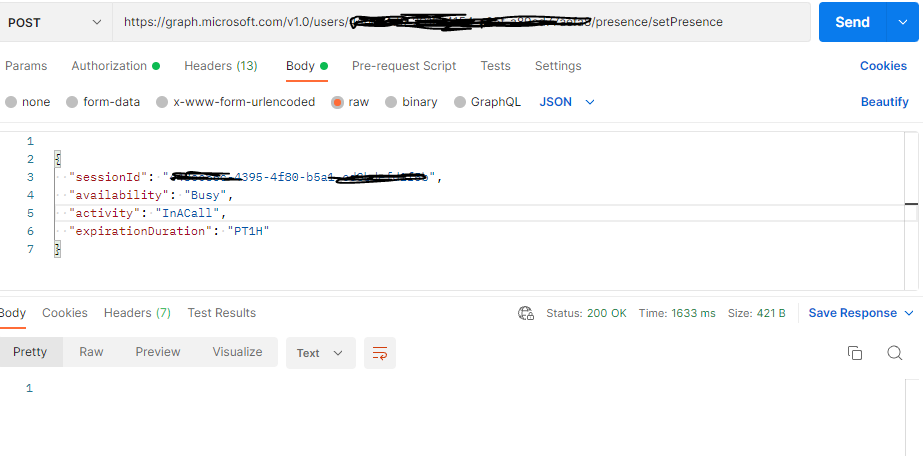
and the status got changed accordingly.

Please follow below doc to check precedence order:
https://learn.microsoft.com/en-us/graph/api/presence-setpresence?view=graph-rest-1.0&tabs=http#presence-sessions
Thanks,
Prasad Das
If the response is helpful, please click "Accept Answer" and upvote it. You can share your feedback via Microsoft Teams Developer Feedback link. Click here to escalate.
Application Id is passed as sessionId?
Yes, Application Id is passed as sessionId
Ok.
I tested it again.
It worked 2 out of 4 times. One thing I observed that the change is reflected after couple of minutes and I was expecting immediately.
Sometimes it gives error as 'The provided availability/activity is invalid' even if the values are correct as per values mentioned in properties table on https://learn.microsoft.com/en-us/graph/api/resources/presence?view=graph-rest-1.0 page
eg. it gives above error for following.
availability = 'BeRightBack';
activity = 'BeRightBack';
Can you point out what is the mistake?
Supported combinations of availability and activity are:
| availability | activity | Description |
|---|---|---|
| Available | Available | Updates the presence session as Available. |
| Busy | InACall | Updates the presence session as Busy, InACall. |
| Busy | InAConferenceCall | Updates the presence session as Busy, InAConferenceCall. |
| Away | Away | Updates the presence session as Away. |
| DoNotDisturb | Presenting | Updates the presence session as DoNotDisturb, Presenting. |
|---|---|---|
Thanks this helps
If the response is helpful, please click "Accept Answer" and upvote it. You can share your feedback via Microsoft Teams Developer Feedback link. Click here to escalate.