Azure Databricks
An Apache Spark-based analytics platform optimized for Azure.
This browser is no longer supported.
Upgrade to Microsoft Edge to take advantage of the latest features, security updates, and technical support.
' cx='32' cy='32' r='32' /%3E%3Ctext x='50%25' y='55%25' dominant-baseline='middle' text-anchor='middle' fill='%23FFF' %3EYL%3C/text%3E%3C/svg%3E)
I logged in Azure Portal and Azure DevOps with the same email account and password. And I tried to link my databricks notebook with Azure DevOps but failed as https://stackoverflow.com/questions/61793826/azure-repos-git-integration-with-azure-databricks
I was suggested to ensure portal and devops are using the same AAD, but I have no idea how?
I can not be more confused that I logged in them with the exact same account why they are using different AAD? Also my attempt of connecting Azure DevOps with Auzre Active Directory has failed because "User: myloggedinemail is not allowed to link organization: myogranizationnameinDevOps to AAD tenant: Default Directory. Only active members of the AAD tenant are allowed to perform the link." That is weird, I used that email to log in all Azure account and it is not a active member of my AAD?
I spent a day on this issue. I do much aprpeciate it if you can give me a hand.
Thanks

BTW, I noticed that there was a big difference between User Principal Name and my email account. Based on your document - "Sign-in pages often prompt users to enter their email address when the required value is actually their UPN.", I asssumed no matter I logged in with UPN or my email account, the portal should be the same. However, they are totally not. No only without all services/products I've created in my email account, I am not allowed to create products such as databricks, resource groups and so on, in the portal logged in by UPN. May you explain more? And could I still log in all my Azure via my email account considering UPN it is too difficult to remember.

Hello @Yuanyue Liu ,
Following up to see if the below suggestion was helpful. And, if you have any further query do let us know.
------------------------------
 or upvote
  button whenever the information provided helps you.
Hello @Yuanyue Liu ,
Welcome to the Microsoft Q&A platform.
Make sure to associate your Azure DevOps organization to Azure Active directory.
Navigate to Organization settings => In General section => Select Azure active directory. which allows you to associate organization.
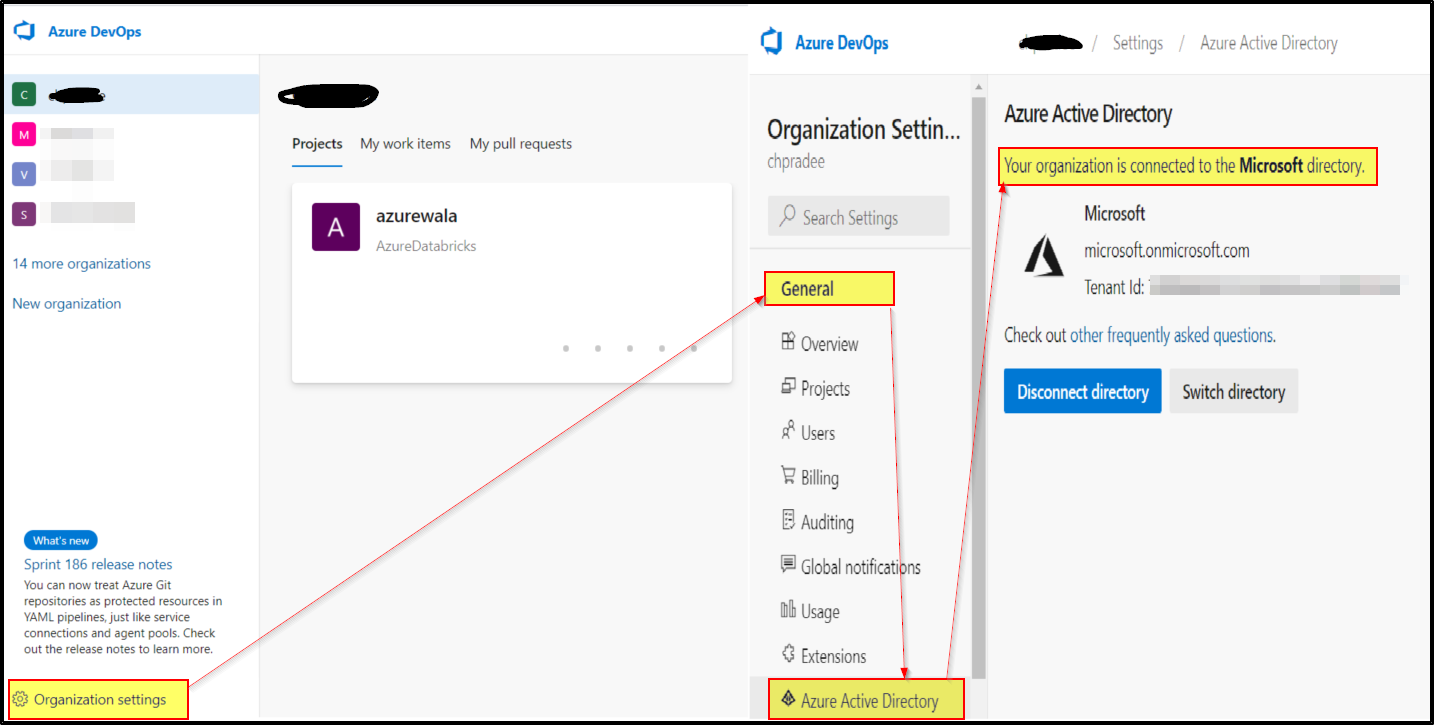
For more info about connecting Azure Repos to your organization's Active Directory, see Connect your Azure DevOps organization to Azure Active Directory.
Hope this helps. Do let us know if you any further queries.
Hello @Yuanyue Liu ,
Following up to see if the above suggestion was helpful. And, if you have any further query do let us know.