Developer technologies | Visual Studio | Debugging
A core feature of Visual Studio that allows developers to inspect, analyze, and troubleshoot code during execution.
This browser is no longer supported.
Upgrade to Microsoft Edge to take advantage of the latest features, security updates, and technical support.
' cx='32' cy='32' r='32' /%3E%3Ctext x='50%25' y='55%25' dominant-baseline='middle' text-anchor='middle' fill='%23FFF' %3EJ%3C/text%3E%3C/svg%3E)
I want to see the code where a variable is changed in the watch window from Visual Studio 2019.
I can see the watch window and variable on it but can't figure out which code makes that variable is changed.
Can I trace it?
' cx='32' cy='32' r='32' /%3E%3Ctext x='50%25' y='55%25' dominant-baseline='middle' text-anchor='middle' fill='%23FFF' %3EAX%3C/text%3E%3C/svg%3E)
Hi @JeffinAtl ,
Welcome to Microsoft Q&A!
For your requirement, please right-click on the variable in watch window and select the “Break When Value Changes”.
If the value of variable is changed, the data breakpoint will stop at the code line after the value is changed.
Sincerely,
Anna
*
If the answer is the right solution, please click "Accept Answer" and kindly upvote it. If you have extra questions about this answer, please click "Comment".
Note: Please follow the steps in our documentation to enable e-mail notifications if you want to receive the related email notification for this thread
If I do so, following error occur.
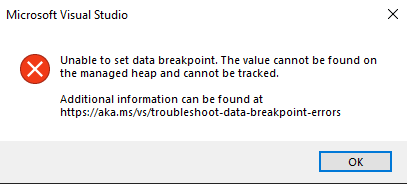

There is some additional guidance when unable to set a data breakpoint here -- https://learn.microsoft.com/en-us/visualstudio/debugger/troubleshoot-data-breakpoint-errors?view=vs-2019
Hi @JeffinAtl , may I know if you have got any chance to check RLWA32-6355’s reply? If you have any updates, please kindly let us know.