Microsoft 365 and Office | SharePoint | For business | Windows
A group of Microsoft Products and technologies used for sharing and managing content, knowledge, and applications.

This browser is no longer supported.
Upgrade to Microsoft Edge to take advantage of the latest features, security updates, and technical support.
' cx='32' cy='32' r='32' /%3E%3Ctext x='50%25' y='55%25' dominant-baseline='middle' text-anchor='middle' fill='%23FFF' %3EJA%3C/text%3E%3C/svg%3E)
Hello everyone,
I have an SP library that allows the users to store files and create folders with the edit permission role.
When the library reaches the 30k number of items, I would like to hide the new & upload button from the ribbon and show a very simple alert for the user “You cannot create or upload any files/folders you have exceeded the limit, please create a new library”.
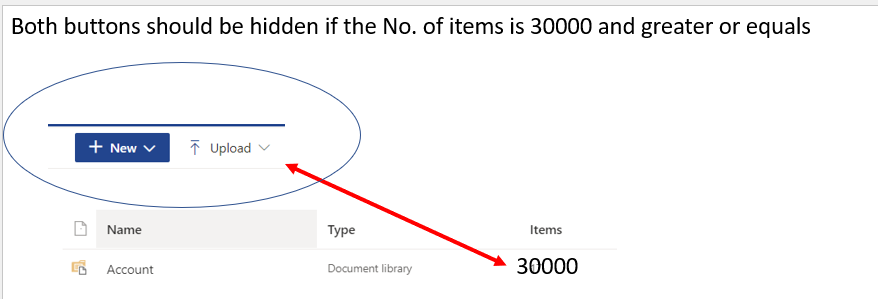 ]1
]1
In that way I obliged the users to create a new library to avoid the limitations of SharePoint.
What will be the solution to achieve the above requirements?
Could you please provide an example?
Any help is highly appreciated.
Thank you.
' cx='32' cy='32' r='32' /%3E%3Ctext x='50%25' y='55%25' dominant-baseline='middle' text-anchor='middle' fill='%23FFF' %3ETZ%3C/text%3E%3C/svg%3E)
Hi @Julien Anid ,
According to my research and testing, there is currently no way to automatically hide New and Upload button if the library exceeded 30k files and show a alert .As a workaround ,when the number of files reaches 30k, you can manually add JSON in the library to hide the New and Upload button. You can refer to the following steps:
1.Go to the library, click Format current view (As shown in the screenshot)

2.Click Advanced mode
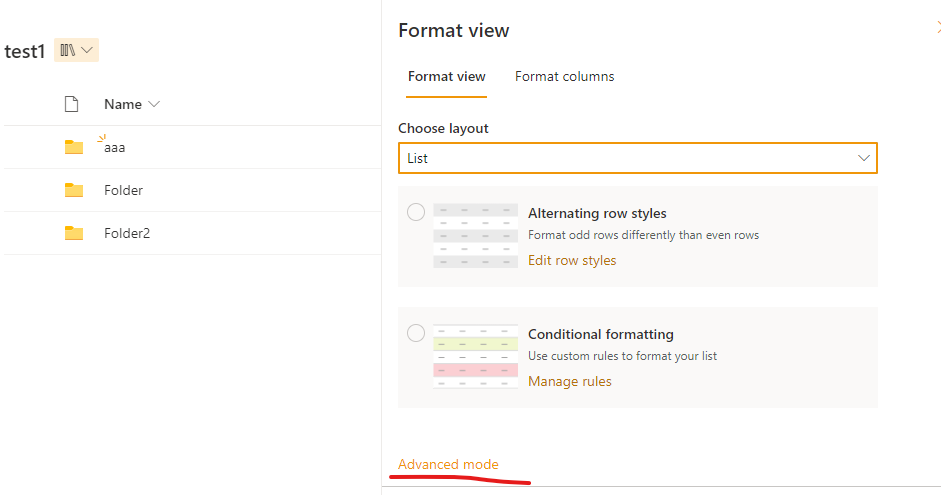
3.Copy the following JSON and paste in Format view:
{
  "commandBarProps" : {
    "commands": [
      {
        "key": "new",
        "hide": true
      },
      {
        "key": "upload",
        "hide": true
      }
    ]
  }
}
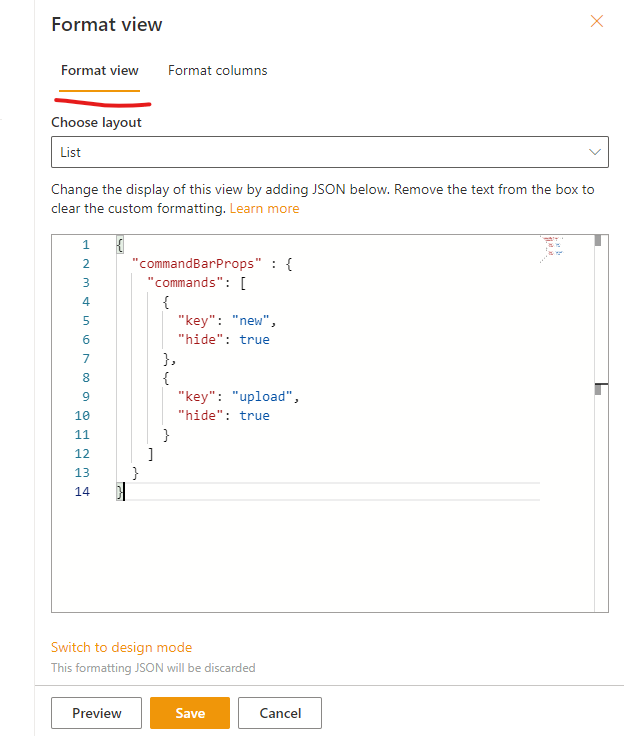
4. Click Save , the New and Upload button will be hidden.

If the answer is helpful, please click "Accept Answer" and kindly upvote it. If you have extra questions about this answer, please click "Comment".
Note: Please follow the steps in our documentation to enable e-mail notifications if you want to receive the related email notification for this thread.
Hello @Tong Zhang_MSFT ,
Thank you so much for providing the above example.
I thought about a way by adding a new column hidden of type number that will increment by 1 each time the user creates either a file or folder by using Power Automate (So i can create a blank row and always update this column for the same record) and in that way I don't add the JSON manually when it reaches 30K since the JSON logic can check this field number and hide the buttons:
How can I query a specific row ID in JSON and check if this record ID has the number Greater or equal to 30K to hide those two buttons?
I was trying to do the below but I am still struggling with the logic:
{
"commandBarProps": {
"commands": [
{
"key": "new",
"hide": "=if([$Money] == 5,true,false)"
},
{
"key": "upload",
"hide": "=if([$Money] == 5,true,false)"
}
]
}
}
Could you please check and update the code that I tried to make it work as mentioned?
Awaiting your response.
Best regards,
Julien
Hi @Julien Anid ,
According to your description, I searched a lot of documents and did a lot of research and testing, but unfortunately, there is currently no way to add if conditions to Hide. This method does not seem to work.
I suggest you make a feedback in the following forum. Many features of our current products are designed and upgraded based on customers’ feedback. With requirements like this increase, the problem may well be released in the future. Thanks for your understanding.
' cx='32' cy='32' r='32' /%3E%3Ctext x='50%25' y='55%25' dominant-baseline='middle' text-anchor='middle' fill='%23FFF' %3EPD%3C/text%3E%3C/svg%3E)
Keep in mind that this only hides the New and Upload buttons in the browser. If documents are uploaded via other ways (e.g. OneDrive for Business client, ...) this will still be possible. If you want to prevent users from adding new content you will have to look at other means (e.g. change permissions).
Hi @Paul de Jong ,
Thank you so much for highlighting this point.
I am always trying to find a way to automate it in case it reaches 30k I stop all the permissions from all the users so they will not be able to upload or add.
But possible to do this complicated task with Power Automate because imagine you have different sub folders layers the flow should iterate through all of the folders/files and break the permission?
Let me know your suggestion.
Best regards,
Julien