Microsoft Security | Intune | Configuration Manager | Deployment
Deploying software and updates using Configuration Manager

This browser is no longer supported.
Upgrade to Microsoft Edge to take advantage of the latest features, security updates, and technical support.
' cx='32' cy='32' r='32' /%3E%3Ctext x='50%25' y='55%25' dominant-baseline='middle' text-anchor='middle' fill='%23FFF' %3ERP%3C/text%3E%3C/svg%3E)
Hi,
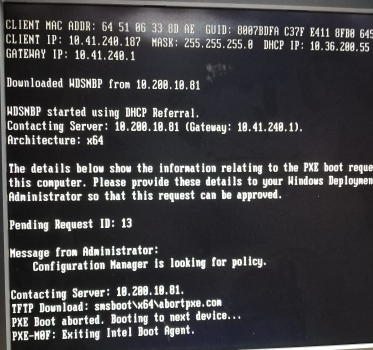
I am facing boot issue in SCCM OSD. My SCCM Server and PXE boot enabled distribution point is in same subnet but the clients are in different subnet. When I try to deploy OSD task sequence to unknown computer it shows below error.

Hi,
Thanks for posting in TechNet.
The client is unable to download network boot program (NBP) and boot files. Based on my experience, you need to configure the IP Helpers correctly. IP Helpers must be configured on the routers if any of the DHCP server, the client computer, or the Configuration Manager server that is running WDS and the PXE-enabled DP are on separate subnets or VLANs.
For more information, please refer to:
Troubleshooting PXE boot issues in Configuration Manager
Troubleshooting PXE boot issues in Configuration Manager
Thanks for your time.
Best regards,
Simon
Hi,
Just checking in to see if there is any update. May we know the current status of the question? If there is any other assistance we can provide, please feel free to let us know, we will do our best to help you.
Thanks and regards,
Simon