Azure SQL Database
An Azure relational database service.
This browser is no longer supported.
Upgrade to Microsoft Edge to take advantage of the latest features, security updates, and technical support.
' cx='32' cy='32' r='32' /%3E%3Ctext x='50%25' y='55%25' dominant-baseline='middle' text-anchor='middle' fill='%23FFF' %3EHM%3C/text%3E%3C/svg%3E)
Help please!
I have a SSIS Solution that uses a "Script Component" to get the columnname causing the error (This is the link to the code in my "Script Component": https://learn.microsoft.com/en-us/sql/integration-services/extending-packages-scripting-data-flow-script-component-examples/enhancing-an-error-output-with-the-script-component?view=sql-server-ver16). The "TargetServerVersion" is "SQL Server 2019".
This solution works when I deploy the solution to my SQL Database (Microsoft SQL Server 2019 (RTM-GDR)) on prem.
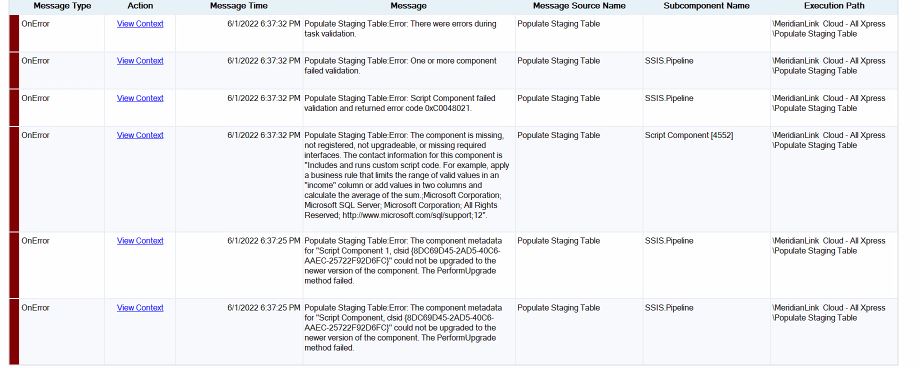
I deployed the same solution to my Azure DB (Microsoft SQL Azure (RTM) - 12.0.2000.8). However, when I attempt to run the solution, it errors out with "The component metadata for "Script....." could not be upgraded to the newer version of the component. The PerformUpgrade method failed."
I have thousands of fields, so the numeric "ErrorColumn" doesn't help. I just want to know what columns are causing this error.
Any advice is greatly appreciated!
thanks!

@Henry Ma Thank you for posting your question on Microsoft Q&A and for using Microsoft services.
My understanding is that you are facing an error when deploying the solution to your SQL Database. I need to check internally if this can be done using Azure SQL. I will get back shortly.
Regards,
Oury
Thanks @Oury Ba-MSFT !
Amazingly, it deploys fine. I only encounter the error when I Execute the package. I get the attached error when I attempt to execute the code provided in this link https://learn.microsoft.com/en-us/sql/integration-services/extending-packages-scripting-data-flow-script-component-examples/enhancing-an-error-output-with-the-script-component?view=sql-server-ver16
@Henry Ma I will suggest if the issue persist to create a support ticket so we can further investigate. Please do let us know if you don't have a support plan.
Regards,
Oury