Microsoft Security | Intune | Configuration Manager | Application
Managing applications through Configuration Manager in Intune

This browser is no longer supported.
Upgrade to Microsoft Edge to take advantage of the latest features, security updates, and technical support.
' cx='32' cy='32' r='32' /%3E%3Ctext x='50%25' y='55%25' dominant-baseline='middle' text-anchor='middle' fill='%23FFF' %3EV%3C/text%3E%3C/svg%3E)
I launched a Script from the Console on top of a Windows 10 Client.
The Client is turned off.
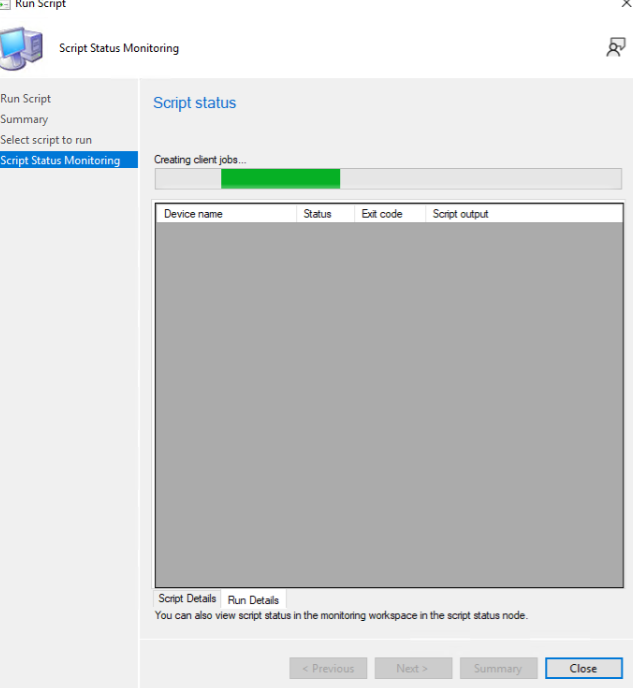
The Console Script always results in "Creating Client Jobs" and never stops.
I tried to Delete the execution from the "Client Operations" node, and although in this node it shows the information that the Job has been deleted, if I go to the Script Status node, instead it still results in "Creating Client Jobs". the loading bar is still moving.
Is this the correct procedure to finish a "Run Script"? If yes, why don't you stop the Job?
Thank you all for your support.

Hi @Vid3al ,
I test it in my environment, when I turn off the client, and deploy the script, the tab of creating client jobs does not finish.
However, when I click the tab of close, the process is finished. Could we know there is the close tab in your environment?
If the answer is the right solution, please click "Accept Answer" and kindly upvote it. If you have extra questions about this answer, please click "Comment".
Note: Please follow the steps in our documentation to enable e-mail notifications if you want to receive the related email notification for this thread.
Hi,
May we know the current status of the question? If there is any other assistance we can provide, please feel free to let us know, we will do our best to help you.
Thanks and regards,
Amanda
Hi,
Could we know if there is close tab in your environment? Just check our status of problem. If there is any update, please let we know.
it seems that after a few days he stopped independently. but it is not clear how what the mode to interrupt is.