Azure Data Factory
An Azure service for ingesting, preparing, and transforming data at scale.
This browser is no longer supported.
Upgrade to Microsoft Edge to take advantage of the latest features, security updates, and technical support.
' cx='32' cy='32' r='32' /%3E%3Ctext x='50%25' y='55%25' dominant-baseline='middle' text-anchor='middle' fill='%23FFF' %3EA%3C/text%3E%3C/svg%3E)
Hi
I have a simple data factory with linked services using credentials from a key vault. So I've successfully created a Key Vault linked service, then for the resources needed, a linked service for storage account and SQL database making use of the key vault linked service to get the credentials from the vault, as described in the documentation elsewhere. Everything is working fine but when I export the factory as an ARM template, the file for the factory parameters ( arm_template_parameters.json ) looks like this (real names are omitted in favour of <...> values):
{
    "$schema": "https://schema.management.azure.com/schemas/2015-01-01/deploymentParameters.json#",
    "contentVersion": "1.0.0.0",
    "parameters": {
        "factoryName": {
            "value": "<right-factory-name>"
        },
        "AzureSqlDatabaseLS_connectionString": {
            "value": ""
        },
        "AzureBlobStorageLS_properties_typeProperties_connectionString_secretName": {
            "value": "<right-factory-connstring>"
        },
        "AzureKeyVaultLS_properties_typeProperties_baseUrl": {
            "value": "https://<right-vault-name>.vault.azure.net/"
        }
    }
}
So, the connection string for the database AzureSqlDatabaseLS_connectionString is empty and I dunno why if everything is working and connecting well.
The linked service configuration for the SQL database is as depicted:
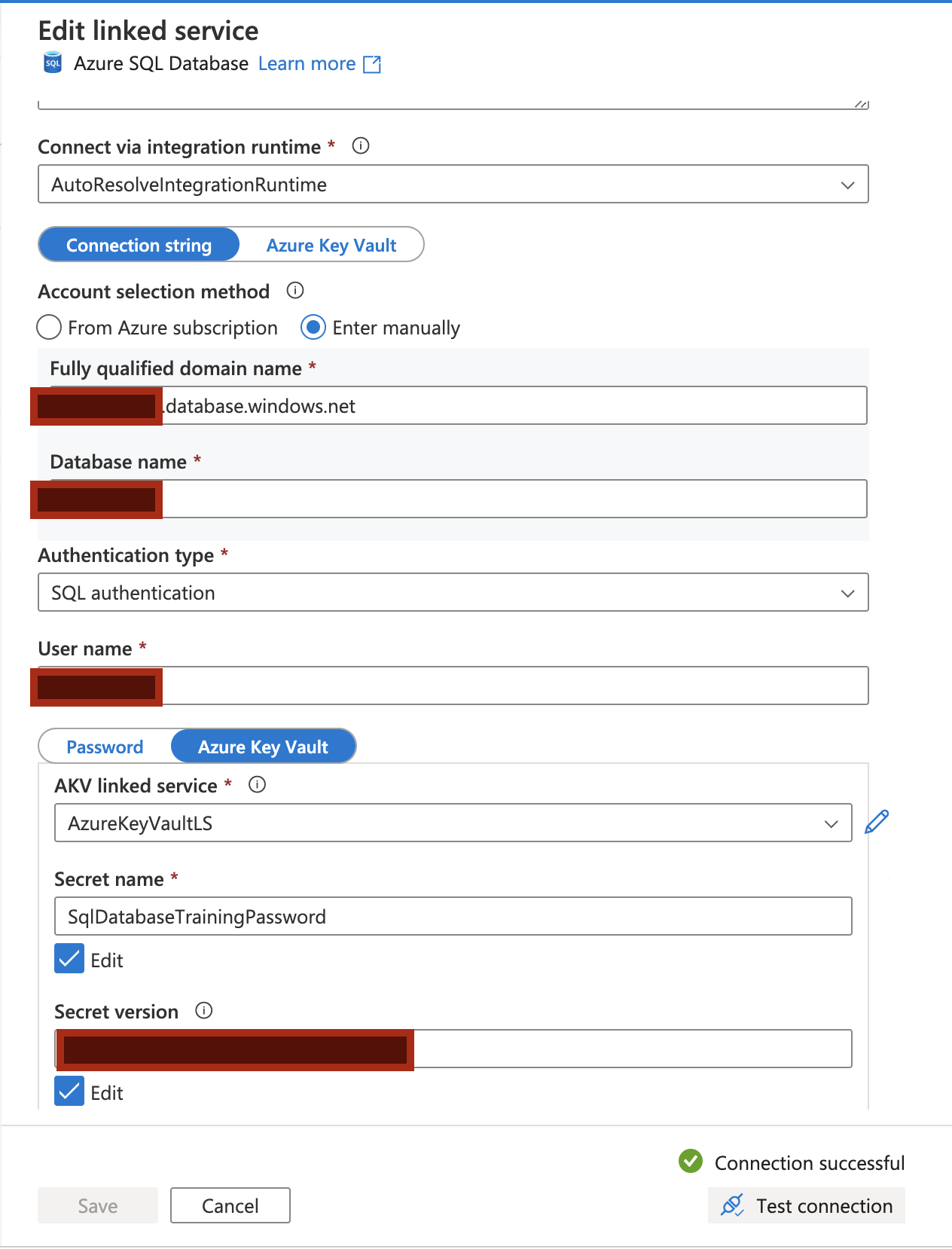
So, am I missing something taking into account the only pipeline in the factory using those services is working ok?
Thanks!!
Well, for the sake of sharing knowledge and if someone has the same issue: that procedures is partially wrong.
The point is setting the azure vault secret with the ADO.NET connection string of the database. You have to replace the placeholder in {your_password} the connection string with the password your chose for the database... manually (I didn't figure out how to do that one automatically, maybe some Microsoft wizard can).
Then, in the SQLDatabase linked service choose Azure Key Vault instead Connection string (just the opposite than in the picture) to successfully connect the database linked service via a secret.
In my case that fixed the issue.
' cx='32' cy='32' r='32' /%3E%3Ctext x='50%25' y='55%25' dominant-baseline='middle' text-anchor='middle' fill='%23FFF' %3EKM%3C/text%3E%3C/svg%3E)
Hello @Anonymous ,
Glad to know that your issue has been resolved and appreciate much for sharing your findings here with the community as it can be helpful for others reading this thread. :)