Microsoft Security | Microsoft Entra | Microsoft Entra ID
A cloud-based identity and access management service for securing user authentication and resource access

This browser is no longer supported.
Upgrade to Microsoft Edge to take advantage of the latest features, security updates, and technical support.
' cx='32' cy='32' r='32' /%3E%3Ctext x='50%25' y='55%25' dominant-baseline='middle' text-anchor='middle' fill='%23FFF' %3ECG%3C/text%3E%3C/svg%3E)
I was working quite happily with Azure and my company account using Authenticator on and Android phone. Then my phone broke and I got a replacement - same number. I have installed Authenticator on the new phone and everything works fine - I get approval notifications on my phone for Teams and other things - I even had to be approved to get in here and ask this question. So all is good - except I can no longer get approval when I try and access Azure "microsoftonline.com" - logging in here it waits for an approval, but it is never received. If I ask to allow a code then the code I enter (as supplied by Authenticator ) is rejected. Eventually I get "request denied".
So why just Azure????
Oh dear - all sorted - turns out my Azure "account" - though registered under the same email address as others (Teams etc) was actually keyed to a different account in Authenticator. After a chat with my local admin wizard I have now got yet another account on Authenticator and all is now working.
Lesson is to ensure you remember ALL your Authenticator accounts in case you phone is replaced :-)

Hello @Corner, Geoff ,
Welcome to the MS Q&A forum. My apologizes for the delayed response.
I am glad you were able to resolve the issue.
Most likely your local admin wizard did the MFA reset:
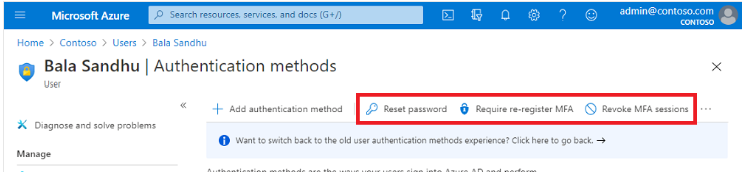
As an alternative, if you have a different methods set up on your account, you could use these to login and re-register MFA on yourself. If where are some strict security settings on tenant, contacting help desk could be the only one option.
Resource: Common problems with two-step verification for a work or school account
Sincerely,
Olga