Developer technologies | .NET | .NET Runtime
.NET: Microsoft Technologies based on the .NET software framework. Runtime: An environment required to run apps that aren't compiled to machine language.
This browser is no longer supported.
Upgrade to Microsoft Edge to take advantage of the latest features, security updates, and technical support.
' cx='32' cy='32' r='32' /%3E%3Ctext x='50%25' y='55%25' dominant-baseline='middle' text-anchor='middle' fill='%23FFF' %3EG9%3C/text%3E%3C/svg%3E)
Hi guys,
I have a really simple Winforms application written in C# with VS Professional 2022 (64-bit) version 17.2.4 and .NET Core 6.0.
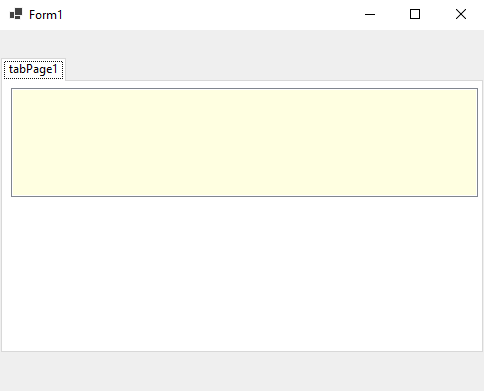
It's a form that contains a tab control that contains a table layout panel that contains a listbox.
Every child control is set to anchor to Top, Bottom, Left, Right.
The expected behaviour is, when I resize the form, every child control resizes accordingly.
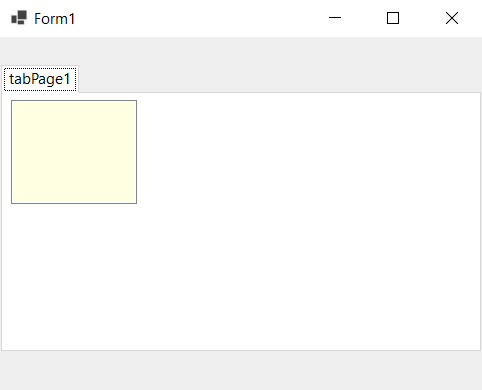
But this is true only if I scale Windows 10 to 100%. If I switch to 125% the children controls go crazy.
This is the form at 100% scaling
And this is the same form at 125% scaling
You can download the testing project from here https://1drv.ms/u/s!Aoz_1Yt8KEEpiRQDuNHrNClhPt7g?e=JrU7Tw
.NET: Microsoft Technologies based on the .NET software framework. Runtime: An environment required to run apps that aren't compiled to machine language.
' cx='32' cy='32' r='32' /%3E%3Ctext x='50%25' y='55%25' dominant-baseline='middle' text-anchor='middle' fill='%23FFF' %3EJL%3C/text%3E%3C/svg%3E)
Hi @Gian-9139 ,
Normally in .net framework all Container Controls can be set to the same AutoScaleMode = Font to solve the scale problem.
But there is no such setting in .net core. It is recommended that you post an issue at the link below.
https://github.com/dotnet/runtime/issues