Display Adapter issue

Leanne 1 Reputation point
2022-06-16T12:36:41.533+00:00

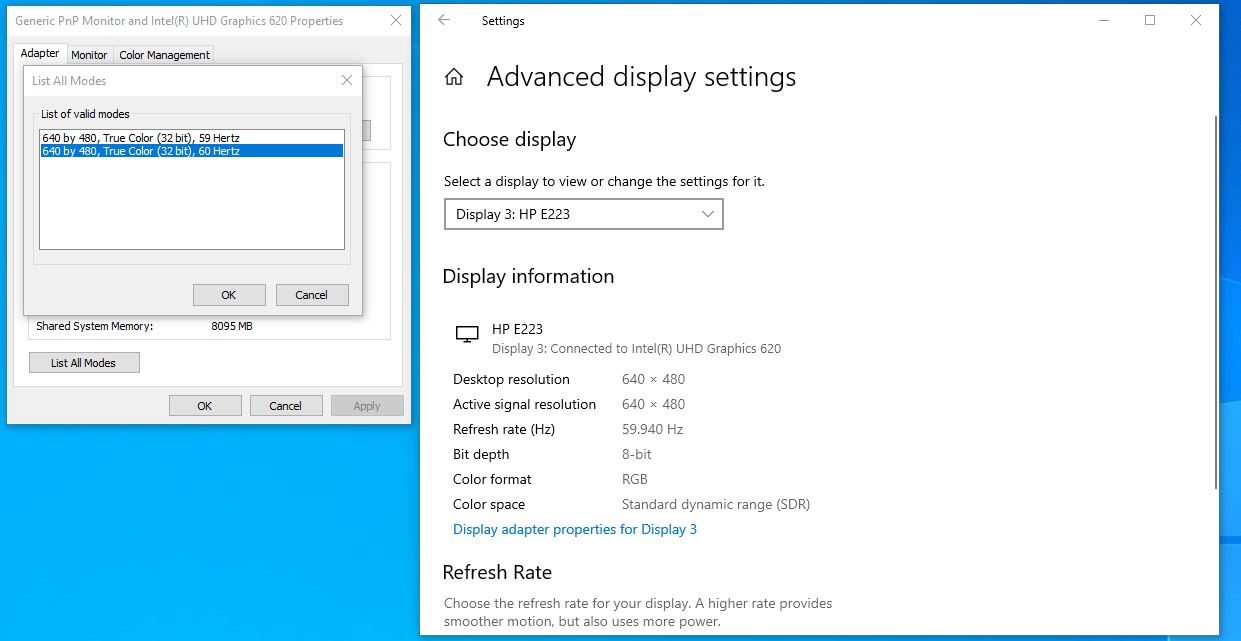
I just added a third monitor and when doing so, one of the other 2 greyed out and I no longer have the ability to change the display setting. Its hard coded at 640x480. I have tried going to advanced and 'list all modes' i only have 640x480 options. thoughts?! Please see attached. Its also connected via Display port.

212122-monitor.png

Windows for business | Windows Client for IT Pros | User experience | Other
{count} votes

1 answer

Sort by: Most helpful
  1. Reza-Ameri 45,666 Reputation points Volunteer Moderator
    2022-06-16T14:46:22.617+00:00

    Try update Windows and update your Graphic Card driver.
    You may try visit your device's manufacturer website and download and install the latest driver.
    You may check the following website:
    https://www.intel.com/content/www/us/en/support.html

    0 comments No comments

Your answer

Answers can be marked as 'Accepted' by the question author and 'Recommended' by moderators, which helps users know the answer solved the author's problem.