Azure Data Factory
An Azure service for ingesting, preparing, and transforming data at scale.
This browser is no longer supported.
Upgrade to Microsoft Edge to take advantage of the latest features, security updates, and technical support.
' cx='32' cy='32' r='32' /%3E%3Ctext x='50%25' y='55%25' dominant-baseline='middle' text-anchor='middle' fill='%23FFF' %3EME%3C/text%3E%3C/svg%3E)
I have set up a copy data pipeline in Azure DataFactory. The table I'm copying from contains 1500 records. The copy data step only read 872 records. I've tried to find records in the input table that seem to have bad data but nothing seems to be excessive long text or the wrong data type. I also looked for duplicate keys but I don't find any fields in the input record layout that indicate they are a key. Does anyone have suggestions as to what I should look for or try to change to resolve the issue?
An Azure service for ingesting, preparing, and transforming data at scale.
' cx='32' cy='32' r='32' /%3E%3Ctext x='50%25' y='55%25' dominant-baseline='middle' text-anchor='middle' fill='%23FFF' %3EMM%3C/text%3E%3C/svg%3E)
Hello @Mark Eckert ,
We haven’t heard from you on the last response and was just checking back to see if you have a resolution yet. In case if you have any resolution, please do share that same with the community as it can be helpful to others . Otherwise, will respond back with the more details and we will try to help .
Thanks
Martin
' cx='32' cy='32' r='32' /%3E%3Ctext x='50%25' y='55%25' dominant-baseline='middle' text-anchor='middle' fill='%23FFF' %3E8%3C/text%3E%3C/svg%3E)
I'm having the same issue.
My source is a parquet file and my sink is a stored procedure with user defined table type.
I have fault tolerance and logging enabled, when I run the pipeline in debug the copy data activity reports:
"rowsRead": 53303,
"rowsCopied": 53303,
"rowsSkipped": 0
I have a simple truncate and insert (from the UDTT) in the procedure to debug the issue but I'm only seeing 4953 rows returned from the UDTT, it looks like they are the last 4953 in the file.
I have tried altering the data types in the UDTT but no difference, if I set up an alternat copy data activity to insert the data as a new table I get the complete file.
We are using SQL procedures as a sink as the processing of the file (bulk\Net etc) is based on other parameters.
Any help would be appreciated.
No I didn't enable skip incompatible rows. The problem seems completely random. Each time I run the Copy Data step I can't be sure what the result will be. Sometimes it copies all of the records and if I run it again a minute later it doesn't copy all of the records. There isn't any error message. Does anyone have a suggestion?
Hello @Mark Eckert and welcome to Microsoft Q&A.
So it sounds like you are missing expected rows. In the Copy Activity settings, did you be chance enable "Skip Incompatible rows" ? See below screenshot.
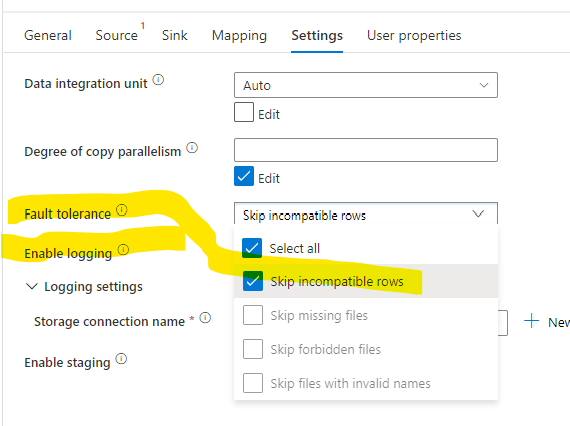
The Logging options allow the incompatible rows to be written to a file of your choice.