Developer technologies | Windows Forms
A set of .NET Framework managed libraries for developing graphical user interfaces.
This browser is no longer supported.
Upgrade to Microsoft Edge to take advantage of the latest features, security updates, and technical support.
' cx='32' cy='32' r='32' /%3E%3Ctext x='50%25' y='55%25' dominant-baseline='middle' text-anchor='middle' fill='%23FFF' %3EF%3C/text%3E%3C/svg%3E)
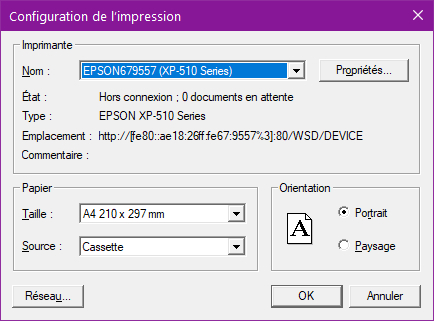
Working to a WPF Application (.NET fw 4.5), I can't find a way to display a print setup dialog as in the following image (I think it's based on Windows Forms but a WPF solution it would be better):
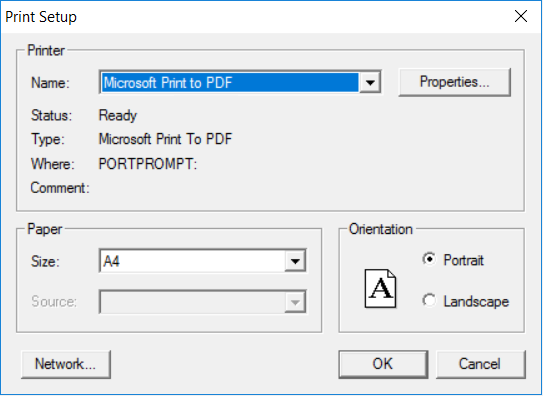
Using the code:
PrintDialog myPrintDialog = new PrintDialog();
myPrintDialog.ShowDialog();
I obtain a dialog with Print Range and Copies Settings (which I don't need) but not Paper and Orientation (which I want to get).
I read the question wpfcsharp-print-dialog-settings but I can't figure out how to use the accepted answer.

In the standard dialog, if you press Properties, you can select the paper size and orientation. Maybe such behaviour is acceptable.

You can get it, but it is the old Dialog Box, replaced by PageSetupDialog as MSDN says at : print-dialog-box
For the PageSetupDialog, you can do for example :
            System.Windows.Forms.PageSetupDialog PageSetupDialog1 = new System.Windows.Forms.PageSetupDialog();
            PageSetupDialog1.PageSettings = new System.Drawing.Printing.PageSettings();
            PageSetupDialog1.PrinterSettings = new System.Drawing.Printing.PrinterSettings();
            PageSetupDialog1.AllowOrientation = true;
            PageSetupDialog1.AllowPaper = true;
            PageSetupDialog1.AllowPrinter = true;
            DialogResult result = PageSetupDialog1.ShowDialog();
Thank for the hint but PageSetupDialog is not what I was searching for because doesn't allow the user to select the printer at runtime. Probably the best way is to create my own print setup dialog.
As the doc says, if I do a quick test with PrintDlg and PD_PRINTSETUP flag, I get this old dialog Box.
Test on french OS (Windows 10 21H1) :