Developer technologies | Windows Presentation Foundation
A part of the .NET Framework that provides a unified programming model for building line-of-business desktop applications on Windows.
This browser is no longer supported.
Upgrade to Microsoft Edge to take advantage of the latest features, security updates, and technical support.
' cx='32' cy='32' r='32' /%3E%3Ctext x='50%25' y='55%25' dominant-baseline='middle' text-anchor='middle' fill='%23FFF' %3EEG%3C/text%3E%3C/svg%3E)
I have a command.cs, that check if all my input fields are not empty and base on that it is suppose to enable he button.
This is the command
public class SendDataCommand : ICommand {

    public PrpertiesWindowViewModel _ViewModel { get; set; }

    public SendDataCommand(PrpertiesWindowViewModel viewModel) {
        _ViewModel = viewModel;
    }

    public event EventHandler? CanExecuteChanged {
        add { CommandManager.RequerySuggested += value; }
        remove { CommandManager.RequerySuggested -= value; }
    }

    public bool CanExecute(object? parameter) {
        return _ViewModel.EnableButton;
    }

    public void Execute(object? parameter) {
        _ViewModel.SendToServer();
    }
}
This is my VM
[AddINotifyPropertyChangedInterface]
public class PrpertiesWindowViewModel {
    public Building? Building { get; set; }

    public SendCommand? SendCommand { get; set; }

    public PrpertiesWindowViewModel() {

        SendCommand = new SendCommand(this);

    }

    public void SendData(Building building) {


    }
}
UI
<Window.DataContext>
        <vm:PrpertiesWindowViewModel />
    </Window.DataContext>

    <StackPanel>
        <TextBox
            materialDesign:HintAssist.Hint="Name of the building"
            materialDesign:HintAssist.IsFloating="True"
            Text="{Binding Building.Name, UpdateSourceTrigger=PropertyChanged}" />
        <TextBox
            x:Name="DescTx"
            materialDesign:HintAssist.Hint="Description"
            materialDesign:HintAssist.IsFloating="True"
            Text="{Binding Building.Desc, UpdateSourceTrigger=PropertyChanged}" />
        <TextBox
            x:Name="RoomsTx"
            materialDesign:HintAssist.Hint="Rooms"
            materialDesign:HintAssist.IsFloating="True"
            Text="{Binding Building.Rooms, UpdateSourceTrigger=PropertyChanged}" />
        <TextBox
            x:Name="AddressTx"
            materialDesign:HintAssist.Hint="Address"
            materialDesign:HintAssist.IsFloating="True"
            Text="{Binding Building.Address, UpdateSourceTrigger=PropertyChanged}" />
        <Button Command="{Binding SendCommand}"/>
I am using MVVM, so I do not have/want code in my xaml.cs(CodeBehind)
' cx='32' cy='32' r='32' /%3E%3Ctext x='50%25' y='55%25' dominant-baseline='middle' text-anchor='middle' fill='%23FFF' %3EHL%3C/text%3E%3C/svg%3E)
Hi,@Eduardo Gomez . Welcome Microsoft Q&A.
For the problem of disabling the button when the text box in the window is null or empty, you could try the following method.
Xaml:
   <Border Padding="20" Width="300">
            <StackPanel>
                <TextBox
                     materialDesign:HintAssist.Hint="Name of the building"
                     materialDesign:HintAssist.IsFloating="True"
                     Text="{Binding Name, Mode=TwoWay, UpdateSourceTrigger=PropertyChanged}" />
                <TextBox
                     materialDesign:HintAssist.Hint="Address"
                     materialDesign:HintAssist.IsFloating="True"
                     Text="{Binding Address,Mode=TwoWay, UpdateSourceTrigger=PropertyChanged}" />
                <Button Content="Save"  IsEnabled="{Binding IsEnabled}"   Command="{Binding ButtonCommand}"  />
            </StackPanel>
        </Border>
CodeBehind:
214713-9.txt
The result:
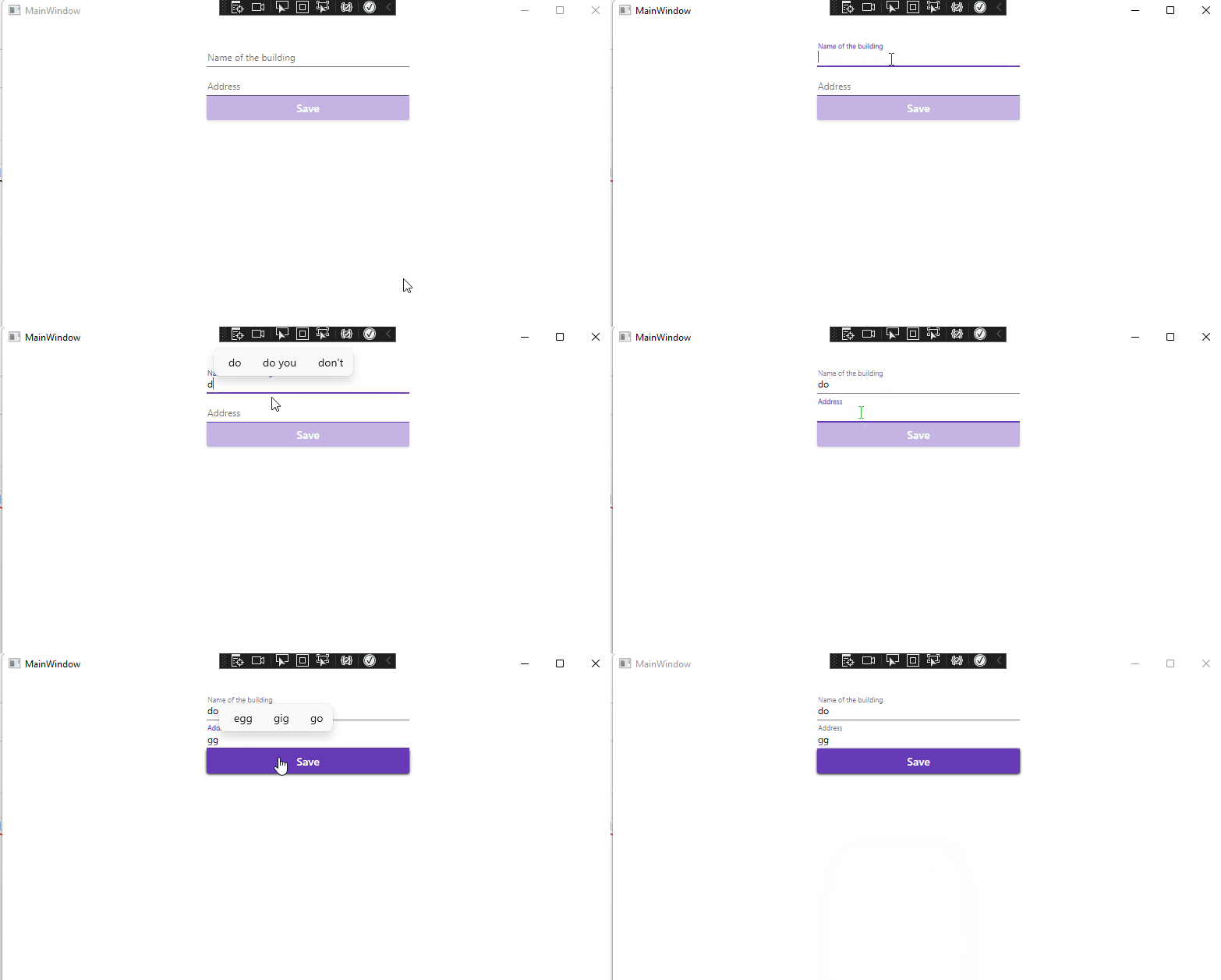
If the response is helpful, please click "Accept Answer" and upvote it.
Note: Please follow the steps in our [documentation][5] to enable e-mail notifications if you want to receive the related email notification for this thread.
[5]: https://learn.microsoft.com/en-us/answers/articles/67444/email-notifications.html
There is someway that I can put this
private string name;
        public string Name
        {
          get { return name; }
          set
          {
            name = value;
            OnPropertyChanged("Name");
            OnPropertyChanged("IsEnabled");
          }
        }
        private string address;
        public string Address
        {
          get { return address; }
          set
          {
            address = value;
            OnPropertyChanged("Address");
            OnPropertyChanged("IsEnabled");
          }
        }
in a sepparate file
I Updated my code