Microsoft Security | Intune | Configuration Manager | Other
Other Configuration Manager-related features and issues

This browser is no longer supported.
Upgrade to Microsoft Edge to take advantage of the latest features, security updates, and technical support.
' cx='32' cy='32' r='32' /%3E%3Ctext x='50%25' y='55%25' dominant-baseline='middle' text-anchor='middle' fill='%23FFF' %3EDD%3C/text%3E%3C/svg%3E)
Hello,
How could I get the following information in Configuration Manager?
![214936-2022-06-24-19-50-41-wuserver-registry.png][1]
I saw the WUServer and WUStatusServer but not the TargetGroup... is it available through query, report, inventory etc...
configuration.mof
//==================================================================
//
// Configuration.mof - WMI configuration that will be compiled on
// SMS clients.
//
// Copyright (c) Microsoft Corporation, All Rights Reserved
//
//==================================================================
//==================================================================
// Define registry classes for inventory reporting
//
// - Registry key/value class definition should be done in cimv2,
// - SMS class definition should be done in cimv2\sms
//==================================================================
//----------------------
// Add Remove Programs
//----------------------
#pragma namespace ("\\.\root\cimv2")
[ dynamic,
provider("RegProv"),
ClassContext("local|HKEY_LOCAL_MACHINE\Software\Microsoft\Windows\CurrentVersion\Uninstall")
]
class Win32Reg_AddRemovePrograms
{
[key]
string ProdID;
[PropertyContext("DisplayName")]
string DisplayName;
[PropertyContext("InstallDate")]
string InstallDate;
[PropertyContext("Publisher") ]
string Publisher;
[PropertyContext("DisplayVersion")]
string Version;
};
……………………………………………………………………………………………………….
//----------------------
// Windows Update
//----------------------
#pragma namespace ("\\.\root\cimv2")
#pragma deleteclass("Win32Reg_SMSWindowsUpdate", NOFAIL)
[DYNPROPS]
class Win32Reg_SMSWindowsUpdate
{
[key]string InstanceKey;
uint32 UseWUServer;
uint32 NoAutoUpdate;
uint32 AUOptions;
};
[DYNPROPS]
instance of Win32Reg_SMSWindowsUpdate
{
InstanceKey = "Windows Update";
[PropertyContext("local|HKEY_LOCAL_MACHINE\Software\Policies\Microsoft\Windows\WindowsUpdate\AU|UseWUServer"), Dynamic, Provider("RegPropProv")]
UseWUServer;
[PropertyContext("local|HKEY_LOCAL_MACHINE\Software\Policies\Microsoft\Windows\WindowsUpdate\AU|NoAutoUpdate"), Dynamic, Provider("RegPropProv")]
NoAutoUpdate;
[PropertyContext("local|HKEY_LOCAL_MACHINE\Software\Policies\Microsoft\Windows\WindowsUpdate\AU|AUOptions"), Dynamic, Provider("RegPropProv")]
AUOptions;
};
#pragma namespace ("\\.\root\cimv2")
……
#pragma namespace ("\\.\root\cimv2")
//========================
// Added extensions start
//========================
#pragma namespace ("\\.\root\cimv2")
#pragma namespace ("\\.\root\cimv2")
#pragma deleteclass("WSUSLocation", NOFAIL)
[DYNPROPS]
Class WSUSLocation
{
[key] string KeyName;
String WUServer;
String WUStatusServer;
};
[DYNPROPS]
Instance of WSUSLocation
{
KeyName="RegKeyToMOF_32";
[PropertyContext("Local|HKEY_LOCAL_MACHINE\SOFTWARE\Policies\Microsoft\Windows\WindowsUpdate|WUServer"),Dynamic,Provider("RegPropProv")] WUServer;
[PropertyContext("Local|HKEY_LOCAL_MACHINE\SOFTWARE\Policies\Microsoft\Windows\WindowsUpdate|WUStatusServer"),Dynamic,Provider("RegPropProv")] WUStatusServer;
};
#pragma namespace ("\\.\root\cimv2")
#pragma deleteclass("WSUSLocation_64", NOFAIL)
[DYNPROPS]
Class WSUSLocation_64
{
[key] string KeyName;
String WUServer;
String WUStatusServer;
};
[DYNPROPS]
Instance of WSUSLocation_64
{
KeyName="RegKeyToMOF_64";
[PropertyContext("Local|HKEY_LOCAL_MACHINE\SOFTWARE\Policies\Microsoft\Windows\WindowsUpdate|WUServer"),Dynamic,Provider("RegPropProv")] WUServer;
[PropertyContext("Local|HKEY_LOCAL_MACHINE\SOFTWARE\Policies\Microsoft\Windows\WindowsUpdate|WUStatusServer"),Dynamic,Provider("RegPropProv")] WUStatusServer;
};
//=======================================================
// Added extensions end
//========================
---------------------------------------------------------------------------------------------------------------------------------
Is standard and already collected?
is it a customization?
Thanks,
Dom
[1]: /api/attachments/214936-2022-06-24-19-50-41-wuserver-registry.png?platform=QnA
Other Configuration Manager-related features and issues
Answer accepted by question author

Thank you for posting in Microsoft Q&A forum.
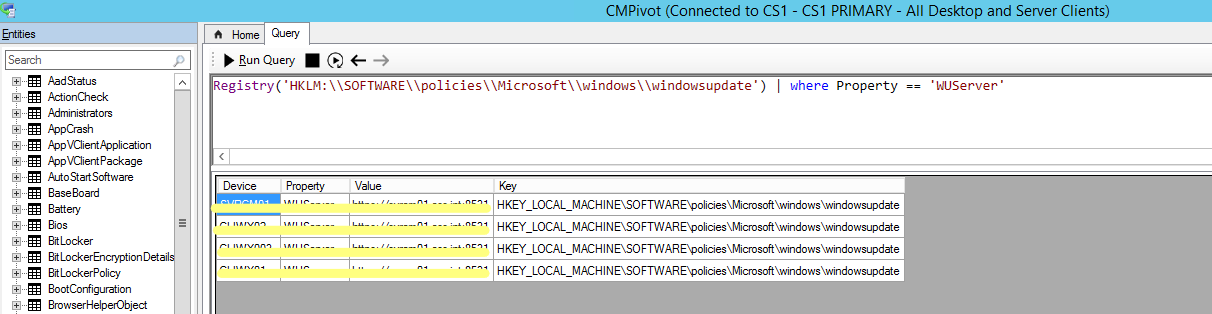
We can use CMPivot to query registry:
Registry('HKLM:\\SOFTWARE\\policies\\Microsoft\\windows\\windowsupdate') | where Property == 'TargetGroup'
Here is an example that I query the value of WUServer:
If the answer is the right solution, please click "Accept Answer" and kindly upvote it. If you have extra questions about this answer, please click "Comment".
Note: Please follow the steps in our documentation to enable e-mail notifications if you want to receive the related email notification for this thread.
May we know the current status of the problem? Is there any other assistance we can provide?
The CMPivot works fine
Thanks,
Dom