Developer technologies | Windows Presentation Foundation
A part of the .NET Framework that provides a unified programming model for building line-of-business desktop applications on Windows.
This browser is no longer supported.
Upgrade to Microsoft Edge to take advantage of the latest features, security updates, and technical support.
' cx='32' cy='32' r='32' /%3E%3Ctext x='50%25' y='55%25' dominant-baseline='middle' text-anchor='middle' fill='%23FFF' %3EEG%3C/text%3E%3C/svg%3E)
Hello
Ihave a class file, that contains the FullPath, and the fileName
I have an image that is bindidng to the fullpath and is working, but when I select another picture, the picture doent change
Picture
    <Image
        Grid.Column="1"
        Margin="10"
        VerticalAlignment="top"
        Source="{Binding File.FullPath}"/>
My class
 [AddINotifyPropertyChangedInterface]
    public class Building {
        public string? Name { get; set; }

        public string? Desc { get; set; }

        public string? Address { get; set; }

        public string? SqF { get; set; }

        public string? Bathrooms { get; set; }

        public string? Bedrooms { get; set; }

        public ObservableCollection<File>? FileNames { get; set; }


        public Building() {
            FileNames = new ObservableCollection<File>();
        }
    }

    [AddINotifyPropertyChangedInterface]
    public class File {

        public string? FullPath { get; set; }

        public string? FileName { get; set; }
    }
}
VM
   [AddINotifyPropertyChangedInterface]
    public class PrpertiesWindowViewModel : MainWindowViewModel {

        public Command? SendCommand { get; set; }

        public Command? ValidateTextCommand { get; set; }

        public Command? ValidateNumberCommand { get; set; }

        public Command? SearchPictureCommand { get; set; }

        public Building? Building { get; set; }

        public File? File { get; set; }

        public string? SeletedItem { get; set; }

        public PrpertiesWindowViewModel() {

            Building = new Building();

            SendCommand = new Command(SendToServer);

            ValidateTextCommand = new Command(ValidateTextAction);

            ValidateNumberCommand = new Command(ValidateNumberAction);

            SearchPictureCommand = new Command(SearchPictureAction);
        }

        private void SearchPictureAction() {
            var dialog = new OpenFileDialog {
                Filter = "Image files (*.png;*.jpeg)|*.png;*.jpeg;",
                CheckPathExists = true,
                Multiselect = true,
                InitialDirectory = GetFolderPath(SpecialFolder.MyPictures)
            };

            if (dialog.ShowDialog() == true) {

                if (Building?.FileNames != null) {

                    foreach (var item in dialog.FileNames) {

                        File = new File { FileName = Path.GetFileName(item), FullPath = item };

                        if (!Building.FileNames.Any(f => f.FileName == File.FileName && f.FullPath == File.FullPath)) {

                            Building.FileNames.Add(File);
                        }
                    }
                }
            }
        }

        private void ValidateNumberAction(object obj) {
            if (obj is TextCompositionEventArgs e) {
                var regex = new Regex("[^0-9]+");
                e.Handled = regex.IsMatch(e.Text);
            }
        }

        private void ValidateTextAction(object obj) {
            if (obj is TextCompositionEventArgs e) {
                var regex = new Regex("[^a-zA-Z]");
                e.Handled = regex.IsMatch(e.Text);
            }
        }

        public void SendToServer() {

            MessageBox.Show("hello");
        }
    }
}
I am using Fody.property change that will automatically trannformyour Auto prperty into fullprperty, as require for the MVVM Pattern
A part of the .NET Framework that provides a unified programming model for building line-of-business desktop applications on Windows.
A language based on Extensible Markup Language (XML) that enables developers to specify a hierarchy of objects with a set of properties and logic.
Answer accepted by question author
' cx='32' cy='32' r='32' /%3E%3Ctext x='50%25' y='55%25' dominant-baseline='middle' text-anchor='middle' fill='%23FFF' %3EHL%3C/text%3E%3C/svg%3E)
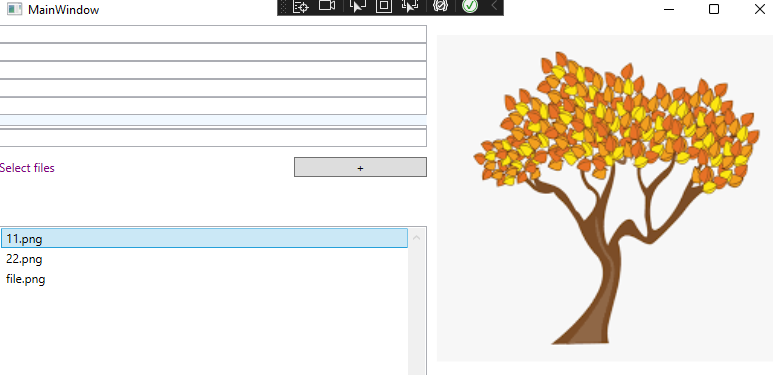
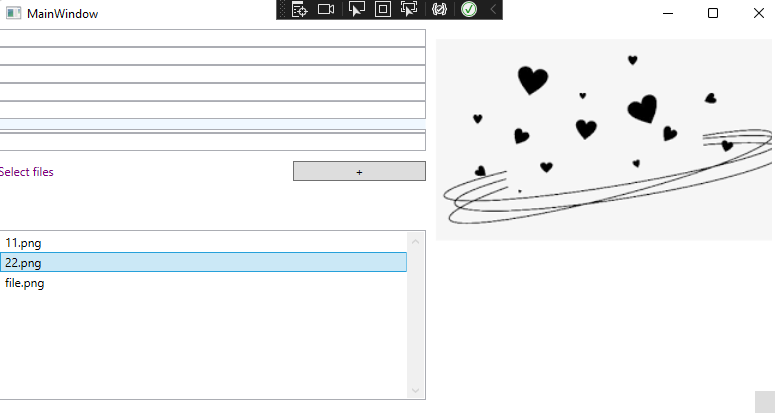
When you add the image to the collection FileNames and bind the ListView's SelectedItem to File. Image will show a picture of the ListView being selected when you click on the option in the ListView.
Xaml:
    <ListView Height="170"
                         Grid.Row="7" Margin="0,10,0,0"
                         d:ItemsSource="{d:SampleData ItemCount=5}"
                         ItemsSource="{Binding Building.FileNames}" ScrollViewer.CanContentScroll="True"
                         ScrollViewer.VerticalScrollBarVisibility="Visible"
                         SelectedItem="{Binding File}">
                        <ListView.ItemTemplate>
                            <DataTemplate>
                                <TextBlock Text="{Binding FileName}" />
                            </DataTemplate>
                        </ListView.ItemTemplate>
                    </ListView>


<Image  Grid.Column="1"   Width="360"   Height="360"      Margin="10"
                 VerticalAlignment="Top"    Source="{Binding File.FullPath}" />
Codebehind:
public File? File { get; set; }
The result:
If the response is helpful, please click "Accept Answer" and upvote it.
Note: Please follow the steps in our [documentation][5] to enable e-mail notifications if you want to receive the related email notification for this thread.
[5]: https://learn.microsoft.com/en-us/answers/articles/67444/email-notifications.html