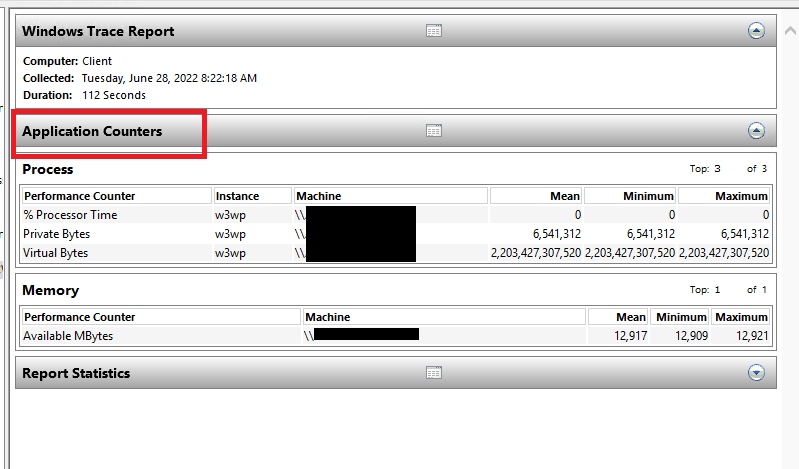
Performance Monitor "Application Counters" report missing in report.html

Manaol, Jayson philbert ted 1 Reputation point
2022-06-29T07:27:48.227+00:00

Can anyone help me on this issue I encountered on a Windows Server 2019 regarding reporting on Perfmon using performance counters?

I've tried to monitor the utilization of our IIS servers using counters in a Windows 2019 server but when I check the generated report, there's no application counters in the generated report.

215986-image.png

I've tried to replicate this to another server and there's an application counters on it, unlike on this specific windows 2019 server. Here's the screenshot of another server where in I tried to replicate to generate a report. It shows an application counters unlike on the other server.
215967-image.png

I've already tried to rebuild the counters by using this command lodctr /R and restarting the Performance Logs and Alerts and WMI services but still no avail.

Any workaround/solution on this one?

Windows for business | Windows Server | User experience | Other
0 comments No comments
{count} votes

1 answer

Sort by: Most helpful
  1. Limitless Technology 40,081 Reputation points
    2022-06-29T15:23:45.577+00:00

    Hi there,

    Try adding the counter as per this article and see if it is reflected in the report.

    Set up Performance Counters in Windows Performance Monitor https:// learn.microsoft.com/en-us/dynamics365/business-central/dev-itpro/administration/set-up-performance-counters-performance-monitor

    Investigate the current registry settings for PerfPoc
    Reg query HKEY_LOCAL_MACHINE\SYSTEM\CurrentControlSet\Services\PerfProc\Performance /ssend the output to the developer

    Set "Disable Performance Counters" to 0. Any value other than 0 causes the performance counter to be disabled
    Reg add HKEY_LOCAL_MACHINE\SYSTEM\CurrentControlSet\Services\PerfProc\Performance /v "Disable Performance Counters" /t REG_DWORD /d 0

    -----------------------------------------------------------------------------------------------------------------------------

    --If the reply is helpful, please Upvote and Accept it as an answer--


Your answer

Answers can be marked as 'Accepted' by the question author and 'Recommended' by moderators, which helps users know the answer solved the author's problem.