Developer technologies | C#
An object-oriented and type-safe programming language that has its roots in the C family of languages and includes support for component-oriented programming.
This browser is no longer supported.
Upgrade to Microsoft Edge to take advantage of the latest features, security updates, and technical support.
' cx='32' cy='32' r='32' /%3E%3Ctext x='50%25' y='55%25' dominant-baseline='middle' text-anchor='middle' fill='%23FFF' %3EAT%3C/text%3E%3C/svg%3E)
Hello,
In a VS2019 WindowsFormsApp, using C#, I got 10 TextBox inputs (named input_1, input_2 ... input_10).
I am trying to get create a loop and get the values of each control.
How can I dynamicaly generate the control name, to get the values in a loop (something like: string value = input_[i].Text)?
I tried the following:
var input_ = new Control[10];
for (int i = 0; i < input_.Length; i++)
{
    MessageBox.Show(input_[i].Text); // <-- System.NullReferenceException: 'Object reference not set to an instance of an object.'
}
Thanks.
EDIT: I am looking to find out if there is a way to do it without setting up a list first like:
var textBoxs = new List<TextBox> { input_1, input_2, .............. input_x};

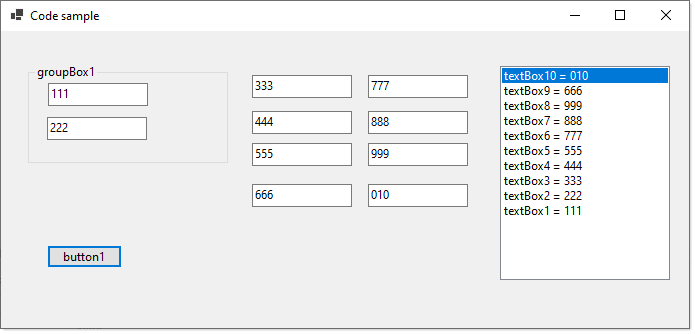
I put together a sample that may seem like overkill but once you think about it you should see it has value passed this question. For instance, as in the screenshot, the extension method TextBoxList find all TextBox controls even in other controls such as panels and group boxes and they can be nested. Otherwise see this post.
listBox1.DataSource = this.TextBoxList()
    .Select(x => new TextBoxItem(x.Name, x.Text)).ToList();
Edit to sort TextBoxes by name accounting for say TextBox1, TextBox10 etc which will not sort properly without help
List<TextBoxItem> textBoxes = this.TextBoxList()
    .Select(x => new TextBoxItem(x.Name, x.Text))
    .OrderBy(x => Regex.Match(x.Name, @"\d+").Value,
        new SemiNumericComparer())
    .ToList();
listBox1.DataSource = textBoxes;
Simplistic version
private List<TextBox> _textBoxes;
private void GetAllButtons_Click(object sender, EventArgs e)
{
    _textBoxes = this.TextBoxList();
}

@Alexandru Teodor , Welcome to Microsoft q&a, you could try the following code to get get a control name/value in loop.
Code example:
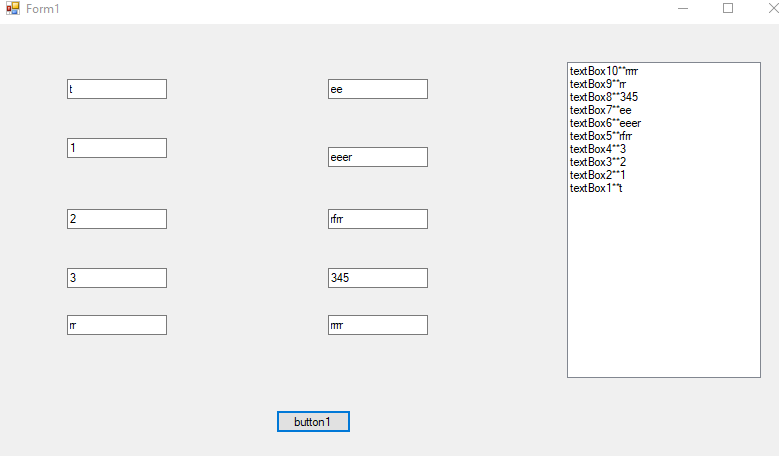
 private void button1_Click(object sender, EventArgs e)
        {
            List<TextBox> list=this.Controls.Cast<Control>().Where(i=>i.GetType() == typeof(TextBox)).Cast<TextBox>().ToList();
            foreach (TextBox tb in list)
            {
                listBox1.Items.Add(tb.Name+"**"+tb.Text);
            }

        }
Tested result:
Hope this could help you.
Best Regards,
Jack
If the answer is the right solution, please click "Accept Answer" and upvote it.If you have extra questions about this answer, please click "Comment".
Note: Please follow the steps in our documentation to enable e-mail notifications if you want to receive the related email notification for this thread.
' cx='32' cy='32' r='32' /%3E%3Ctext x='50%25' y='55%25' dominant-baseline='middle' text-anchor='middle' fill='%23FFF' %3EBS%3C/text%3E%3C/svg%3E)
Your code only allocated the control array, with each entry null. You need to create the controls and set each array entry to a value.
Thank you all for your answers. Both answers helped me understand more then I asked which is great.
If I could I would accept more then one answer :)