Exchange Online
A cloud-based service included in Microsoft 365, delivering scalable messaging and collaboration features with simplified management and automatic updates.
This browser is no longer supported.
Upgrade to Microsoft Edge to take advantage of the latest features, security updates, and technical support.
' cx='32' cy='32' r='32' /%3E%3Ctext x='50%25' y='55%25' dominant-baseline='middle' text-anchor='middle' fill='%23FFF' %3EI%3C/text%3E%3C/svg%3E)
Hello
We have a shared inbox for users. We normally get emails notifications about it in the inbox.
It seems we only have 5 GB space whereas it should be 50 GB.
Does anyone know how we can increase this limitation, I do not find resources online on how to fix it.
A cloud-based service included in Microsoft 365, delivering scalable messaging and collaboration features with simplified management and automatic updates.
The administration and maintenance of Microsoft Exchange Server to ensure secure, reliable, and efficient email and collaboration services across an organization.

How do you know the mailbox has only a 5GB quota?
' cx='32' cy='32' r='32' /%3E%3Ctext x='50%25' y='55%25' dominant-baseline='middle' text-anchor='middle' fill='%23FFF' %3EJS%3C/text%3E%3C/svg%3E)
Hi @IBN
I am writing to see how everything is going on with this thread. If you still have further concern on this, please feel free to let us know.
If an Answer is helpful, please click "Accept Answer" and upvote it.
Note: Please follow the steps in our documentation to enable e-mail notifications if you want to receive the related email notification for this thread.
Hi @IBN
Is your issue get resolved now? Feel free to share your update here.
If an Answer is helpful, please click "Accept Answer" and upvote it.
Note: Please follow the steps in our documentation to enable e-mail notifications if you want to receive the related email notification for this thread.
Hi @IBN
Are you using Exchange online? The Mailbox storage limits are introduced here
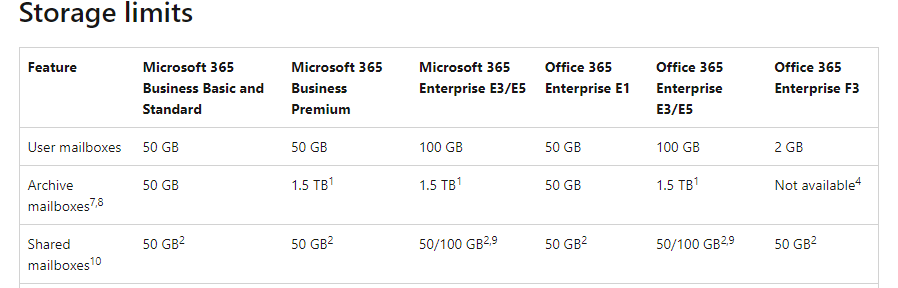
To access a shared mailbox, a user must have an Exchange Online license, but the shared mailbox doesn't require a separate license. Without a license, shared mailboxes are limited to 50 GB. To increase the size limit to 100 GB, the shared mailbox must be assigned an Exchange Online Plan 2 license.
Shared and resource mailboxes don't require a license. However, without a license, these mailboxes are limited to 50 GB. To increase the mailbox size, an E3 or E5 license must be assigned. This will increase the mailbox to 100 GB.
Or do you mean mailbox quota configuration for your shared mailbox? Please run the command below to check the value:
Get-Mailbox <User ID> | Select *quota*
You could set the quota using this:
Get-Mailbox | Set-Mailbox -ProhibitSendQuota <Value> -ProhibitSendReceiveQuota <Value> -IssueWarningQuota <Value>
Details: Increase or customize Exchange Online mailbox size
If an Answer is helpful, please click "Accept Answer" and upvote it.
Note: Please follow the steps in our documentation to enable e-mail notifications if you want to receive the related email notification for this thread.

@IBN Is there any update on this thread? If the issue has been resolved, please mark the helpful replies as answers, this will make answer searching in the forum easier and be beneficial to other community members as well. Thanks for your understanding.