Azure Application Gateway
An Azure service that provides a platform-managed, scalable, and highly available application delivery controller as a service.
This browser is no longer supported.
Upgrade to Microsoft Edge to take advantage of the latest features, security updates, and technical support.
' cx='32' cy='32' r='32' /%3E%3Ctext x='50%25' y='55%25' dominant-baseline='middle' text-anchor='middle' fill='%23FFF' %3EJM%3C/text%3E%3C/svg%3E)
Hi everyone.
We have an Application Gateway with a public certificate. The certificate is working properly but expires in about 30 days. We rekey the certificate in GoDaddy and tried to install it on the AppGw.
When we try to install the certificate, we receive an error from Azure
Failed to save configuration changes to application gateway AppGw03. Error: WebApplicationFirewallConfiguration cannot be changed when there is a WAF policy DevWAFPolicy associated with it.
We tried using powershell and get the same error.
We tried to do this using a PFX certificate file and a Key-Vault, and get the same error.
How can we install the certificate in the AppGw?
An Azure service that provides a platform-managed, scalable, and highly available application delivery controller as a service.
Answer accepted by question author

Hello @Javier Morales ,
Welcome to Microsoft Q&A Platform. Thank you for reaching out & hope you are doing well.
I understand that you are unable to renew certificate in Azure Application Gateway with WAF and getting following error when trying to upload a new certificate - "Failed to save configuration changes to application gateway AppGw03. Error: WebApplicationFirewallConfiguration cannot be changed when there is a WAF policy DevWAFPolicy associated with it."
I checked internally and found that you already have raised a support request for this issue and the support team advised you to delete the existing certificate and then upload the new certificate.
I am not sure if you have already tried this but I also found the same issue reported by another customer where the Application gateway Product Group team was engaged and the resolution provided was as below:
The received error is not expected and actually in normal conditions you should be able to upload new certificates without any problems. The error here could be because some parameters related to the WAF policy are missing from the Application Gateway configuration.
You can fix this error by changing the Application Gateway SKU from WAF_V2 to Standard_V2, using the below PowerShell script:
$SubscriptionId = 'xxxxxx-xxxx-xxx'
$ResourceGroupName = 'RGname'
$GatewayName = 'appgwname'
Connect-AzAccount -Subscription $SubscriptionId
$appGw = Get-AzApplicationGateway -ResourceGroupName $ResourceGroupName -Name $GatewayName
$appGw.FirewallPolicy = $null
$appGw.Sku.Name = 'Standard_v2'
$appGw.Sku.Tier = 'Standard_v2'
$appGw.WebApplicationFirewallConfiguration = $null
$appGW.ForceFirewallPolicyAssociation = $true
Set-AzApplicationGateway -ApplicationGateway $AppGw
Once you finish updating the Application Gateway using the above script, you should be able to upload the new certificate successfully.
After that you can change the Application Gateway SKU again to WAF_V2 via Azure portal and associate the WAF policy to it.
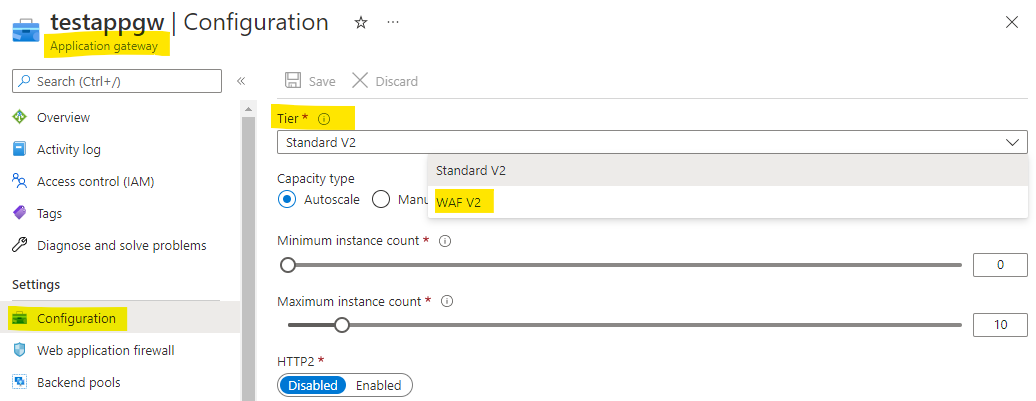
To associate your WAF policy with the existing Application Gateway : https://learn.microsoft.com/en-us/azure/web-application-firewall/ag/associate-waf-policy-existing-gateway
I would request you to try the above steps to fix your issue.
Kindly let us know if the above helps or you need further assistance on this issue.
----------------------------------------------------------------------------------------------------------------
Please "Accept the answer" if the information helped you. This will help us and others in the community as well.
Hi
I will coordinate a maintenance window to execute your recommendations and get back to you with the results.
Sure, @Javier Morales .
Hi
With your instructions, we were able to solve the issue.
Thanks for your help.
Thank you for the update, @Javier Morales . Glad to hear that the provided instructions helped fix your issue.