Microsoft Security | Microsoft Entra | Microsoft Entra External ID
Managing external identities to enable secure access for partners, customers, and other non-employees

This browser is no longer supported.
Upgrade to Microsoft Edge to take advantage of the latest features, security updates, and technical support.
' cx='32' cy='32' r='32' /%3E%3Ctext x='50%25' y='55%25' dominant-baseline='middle' text-anchor='middle' fill='%23FFF' %3EJ%3C/text%3E%3C/svg%3E)
Hello Team,
I'm trying to delete the Azure ad b2c users using bulk option from azure adb2c portal and ended up with the error.
currently our users with their signinnames shows as user principle name in azure ad b2c portal. but when i try to delete using bulk operation through csv file. It is not able to find the user with specific UPN and we realized that in the backedend the UPN is different.
error: 
can anyone help us?
we want to delete plenty of users on azure ad b2c
regards,
John
' cx='32' cy='32' r='32' /%3E%3Ctext x='50%25' y='55%25' dominant-baseline='middle' text-anchor='middle' fill='%23FFF' %3EAS%3C/text%3E%3C/svg%3E)
How we can add users in bulk (without an invite)

How we can add users in bulk (without an invite)

Hi @Jhon ,
To delete users in bulk, you can follow below steps:

Note: This will soft delete all the users listed in the uploaded file. Which means the users will be moved to Deleted users and then gets hard/permanently deleted automatically after 30 days. If you want to permanently delete the users before 30 days, you'll have to manually delete the users from the Deleted users blade.
-----------------------------------------------------------------------------------------------------------
Please "Accept the answer" if the information helped you. This will help us and others in the community as well.
Hi Aman,
thanks for your answer. But i'm looking for more to use power-shell. The answer which you have is already known.
Hi @Jhon Please find below the script for this purpose:
Connect-MsolService #sign-in using Global Admin of your B2C tenant. User should be Member of the tenant and not signed-up or guest user.
$users = import-csv C:\temp\users.csv
foreach ($usr in $users)
{
Remove-MsolUser -UserPrincipalName $usr.upn -Force
}
Below is how the user.csv file looks:
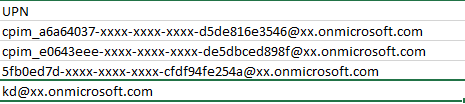
-----------------------------------------------------------------------------------------------------------
Please "Accept the answer" if the information helped you. This will help us and others in the community as well.
Hi @Jhon Do you have any further questions?
Hi @Jhon Have you had a chance to try the script?