
The setting is stored in the registry key below:
Key Path: HKCU\Software\Microsoft\RDclientRadc
Key Name (Dword): EnableMSRDCTelemetry
If you change the value of the reg key to 0 it should disable this setting. 1 to enable.
This browser is no longer supported.
Upgrade to Microsoft Edge to take advantage of the latest features, security updates, and technical support.
' cx='32' cy='32' r='32' /%3E%3Ctext x='50%25' y='55%25' dominant-baseline='middle' text-anchor='middle' fill='%23FFF' %3EAN%3C/text%3E%3C/svg%3E)
Hi,
As an IT admin, I wanted to disable the "Send Usage data" in Remote Desktop Client. Can someone please tell me how can I disable this option for all users?
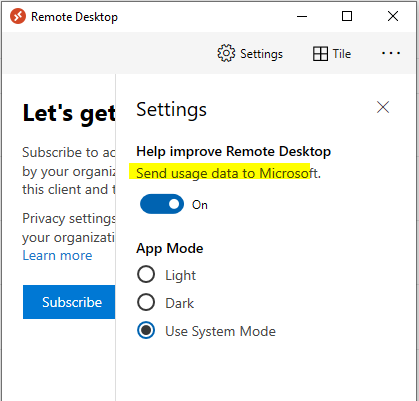
Also can you please tell where this setting information is getting stored if I disable(turn off) manually?
Regards,
Anique

Thank you for asking this question on the **Microsoft Q&A Platform. **
You have not received answers or comments to your question because it may be ambiguous or confusing.
I recommend you visit How to write a quality question and verify that your question meets some of the recommendations.
Hope this helps,
Carlos Solís Salazar
----------
NOTE: To answer you as quickly as possible, please mention me in your reply.
' cx='32' cy='32' r='32' /%3E%3Ctext x='50%25' y='55%25' dominant-baseline='middle' text-anchor='middle' fill='%23FFF' %3ENT%3C/text%3E%3C/svg%3E)
The setting is stored in the registry key below:
Key Path: HKCU\Software\Microsoft\RDclientRadc
Key Name (Dword): EnableMSRDCTelemetry
If you change the value of the reg key to 0 it should disable this setting. 1 to enable.