Microsoft Security | Intune | Configuration Manager | Application
Managing applications through Configuration Manager in Intune

This browser is no longer supported.
Upgrade to Microsoft Edge to take advantage of the latest features, security updates, and technical support.
' cx='32' cy='32' r='32' /%3E%3Ctext x='50%25' y='55%25' dominant-baseline='middle' text-anchor='middle' fill='%23FFF' %3EP1%3C/text%3E%3C/svg%3E)
Hi,
I want to provide our users to select the Application himself and install it per Web Browser or like applications Catalog in the old version of SCCM.
Or is there any third party tools?
Regards
Nick

Hi @PerserPolis-1732 ,
As far as I am concerned, there are no possible to deploy the application per Web Browser in SCCM, as the function of application catelog has been assigned to management point.
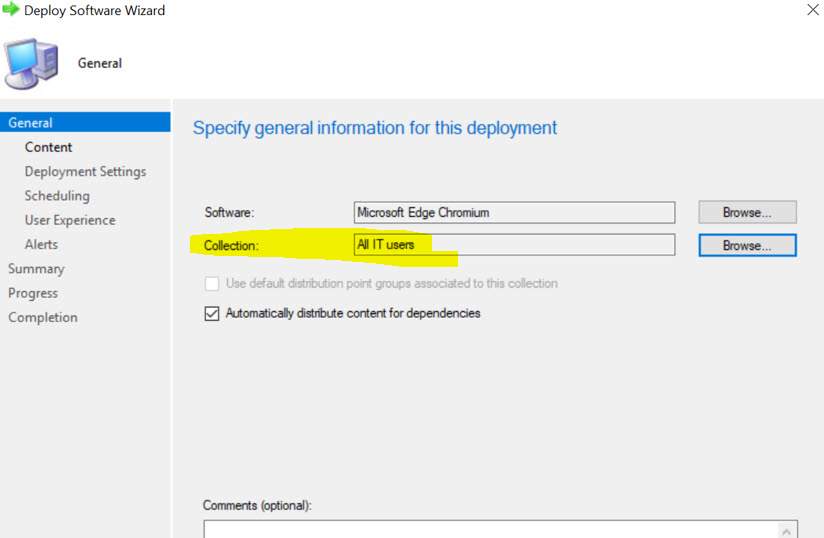
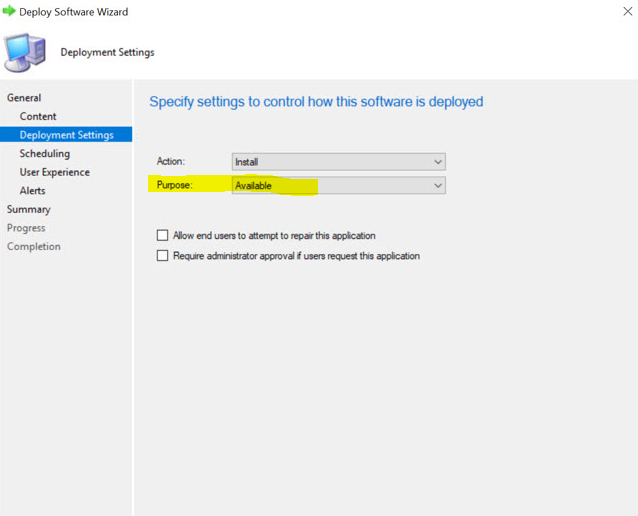
As Jason mentioned, could not we use software center? If we want to deploy the application by users, we could deploy it to users and set the deployment as available.
Some operation could be refer to following screenshot:
If the answer is the right solution, please click "Accept Answer" and kindly upvote it. If you have extra questions about this answer, please click "Comment".
Note: Please follow the steps in our documentation to enable e-mail notifications if you want to receive the related email notification for this thread.

Is there a reason the users can't, or you don't want them to use Software Center for this?
Yes there is a reason, because many users see all applications in software Center and want to install even when the software is installed already.
The Application catalog was perfect for my company, but it does not exist any more. Maybe there is third party for my project. Do you know about it?
Sorry, not following. All capabilities of the application catalog were simply incorporated into Software Center. What exactly is undesirable about this as I don't really understand what you are describing. Is it simply the notifications distracting them?
do you have a resolution or do you want to discuss with me? Apparently you don't have any Idea or don't want to understand the question. Either the question to hard for you or to simple.
The question was very easy. Is there anyway to deploy the Application like in previously Application catalog to project the users all Applications?
The question was very easy. Is there anyway to deploy the Application like in previously Application catalog to project the users all Applications?
Yes, the question is easy and I answered it: Yes, all capabilities of the application catalog are included in Software Center.
What's not easy is understanding why you feel that software center does not meet your requirements. You need to provide more information on what is not meeting your expectations and what your requirements actually are for me to be able to additional info here as neither of these is clear.
Hi Amandayou-MSFT
I know that, my problem is our users, because it pop up in Software Center and the user thing, he has to install it.
Even when the application is already installed.
As far as I am concerned, the Applications catalog does not exist any more. What do you mean with management point?
Any third party for my project?
Hi,
Thanks for your update.
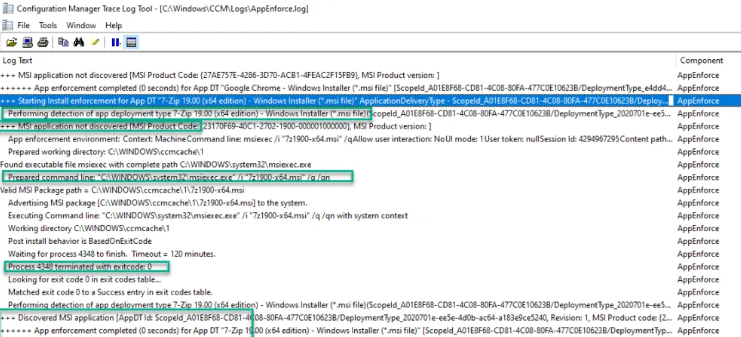
Do we mean the application is installed, but in software center, the iron 'install' does not change to grey, and is available to click, is it right? If so, we click it, the application will install again or did nothing? This issue may not nothing about software center, it maybe something with deployment type or method, command...... At this mean, we should check some log, for example, AppEnforce.log, we can see Exit Code 0, which means application installed successfully.
If the answer is the right solution, please click "Accept Answer" and kindly upvote it. If you have extra questions about this answer, please click "Comment".
Note: Please follow the steps in our documentation to enable e-mail notifications if you want to receive the related email notification for this thread.
No I dont mean that.
I know I can deploy Application using User Collection. But the means , there are in software center some application to be installed and ask me should I install it?
That is my problem
As I called out previously, its still unclear what you are asking for here. What functionality, feature, or capability exactly are you asking for that you feel software center does not fulfill? What challenge or requirement are you trying to address that you feel you cannot today?
Ok then write me how I can deploy Application like application catalog(does not more exist) using software center? Is that now clear?
No, not clear at all. You simply deploy them as you always have and they will show in software center. As called out, everything that application catalog could do is now included in software center. So last time to ask, what exactly are you wanting or expecting that does not happen when you use software center? You keep writing that it doesn't meet your requirements but won't tell us what that requirement is that is not being met so it's impossible for us to guide you. without you providing more information that I've repeatedly asked for. Specifically, what exactly does not meet your requirements or expectations, what challenge are you trying to address, and/or what exactly is your requirement that you are trying to meet?
Ok, I want to provide all users all my applications to install himself it they have these needed.
Software center does that.
super answer, but tell me please, how is the best way to do that?
Do what? All package, application, and task sequence deployment -- unless hidden -- show in software center on the targeted clients. There's nothing special about this.