Microsoft Security | Microsoft Entra | Microsoft Entra ID
A cloud-based identity and access management service for securing user authentication and resource access

This browser is no longer supported.
Upgrade to Microsoft Edge to take advantage of the latest features, security updates, and technical support.

We are using Graph Explorer, attempting to extend the AzureAD User object schema in our non-prod (labs) tenant.
{ "id":"OurUserExtensions",
"description": "User Object Extensions",
"targetTypes": [
"User"
],
"properties": [
{
"name": "costCenter",
"type": "String"
},
{
"name": "costCenterName",
"type": "String"
}
]
The response code is "Authorization_RequestDenied" with the "message" "Attempt to update complex extension definition on application belonging to a different context"
The Admin person executing the POST did check Modify permissions, however none listed required Consent to be granted.
Returned Error https://1drv.ms/u/s!AhWdkaAMXIqfg6kTv06c7W7ZGBgAvg?e=HxrbSb
Is it possible that schemaExtensions must be created/managed only at a Domain level just below a TLD?
There are two Domains defined in our labs tenant
Do we require a Domain in our non-prod tenant such as myDomainLabs.com with the GraphAPI logged in Admin user/UPN eg ******@myDomainLabs.com ??
The person executing GraphAPI calls is using a full Admin account & logs in with a UPN specific to the lab.myDomain.com domain.
Thanks in advance!
/paul
' cx='32' cy='32' r='32' /%3E%3Ctext x='50%25' y='55%25' dominant-baseline='middle' text-anchor='middle' fill='%23FFF' %3ESS%3C/text%3E%3C/svg%3E)
@Paul Rarey Hi Paul,
I am able to reproduce your issue. (See screenshot below)

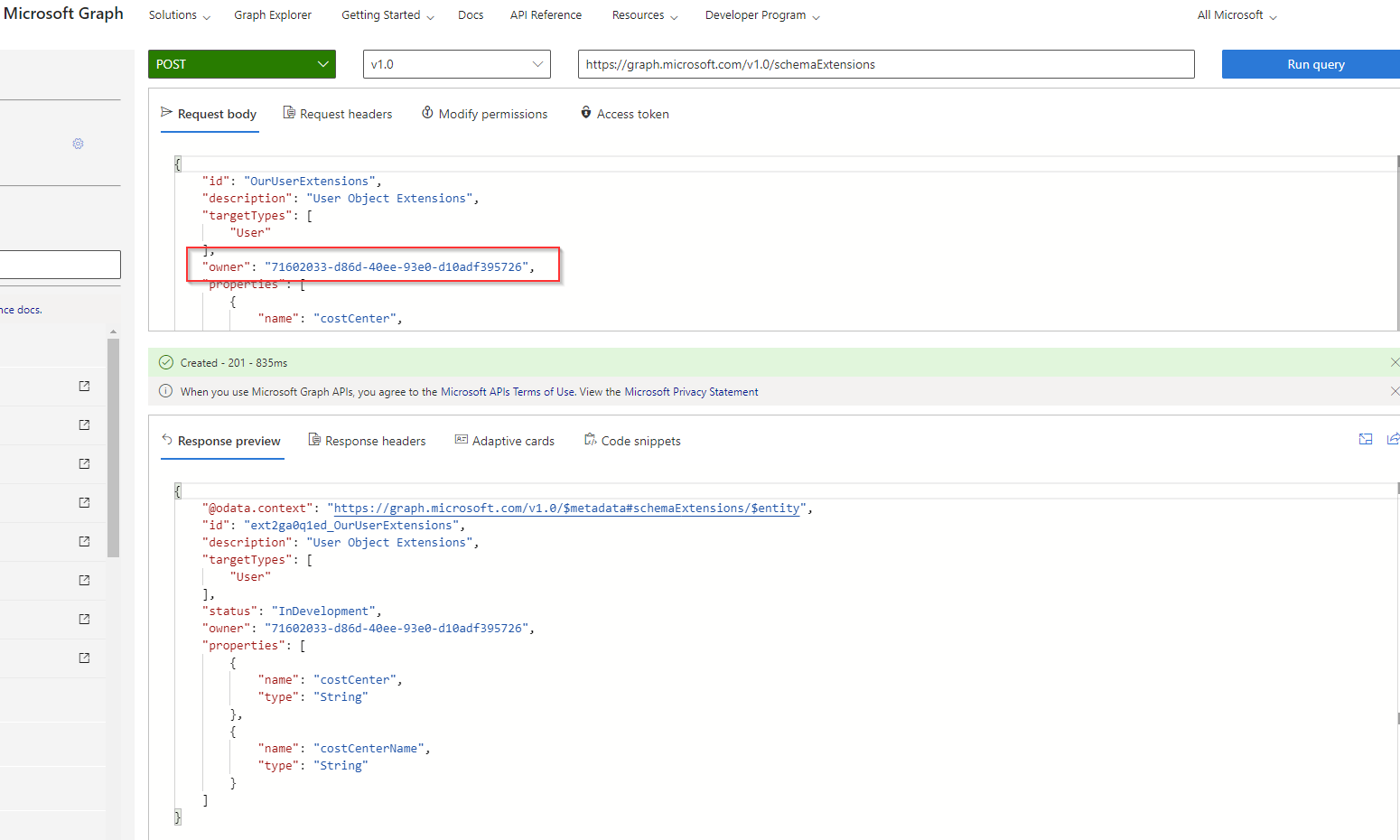
As you are using Microsoft Graph Explorer to add the schema extension, the application id of the Graph Explorer is being used to add as the owner of schema extension which is not allowed as Graph Explorer application is managed by Microsoft and signed in user need to owner of the application for this call to work. Please refer to the documentation. (See extract from the referred documentation)

In order to fix this you need to pass the "Owner" property to JSON payload while making the Graph API call. So, first register an application in AAD and pass the application id to POST like below -
Thank you @Saurabh Sharma !!
I did go dig into the docs & found what you highlighted. Kind'a embarrassed I didn't RTFM deeper first :)
/paul
@Paul Rarey No Problem Paul :) and thanks for accepting the answer.