Azure Virtual Machines
An Azure service that is used to provision Windows and Linux virtual machines.
This browser is no longer supported.
Upgrade to Microsoft Edge to take advantage of the latest features, security updates, and technical support.

I'm currently running a F8s machine in the East US region.
I've resize multiple time the machine over the time. Today, I need more RAM but when selecting the resize option, I only have 8 machine type listed and they are all smaller size than the actual VM.
When trying to create a new machine, all the same size are listed (too small).
How can I resize the F8s to have more vCPU and more RAM ?
Thank you.

Hi @Benoit LORAND ,
Thanks for the question! I've gone ahead and tried to replicate your F8s VM so I can see what your seeing. Can you double check you don't have any filters enabled? A filter would prevent you from seeing the other size options. I've taken a screenshot below to show you what I see and what I am referring too:
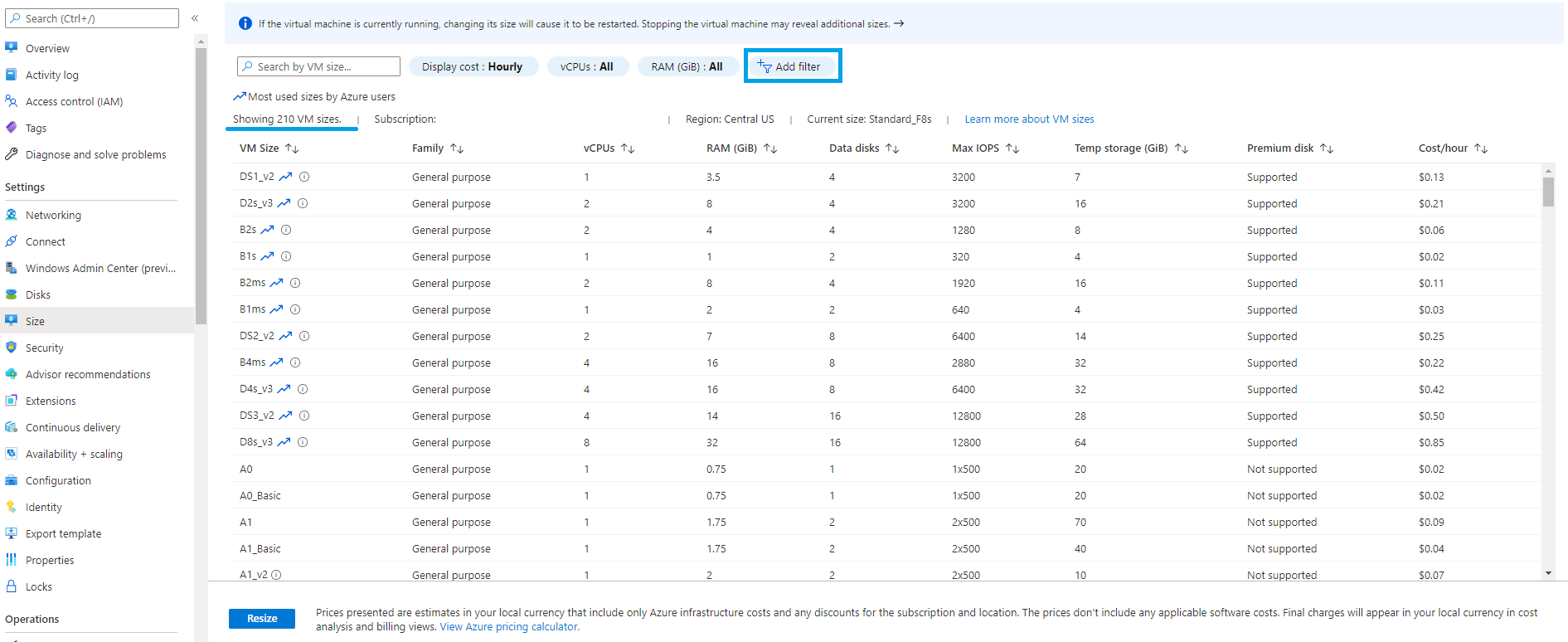
Hope this helps! Please provide feedback accordingly. If this answer helps you solve your question please mark it as accepted.
Hi,
I do not have any filter enabled. I can see all VM size but they are all greyed out. However, I just saw that hovering on the little "I", gives me a quota error... if that may help.

I just found out this article, I supposed it will fix my problem. Thank you for helping.
https://learn.microsoft.com/en-us/azure/azure-portal/supportability/per-vm-quota-requests
Sure. Glad you got the issue solved! Let me know if you have any further questions about subscription quotas.