Azure App Service
Azure App Service is a service used to create and deploy scalable, mission-critical web apps.
This browser is no longer supported.
Upgrade to Microsoft Edge to take advantage of the latest features, security updates, and technical support.
' cx='32' cy='32' r='32' /%3E%3Ctext x='50%25' y='55%25' dominant-baseline='middle' text-anchor='middle' fill='%23FFF' %3ET%3C/text%3E%3C/svg%3E)
Is it possible to limit the Consumption (serverless) level api to authenticated users from AAD B2C?
Thanks
Azure App Service is a service used to create and deploy scalable, mission-critical web apps.
Managing external identities to enable secure access for partners, customers, and other non-employees

' cx='32' cy='32' r='32' /%3E%3Ctext x='50%25' y='55%25' dominant-baseline='middle' text-anchor='middle' fill='%23FFF' %3ESM%3C/text%3E%3C/svg%3E)
Thanks for asking question! Could you please confirm if you are using azure function? Request you to elaborate your query, to help you better on this.

@Todd
I just wanted to check in and see if you required additional assistance or if you were able to resolve this issue?
' cx='32' cy='32' r='32' /%3E%3Ctext x='50%25' y='55%25' dominant-baseline='middle' text-anchor='middle' fill='%23FFF' %3ET%3C/text%3E%3C/svg%3E)
Hello,
Yes i was referring to an Azure Function. Basically I only wont those users who have authenticated to be able to call an api.
This would be quite a common request so i guess im just looking for documenttion, demonstration on how to do it.
Thanks
@Todd
Thank you for the quick response!
I walked through this Stack Overflow thread and was able to authenticate my Function App using my B2C user, I'll post the details from the link below.
Steps:
1- Create an Azure Functions App and write down the URL i.e. https://jatrantest.azurewebsites.net
2- Within your AzureAD B2C tenant:
-Navigate to your AzureAD B2C User Flows -> Select your sign-in flow -> Select "Run user Flow" -> Copy the metadata endpoint URL
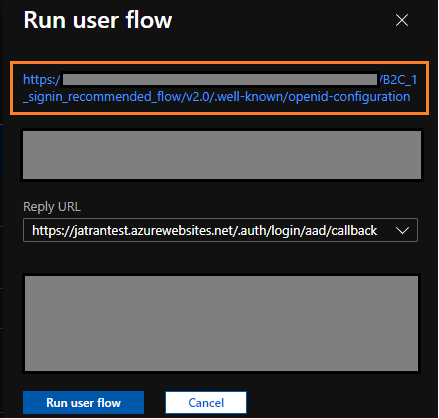
3- Within your Function App:
-Select Authentication / Authorization on the left blade -> Turn on "App Service Authentication" -> Select Azure Active Directory -> Select "Advanced"
Client ID - This is the Application ID of your B2C application
Issuer Url - This is the metadata endpoint URL
Client Secret - This is optional, however, you can create a secret within your B2C app and paste it here.
-Select "OK" -> Select Save
4- To test out functionality in your B2C tenant
-Select the Sign-in Flow -> Select "Run user Flow" -> Select the Reply URL you added earlier (/.auth/login/aad/callback) -> Run user flow
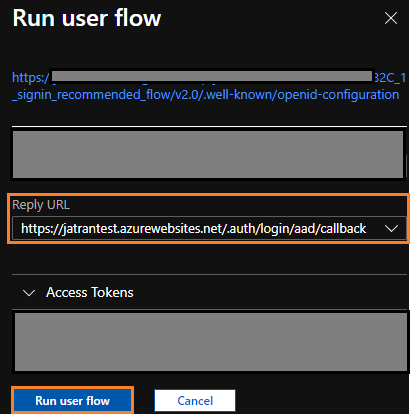
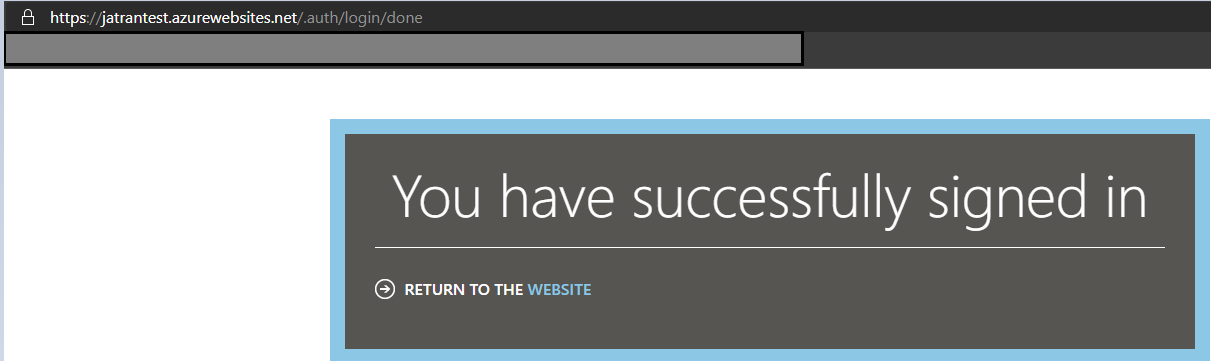
If you have any other questions, please let me know.
Thank you for your time and patience throughout this issue.
Please remember to "Accept Answer" if any answer/reply helped, so that others in the community facing similar issues can easily find the solution.
@Todd
I just wanted to check in and see if you had any other questions or if you were able to resolve this issue?
----------
Please remember to "Accept Answer" if any answer/reply helped, so that others in the community facing similar issues can easily find the solution.