Exchange | Hybrid management
The administration of a hybrid deployment that connects on-premises Exchange Server with Exchange Online, enabling seamless integration and centralized control.
This browser is no longer supported.
Upgrade to Microsoft Edge to take advantage of the latest features, security updates, and technical support.
' cx='32' cy='32' r='32' /%3E%3Ctext x='50%25' y='55%25' dominant-baseline='middle' text-anchor='middle' fill='%23FFF' %3EMJ%3C/text%3E%3C/svg%3E)
Hello,
Our team uses a PowerShell script to finalize onboarding of new users. I am trying to modify the script to change it from using basic auth to modern auth. The EXO module was installed by me on the server, and I don't recall seeing an option to install it for the CurrentUser vs the entire computer for all users. When a different admin logs into the server and attempts to run the script, the following line generates an error that the file cannot be found (obviously, since the module was only installed into my profile):
Import-Module $((Get-ChildItem -Path $($env:LOCALAPPDATA+"\Apps\2.0\") -Filter Microsoft.Exchange.Management.ExoPowershellModule.dll -Recurse ).FullName|?{$_ -notmatch "none"}|select -First 1)
The above line came from the following archived thread:
https://social.technet.microsoft.com/Forums/en-US/da419e14-de8d-4b35-99d7-2550eeab5d43/connect-exonline-using-window-powershell-instead-of-using-quotexchange-online-powershell-module?forum=winserverpowershell
We need multiple staff to have the ability to successfully run this script. I'd rather not depend upon a module installed into a specific user profile. How do I modify the environment and script on this server so that the module can be loaded by any profile?
Thanks!
The administration of a hybrid deployment that connects on-premises Exchange Server with Exchange Online, enabling seamless integration and centralized control.
' cx='32' cy='32' r='32' /%3E%3Ctext x='50%25' y='55%25' dominant-baseline='middle' text-anchor='middle' fill='%23FFF' %3EAL%3C/text%3E%3C/svg%3E)
Hi @Mueller, Jim ,
Does this issue have any updates?
If it has been resolved, please click "Accept as answer" to mark useful post or share your solution, your action would benefit others who have similar issues.
If you have any questions or need further assistance, please feel free to post back. Thanks!

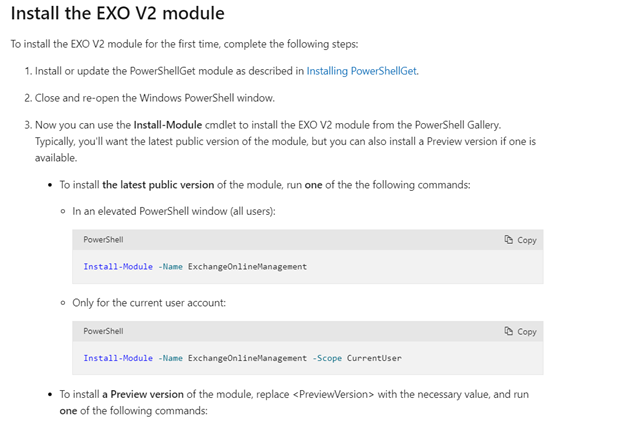
That's for the old version of the module. Install the V2 one, ExchangeOnlineManagement, which you can also do in the AllUsers scope:
Install-Module -Name ExchangeOnlineManagement -Scope AllUsers
https://learn.microsoft.com/en-us/powershell/exchange/exchange-online-powershell-v2?view=exchange-ps
Hi @Mueller, Jim ,
According to the link provided by michev, you could refer to the command he provides or run the command without scope parameter.
If the answer is helpful, please click "Accept Answer" and kindly upvote it. If you have extra questions about this answer, please click "Comment".
Note: Please follow the steps in our documentation to enable e-mail notifications if you want to receive the related email notification for this thread.
