Developer technologies | Windows Presentation Foundation
A part of the .NET Framework that provides a unified programming model for building line-of-business desktop applications on Windows.
This browser is no longer supported.
Upgrade to Microsoft Edge to take advantage of the latest features, security updates, and technical support.
' cx='32' cy='32' r='32' /%3E%3Ctext x='50%25' y='55%25' dominant-baseline='middle' text-anchor='middle' fill='%23FFF' %3EJ%3C/text%3E%3C/svg%3E)
I made an oxyplot with wpf as below. If I click the line1 legend below, line1 will be invisible.
In addition to this function, I want to show only line1 when a specific key is pressed (ex. ctrl+mouse left btn) and hide the rest of the legend items.
But I'm not sure about the legend click event.
Can anyone help me? I am attaching my code and picture description.
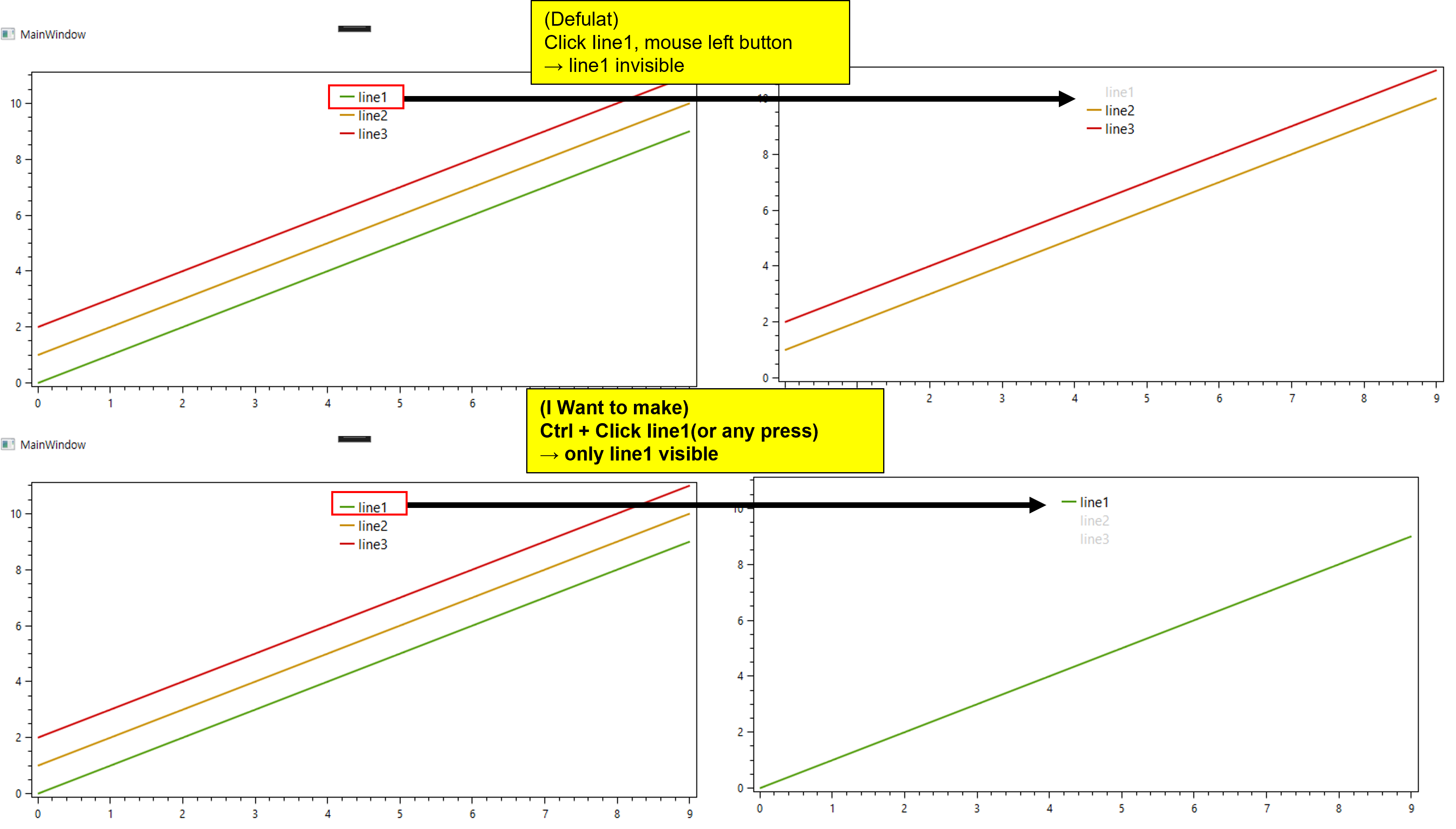
xaml

<Window x:Class="oxyplot_sample.MainWindow"
        xmlns="http://schemas.microsoft.com/winfx/2006/xaml/presentation"
        xmlns:x="http://schemas.microsoft.com/winfx/2006/xaml"
        xmlns:d="http://schemas.microsoft.com/expression/blend/2008"
        xmlns:mc="http://schemas.openxmlformats.org/markup-compatibility/2006"
        xmlns:local="clr-namespace:oxyplot_sample"
        mc:Ignorable="d"
        xmlns:oxy="http://oxyplot.org/wpf"
        Title="MainWindow" Height="450" Width="800">
    <Grid>
        <oxy:PlotView Model="{Binding plotmodel}" Margin="10 10 10 10"/>
    </Grid>
</Window>


cs

namespace oxyplot_sample
{
    /// <summary>
    /// Interaction logic for MainWindow.xaml
    /// </summary>
    public partial class MainWindow : Window
    {

        public PlotModel plotmodel { get; set; }

        public MainWindow()
        {
            InitializeComponent();

            plotmodel = new PlotModel();

            var line1 = new LineSeries() { Title="line1"};
            var line2 = new LineSeries() { Title="line2"};
            var line3 = new LineSeries() { Title="line3"};

            for (int i=0; i<10; i++)
            {
                line1.Points.Add(new DataPoint(i, i));
                line2.Points.Add(new DataPoint(i, i + 1));
                line3.Points.Add(new DataPoint(i, i + 2));
            }

            plotmodel.Series.Add(line1);
            plotmodel.Series.Add(line2);
            plotmodel.Series.Add(line3);
            plotmodel.Legends.Add(new Legend()
            {
                LegendPosition = LegendPosition.TopCenter,
                LegendFontSize = 15
            }) ;

            plotmodel.Axes.Add(new LinearAxis { Position = AxisPosition.Left});
            this.DataContext = this;

        }


    }
}
' cx='32' cy='32' r='32' /%3E%3Ctext x='50%25' y='55%25' dominant-baseline='middle' text-anchor='middle' fill='%23FFF' %3EHL%3C/text%3E%3C/svg%3E)
Hi,@JunYoungLee . For the issue of oxyplot's make only the clicked item visible when the legend item is clicked, it is recommended that you raise an issue here.
This answer has been deleted due to a violation of our Code of Conduct. The answer was manually reported or identified through automated detection before action was taken. Please refer to our Code of Conduct for more information.
Comments have been turned off. Learn more