Azure Data Factory
An Azure service for ingesting, preparing, and transforming data at scale.
This browser is no longer supported.
Upgrade to Microsoft Edge to take advantage of the latest features, security updates, and technical support.
' cx='32' cy='32' r='32' /%3E%3Ctext x='50%25' y='55%25' dominant-baseline='middle' text-anchor='middle' fill='%23FFF' %3ES%3C/text%3E%3C/svg%3E)
I have a complex JSON file. The name section has got an array as well as a single string value in the node.
How can the column be flattened?
Student members: names in array
Teachers: names as string
JSON file (source)
{
"members":
[
{
"resourceType": "Student",
"id": "1234",
"active": true,
"name":
{
"family": "Dup",
"given": [ "Jonny", "John" ]
}
,
"gender": "female",
"birthDate": "2010-10-29",
"school": { "name": "London High School" }
},
{
"resourceType": "Teacher",
"id": "1235",
"name":
{
"Title": "Dr."
"fullname": "Jonny Clinton",
}
,
"TeachingCertificate":
{
"yearObtained": "1999-01-01",
"level": "2"
}
}
]
}
' cx='32' cy='32' r='32' /%3E%3Ctext x='50%25' y='55%25' dominant-baseline='middle' text-anchor='middle' fill='%23FFF' %3EMM%3C/text%3E%3C/svg%3E)
Hello @Sydney ,
Thanks for the question and using MS Q&A platform.
as I understand, you want to flatten two different data structures attributed to similar properties.
I worked closely with Kranthi on your [initial request][1]. It was a challenge. As I recall, we split the data into two streams, one for Student and one for Teacher. Since we split into separate streams, we can then treat each differently. Thus string versus array is not the problem.
The flattening implies you want each name in the array to have its own column. The challenge I see, is that array does not have a fixed length. We could have["Jimmy", "Jon", "Smith", "Wesson", "The third"] or we could have ["Rodrigo","Cortez"].
Having a changing quantity of columns becomes impossible to work with.
However if you wanted to merge the items in an array together into a single string, we solve the issue of name length.
This merge was accomplished in the original ask by:
For name you can use this expression: reduce(name.given, '', #acc + #item + ' ', #result + name.family)
Reduce is a function used to collect all the items in an array and render them into a single result. Usually paired with the map function, and is the origin of the term "map-reduce".
name.given is the array of names. To each element in turn we apply concatenate( everything_so_far , the_next_item)
Then after all items have been done, we do concatenate( the_result, name.family)`
Does this make sense? Is it agreeable? Do you have any suggestions or questions I can clarify or find alternate solution for?
Thanks again. I found that ADF is inconsistent.
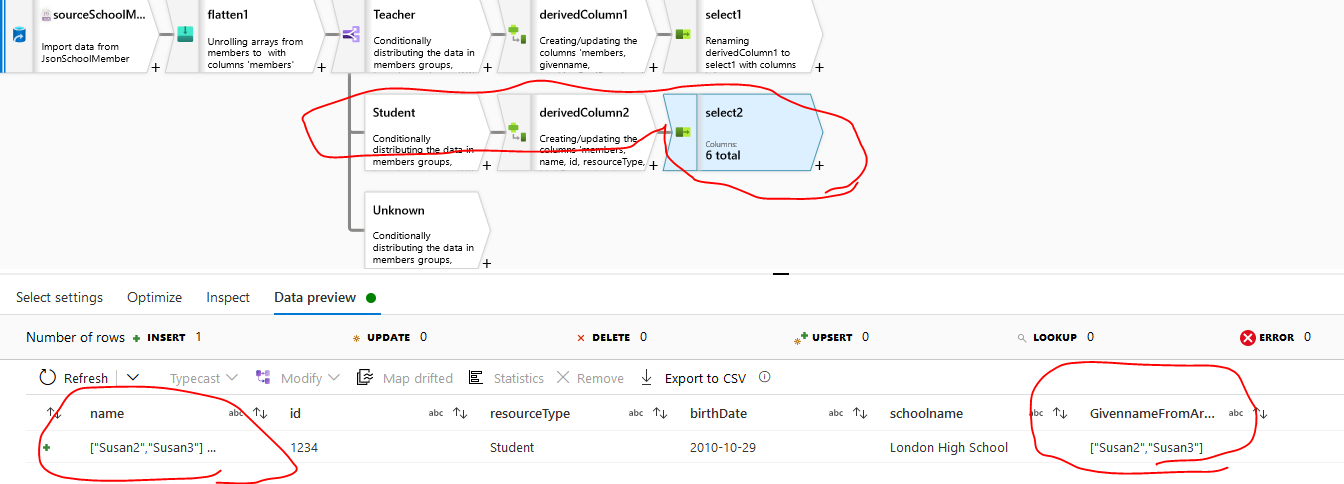
Now both are shown as array even though one is a string value, the other is an array format. The ADF is becoming smarter and smarter now. However I used reduce function to get given names and the teacher's name looks ok but the student's given name is in [ ]. What could cause this?


Both have the same expression to get the given name(s).

Oh, oh! I see my mistake now @Sydney .
I think it is type mixup. I forgot to put in conversion from array to string in the proper places, so Susan2 was kept as an array, and then cast as string making ["Susan2"] . Then added the string value to this making ["Susan2"] Dup.
So (I still need to test to be sure) I am thinking...
reduce(members.name.given, '', concat( #acc, toString(#item), ' '), concat(toString(#result), members.name.family) )
wait, no no, you showed me the data. This won't fix it.
Johnny looks correct, but Susan2....
that must be in the data as ["[\"Susan2\"]"] or [["Susan2"]]. This can't be right. It must be cause by something earlier in the stream, unless someone really did enter ["Susan2"]
I'll need to look and test. Can you share that record from the source? If I add it to the example data used earlier with Kranthi we should be able to repro.
The below Json is valid but I cannot flatten the name section because one is a string and the other is an array. The teacher's given name is correct. But the student given name is returned as an JSON array. ADF treated [ "Susan2", "Susan3" ] as one string value. Does it need a parse transforming from a string to JSON array?
{
"members":
[
{
"resourceType": "Student",
"id": "1234",
"active": true,
"name":
{
"family": "Dup",
"given": [ "Susan2", "Susan3" ]
}
,
"gender": "female",
"birthDate": "2010-10-29",
"school": { "name": "London High School" }
},
{
"resourceType": "Teacher",
"id": "1235",
"name":
{
"Title": "Dr.",
"family": "Clinton",
"given": "Jonny"
}
,
"TeachingCertificate":
{
"yearObtained": "1999-01-01",
"level": "2"
}
}
]
}