The spreadsheet is on a network share
And do the SQL Server service account have access (read) permissions on the share?
This browser is no longer supported.
Upgrade to Microsoft Edge to take advantage of the latest features, security updates, and technical support.
' cx='32' cy='32' r='32' /%3E%3Ctext x='50%25' y='55%25' dominant-baseline='middle' text-anchor='middle' fill='%23FFF' %3EJS%3C/text%3E%3C/svg%3E)
Hi,
I am trying to link a spreadsheet using MS Office 12.0 Access Database Engine via a linked server.
The spreadsheet is on a network share and is spaces in the name and macros enabled on it (xlsm)
The Linked server provider has "Allow inprocess" the SQL Man is running as administrator but i keep getting this error:
Cannot Initialize the data source object of OLE DB provider MS SQL ERROR 7399
I have OLEDB 16 install and if i try and do the exact same config as OLEDB12 i get:
Could not find installable ISAM MS SQL ERROR 7303
Both my SQL server and OLEDB are 64bit I am at a complete loss.
I have had this working on a backup Excel sheet but i cannot get this work on my existing instance or a brand new instance.
Can anyone assist and help resolve the issue as i am at a complete loss to troubleshooting and diagnostics.

The spreadsheet is on a network share
And do the SQL Server service account have access (read) permissions on the share?
I have both SA\Windows Auth configured on the server
The SQL instance is logged under: NT Service\MSSQL$SUPPORTDB
The Windows user logged on the PC has domain access to the share and can access the sheet.
Doing some research, I have changed the SQL service account to the domain logon and restarted the SQL service and MSSM.
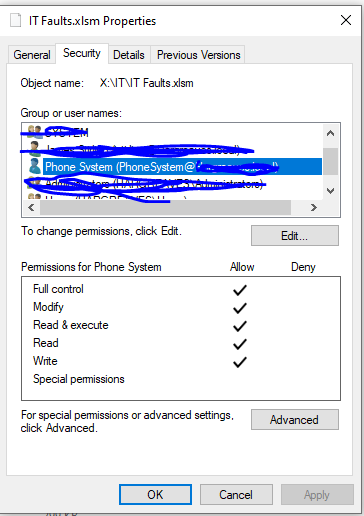
I have also made sure the spreadsheet (XLSM) has full rights for the domain logon.
Provider: MS Office 12 Access Database Engine OLE DB Provider
Product Name: Excel
DataSource: Spreadsheet Location (X:\IT\IT Faults.xlsm)
Provider String: Excel 12.0 Macro
As per: https://www.microsoft.com/en-us/download/details.aspx?id=54920
The Windows user logged on the PC has domain access
User logged on? That doesn't matter in any way, it's the SQL Server service account which accesses the file and requires for this access permissions.
Hi,
Please see screenshots attached of the SQL Service Account and File Security.