Developer technologies | Visual Basic for Applications
An implementation of Visual Basic that is built into Microsoft products.
This browser is no longer supported.
Upgrade to Microsoft Edge to take advantage of the latest features, security updates, and technical support.
' cx='32' cy='32' r='32' /%3E%3Ctext x='50%25' y='55%25' dominant-baseline='middle' text-anchor='middle' fill='%23FFF' %3EVN%3C/text%3E%3C/svg%3E)
I have a code which display the text of the cell underneath it. However, it seems that the Combobox just refuse to display the correct text. As you can see in the screenshot
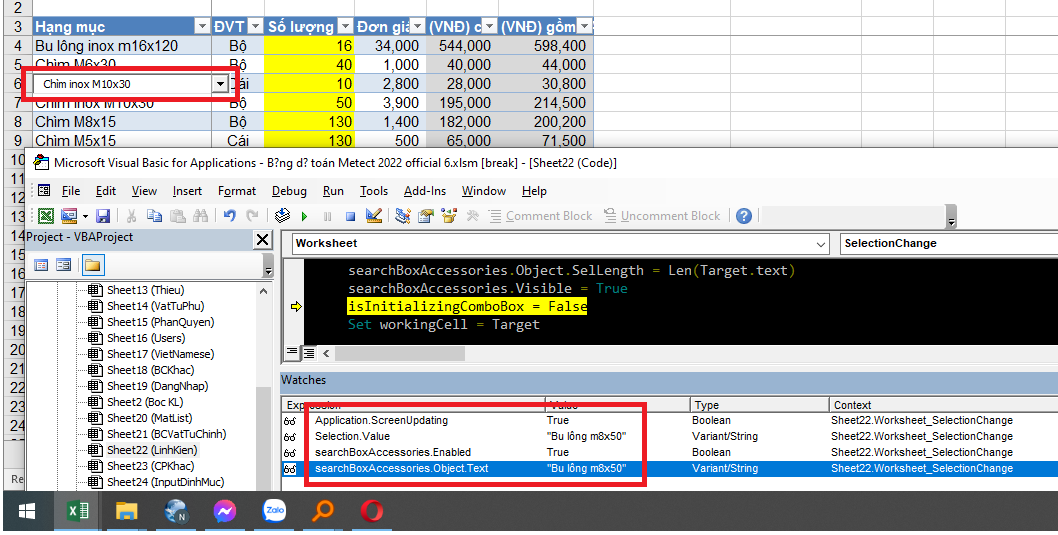
Other information:
I think there is something wrong with my settings/set up. If the code is of relevant, here it is.
Private Sub Worksheet_SelectionChange(ByVal Target As Range)
DoEvents
If Selection.Count > 1 Then Exit Sub
If Application.CutCopyMode Then
    searchBoxAccessories.Visible = False
    Exit Sub
End If

If searchBoxAccessories Is Nothing Then
    Set searchBoxAccessories = ActiveSheet.OLEObjects("SearchCombBoxAccessories")
End If


If Target.Column = 1 And Target.Row > 3 Then
    Dim isect As Range
    Set isect = Application.Intersect(Target, ListObjects(1).Range)
    If isect Is Nothing Then GoTo DoNothing
    isInitializingComboBox = True
    GetSearchAccessoriesData
    searchBoxAccessories.Activate

    isInitializingComboBox = True 'This prevent "_Change" fires up when something changes'

    searchBoxAccessories.Top = Target.Top
    searchBoxAccessories.Left = Target.Left
    searchBoxAccessories.Width = Target.Width + 15
    searchBoxAccessories.Height = Target.Height + 2
    Application.EnableEvents = False 'Another attempt to prevent "_Change" fires up when something changes'
    searchBoxAccessories.Object.text = Target.text
    Application.EnableEvents = True
    searchBoxAccessories.Object.SelStart = 0
    searchBoxAccessories.Object.SelLength = Len(Target.text)
    searchBoxAccessories.Visible = True
    isInitializingComboBox = False 'Screenshot is taken here'
    Set workingCell = Target
Else
DoNothing:

    If searchBoxAccessories Is Nothing Then
        Set searchBoxAccessories = ActiveSheet.OLEObjects("SearchCombBoxAccessories")
    End If

    If searchBoxAccessories.Visible Then searchBoxAccessories.Visible = False
End If

End Sub

Thank you for asking this question on the **Microsoft Q&A Platform. **
You have not received answers or comments to your question because it may be ambiguous or confusing.
I recommend you visit How to write a quality question and verify that your question meets some of the recommendations.
Hope this helps,
Carlos Solís Salazar
----------
NOTE: To answer you as quickly as possible, please mention me in your reply.
I think I followed most of the guideline already. Which part did you find ambiguous or confusing?