Developer technologies | Windows Presentation Foundation
A part of the .NET Framework that provides a unified programming model for building line-of-business desktop applications on Windows.
This browser is no longer supported.
Upgrade to Microsoft Edge to take advantage of the latest features, security updates, and technical support.

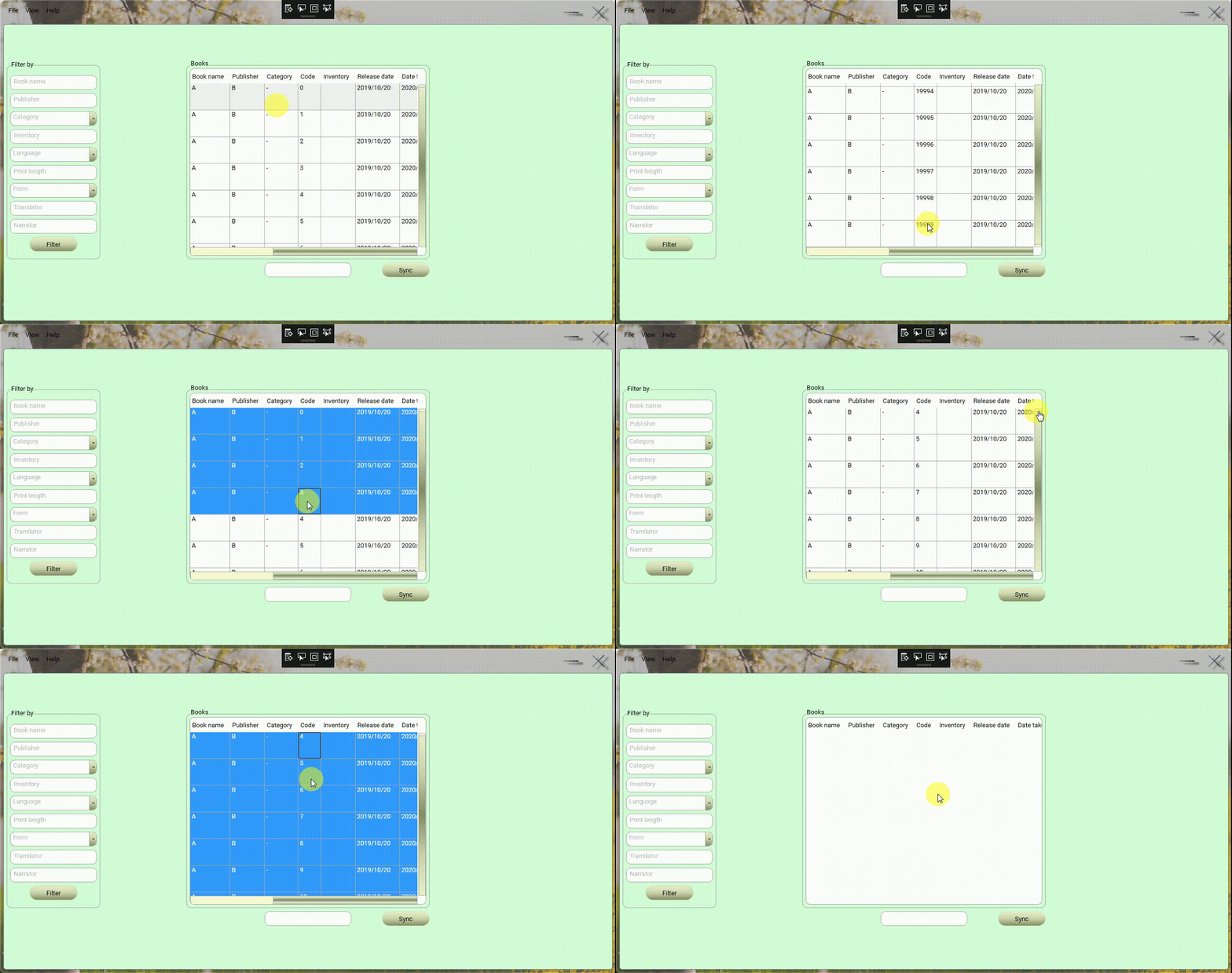
After converting my DataGrid.ItemsSource to DataTable to extract the column 3 value of each row of DataTable, and also when I select all rows of DataGrid using Ctrl +A and wish to delete them, I receive the following error: System.IndexOutOfRangeException: 'There is no row at position 10000'

Whereas BookDataGrid.SelectedItems.Count is 20,000.
The following information may assist you in resolving the issue:
When there were 30,000 rows in the DataGrid, the error mentioned above happened at row 15,000.
For instance, I think this error will occur on row 20,000 if there are 40,000 rows.
XAML:
 <Window.Resources>
 <local:DatabaseDataSet x:Key="Database_DataSet"/>
 <CollectionViewSource x:Key="BookTableViewSource" Source="{Binding BookTable, Source={StaticResource Database_DataSet}}"/>
 <CollectionViewSource x:Key="MemberTableViewSource" Source="{Binding MemberTable, Source={StaticResource Database_DataSet}}"/>
 </Window.Resources>
 <Grid DataContext="{StaticResource BookTableViewSource}" Width="486" Height="386">
  <DataGrid x:Name="BookDataGrid" HeadersVisibility="Column" EnableRowVirtualization="True" VirtualizingPanel.ScrollUnit="Pixel" CanUserAddRows="False" AutoGenerateColumns="False" ItemsSource="{Binding}" HorizontalAlignment="Left" VerticalAlignment="Top" Width="486" Height="386" Margin="0">
     <DataGrid.Columns>
         <DataGridTextColumn x:Name="BookName" Binding="{Binding BookName}" Width="SizeToHeader"/>
         <DataGridTextColumn x:Name="Publisher" Binding="{Binding Publisher}" Width="SizeToHeader"/>
         <DataGridTextColumn x:Name="Category" Binding="{Binding Category}" Width="SizeToHeader"/>
         <DataGridTextColumn x:Name="BookCode" Binding="{Binding BookCode}" IsReadOnly="True" Width="SizeToHeader"/>
         <DataGridTextColumn x:Name="Inventory" Binding="{Binding Inventory}" IsReadOnly="True" Width="SizeToHeader"/>
         <DataGridTextColumn x:Name="ReleaseDate" Binding="{Binding ReleaseDate}" Width="SizeToHeader"/>
         <DataGridTextColumn x:Name="DateTaken" Binding="{Binding DateTaken}" Width="SizeToHeader"/>
         <DataGridTextColumn x:Name="ReturnDate" Binding="{Binding ReturnDate}" Width="SizeToHeader"/>
         <DataGridTextColumn x:Name="RecipientName" Binding="{Binding RecipientName}" Width="SizeToHeader"/>
         <DataGridTextColumn x:Name="Language" Binding="{Binding BookLanguage}" Width="SizeToHeader"/>
         <DataGridTextColumn x:Name="Length" Binding="{Binding Length}" Width="SizeToHeader"/>
         <DataGridTextColumn x:Name="Form" Binding="{Binding Form}" Width="SizeToHeader"/>
         <DataGridTextColumn x:Name="Translator" Binding="{Binding Translator}" Width="SizeToHeader"/>
         <DataGridTextColumn x:Name="Narrator" Binding="{Binding Narrator}" Width="SizeToHeader"/>
         <DataGridTextColumn x:Name="ISBN" Binding="{Binding ISBN}" Width="SizeToHeader"/>
         <DataGridTextColumn x:Name="Location" Binding="{Binding Location}" Width="SizeToHeader"/>
         <DataGridTextColumn x:Name="Price" Binding="{Binding Price}" Width="SizeToHeader"/>
         <DataGridTemplateColumn x:Name="BookImage" Width="SizeToHeader">
             <DataGridTemplateColumn.CellTemplate>
                 <DataTemplate>
                     <Image x:Name="BookImg" Source="{Binding BookImage}"/>
                 </DataTemplate>
             </DataGridTemplateColumn.CellTemplate>
         </DataGridTemplateColumn>
     </DataGrid.Columns>
  </DataGrid>
 </Grid>
C#:
    uint[] BookCodeSelectedItems = null;
    private void DataGridDeleteMenu_PreviewMouseLeftButtonDown(object sender, MouseButtonEventArgs e)
    {
        switch (BookDataGrid.SelectedItems.Count > 0)
        {
            case false:
                MessageWindow MW = new MessageWindow();
                MW.YesButton.Visibility = Visibility.Hidden;
                MW.NoButton.Visibility = Visibility.Hidden;
                MW.MessageLabel.Margin = new Thickness(0, 110, 0, 0);
                MW.MessageLabel.HorizontalAlignment = HorizontalAlignment.Center;
                MW.Image.Source = GetImageFromBytes(System.IO.File.ReadAllBytes(System.Windows.Forms.Application.StartupPath + @"\Images\Warning.bin"));
                MW.MessageTextBlock.Text = "No rows selected";
                MW.OKButton.Content = "OK";
                MW.ShowDialog();
                break;
            default:
                DataTable DT = ((DataView)BookDataGrid.ItemsSource).ToTable();
                ISBN_Value = new string[BookDataGrid.SelectedItems.Count];
                BookCodeSelectedItems = new uint[BookDataGrid.SelectedItems.Count];
                for (int i = 0; i < BookDataGrid.SelectedItems.Count; i++)
                {
                    BookCodeSelectedItems[i] = uint.Parse(DT.Rows[i][3].ToString());
                    DT.Rows.RemoveAt(i);
                }
                BookDataGrid.ItemsSource = DT.DefaultView;
                break;
        }
    }
Thanks

Try this:
. . .
for (int i = 0; i < BookDataGrid.SelectedItems.Count; i++)
{
   BookCodeSelectedItems[i] = uint.Parse(DT.Rows[i][3].ToString());
}
DT.Rows.Clear( );
. . .
Thank you for your feedback.
DT.Rows.Clear() is used when you are sure the user has selected all rows, the user may select 4500 rows out of 10000.
I think I should use a descending loop.
I knew but forgot that I needed to use a descending For loop to utilize the Remove function on arrays because when a value is removed from the array, the Count value is decremented and the Count will error halfway through the loop.
Therefore, the codes need to be changed as follows:
Note: i >= 0 (in descending For loop) because the index of the DataGrid's first row begins at zero
C#:
    private void DataGridDeleteMenu_PreviewMouseLeftButtonDown(object sender, MouseButtonEventArgs e)
    {
        switch (BookDataGrid.SelectedItems.Count > 0)
        {
            case false:
                MessageWindow MW = new MessageWindow();
                MW.YesButton.Visibility = Visibility.Hidden;
                MW.NoButton.Visibility = Visibility.Hidden;
                MW.MessageLabel.Margin = new Thickness(0, 110, 0, 0);
                MW.MessageLabel.HorizontalAlignment = HorizontalAlignment.Center;
                MW.Image.Source = GetImageFromBytes(System.IO.File.ReadAllBytes(System.Windows.Forms.Application.StartupPath + @"\Images\Warning.bin"));
                MW.MessageTextBlock.Text = "No rows selected";
                MW.OKButton.Content = "OK";
                MW.ShowDialog();
                break;
            default:
                DataTable DT = ((DataView)BookDataGrid.ItemsSource).ToTable();
                ISBN_Value = new string[BookDataGrid.SelectedItems.Count];
                BookCodeSelectedItems = new uint[BookDataGrid.SelectedItems.Count];
                //"i >= 0" because the index of the DataGrid's first row begins at zero
                for (int i = BookDataGrid.SelectedItems.Count - 1; i >= 0; i--)
                {
                    BookCodeSelectedItems[i] = uint.Parse(DT.Rows[i][3].ToString());
                    DT.Rows.RemoveAt(i);
                }
                BookDataGrid.ItemsSource = DT.DefaultView;
                break;
        }
    }
Output:
Thanks