Microsoft 365 and Office | SharePoint | Development
The process of building custom applications and tools that interact with Microsoft SharePoint, including SharePoint Online in Microsoft 365.

This browser is no longer supported.
Upgrade to Microsoft Edge to take advantage of the latest features, security updates, and technical support.
' cx='32' cy='32' r='32' /%3E%3Ctext x='50%25' y='55%25' dominant-baseline='middle' text-anchor='middle' fill='%23FFF' %3ET%3C/text%3E%3C/svg%3E)
When i try to get microsoft 365 audit log with pnp powershell, it reports
 Get-PnPUnifiedAuditLog : Trying to get a token for a different endpoint while being connected through an ACS token is
    not possible. Please connect differently.
Firstly, I created a app with ActivityFeed.Read permissions to get unified audit logs from the Office 365 Management API in aad,
Then I use the following code:
Connect-PnPOnline -Url https://contoso.sharepoint.com -ClientId e68b50b6-ef63-4396-acc9-97260482000a -ClientSecret 8oh8Q~ooooP3sE2qSJpWOWlxE9o9o9_S4X~NdaPl
Get-PnPUnifiedAuditLog -ContentType SharePoint -StartTime (Get-Date).AddDays(-2) -EndTime (Get-Date).AddDays(-1)
The process of building custom applications and tools that interact with Microsoft SharePoint, including SharePoint Online in Microsoft 365.
A group of Microsoft Products and technologies used for sharing and managing content, knowledge, and applications.
A cloud-based identity and access management service for securing user authentication and resource access
' cx='32' cy='32' r='32' /%3E%3Ctext x='50%25' y='55%25' dominant-baseline='middle' text-anchor='middle' fill='%23FFF' %3ETZ%3C/text%3E%3C/svg%3E)
Hi @testUser ,
Per my research and test, currently I cannot reproduce this issue. Please try to do a troubleshooting, please follow these steps to use Get-PnPUnifiedAuditLog command ,and check if anything is missed:
1.Refer to this document to Create an Azure AD app registration for the Office 365 Management API.
2.Connect to SharePoint using Connect-PnPOnline ,and use Client Id and Client Secret of Azure AD app you created in first step.
Connect-PnPOnline -Url https://contoso.sharepoint.com -ClientId xxxxxxx -ClientSecret xxxxxxxxx
3.Then use Get-PnPUnifiedAuditLog command.
Hope it can help you. Thanks for your understanding.
Note: Microsoft is providing this information as a convenience to you. The sites are not controlled by Microsoft. Microsoft cannot make any representations regarding the quality, safety, or suitability of any software or information found there. Please make sure that you completely understand the risk before retrieving any suggestions from the above link.
If the answer is helpful, please click "Accept Answer" and kindly upvote it. If you have extra questions about this answer, please click "Comment".
Note: Please follow the steps in our documentation to enable e-mail notifications if you want to receive the related email notification for this thread.
My application information:
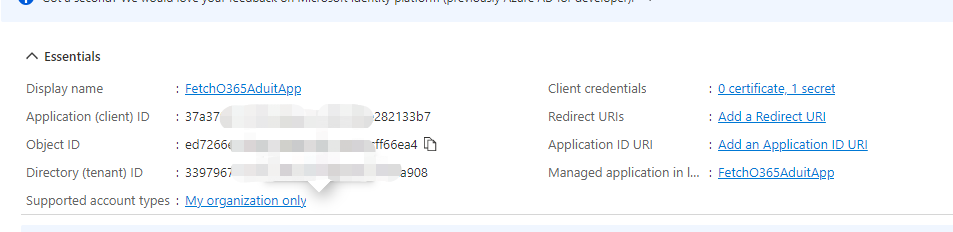
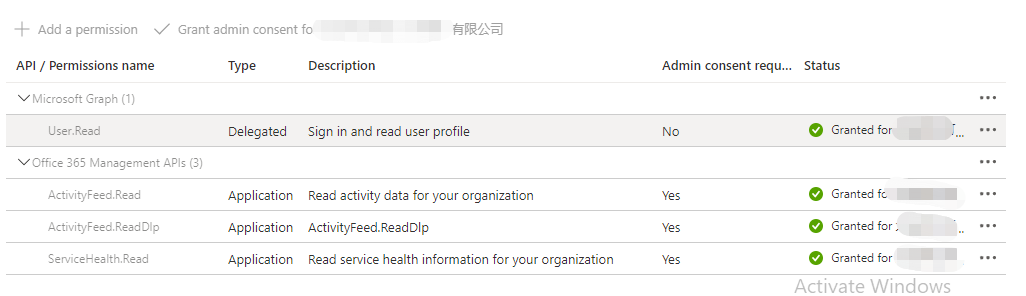
It's v21 version.
The point should not be about which permission to use. I can get the value by calling the Office 365 Management API with the access token got by my application, but it is more convenient to use Get-PnPUnifiedAuditLog.Thank you.
