Microsoft 365 and Office | SharePoint | For business | Windows
A group of Microsoft Products and technologies used for sharing and managing content, knowledge, and applications.

This browser is no longer supported.
Upgrade to Microsoft Edge to take advantage of the latest features, security updates, and technical support.
' cx='32' cy='32' r='32' /%3E%3Ctext x='50%25' y='55%25' dominant-baseline='middle' text-anchor='middle' fill='%23FFF' %3EPR%3C/text%3E%3C/svg%3E)
hi
i was wondering if it was possible to have a calculated column (Next review date) based on the outcomes of 2 columns , one column is a date column (review Date) , the other is a choice column (Document type)
i would like to apply a set number of days to the (Next review date) column based on the selection from the choice (Document type) Column, and the date column (review date)
i have 3 choices that i would like to be 365 days (1 years) and everything else 730 days (2 years)
i'll be honest ive not idea where to start ? so any help would be appreciated
thanks
paddi
A group of Microsoft Products and technologies used for sharing and managing content, knowledge, and applications.
' cx='32' cy='32' r='32' /%3E%3Ctext x='50%25' y='55%25' dominant-baseline='middle' text-anchor='middle' fill='%23FFF' %3EYJ%3C/text%3E%3C/svg%3E)
Hi @Paddi Rooney ,
Thank you for your question.
Can you please give me some examples to illustrate your needs? What are the requirements for the review date and next review date corresponding to each document type, that is, what kind of effect you want to achieve.
Hi,
i would just like to update the next review date column by 1 year or 2 years depending on the document type selected by the end user when adding an item
in that if the users select document type (Policy) then the next review date would be one year after the review date (the review date would be selected by the user at the time)
or if the users select document type (Form) then the next review date would be two years after the review date (the review date would be selected by the user at the time)
im creating a document status register and users will have to review the documents and then update this list to say they have reviewed them and when , i then want to run a flow to notify users when the docs are due for review etc...
thanks
paddi
Answer accepted by question author
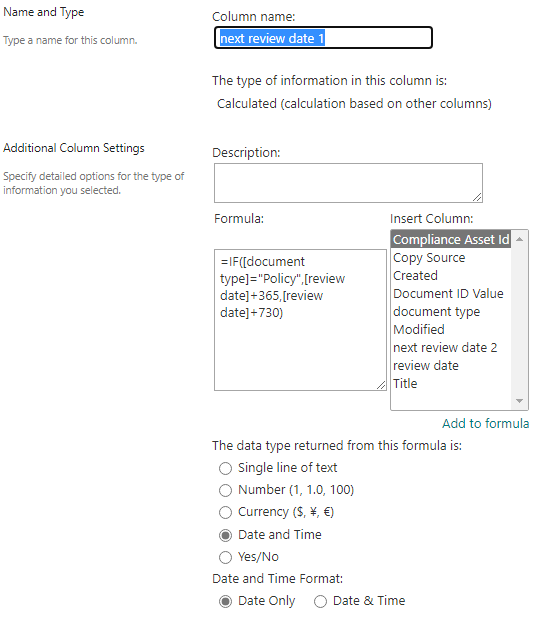
According to my research and testing, you can use the following 2 formulas:
1, Set by days:
=IF([document type]="Policy",[review date]+365,[review date]+730)
2, Set by years:
=IF([document type]="Policy",DATE(YEAR([review date])+1,MONTH([review date]),DAY([review date])),DATE(YEAR([review date])+2,MONTH([review date]),DAY([review date])))
The result:

Thanks,
Yanli Jiang
===========================================
If the answer is helpful, please click "Accept Answer" and kindly upvote it. If you have extra questions about this answer, please click "Comment".
Note: Please follow the steps in our documentation to enable e-mail notifications if you want to receive the related email notification for this thread.
Hi,
i think i may have foundit using your suggestion and another thread
=IF(OR([document type]="Policy",[document type]="Procedure",[document type]="Rail Form",[document type]="Rail Procedure"),[Date of Review]+365,[Date of Review]+730)
thank you so much for the help, its much appreciated
paddi
Hi,
thank you for that answer above , so will i be able to use the below command for the 3 document types that i need to be 1 year, everything else by default will be 2 years ?
=IF([document type]="Policy,Procedures,Rail",[review date]+365,[review date]+730)
=IF([Document Type]="Policy","Procedures","Rail",[Date of Review]+365,[Date of Review]+730)
the command will work if i select either individually but i cant get it to run if i input more as above
thanks