Microsoft 365 and Office | SharePoint | Development
The process of building custom applications and tools that interact with Microsoft SharePoint, including SharePoint Online in Microsoft 365.

This browser is no longer supported.
Upgrade to Microsoft Edge to take advantage of the latest features, security updates, and technical support.
' cx='32' cy='32' r='32' /%3E%3Ctext x='50%25' y='55%25' dominant-baseline='middle' text-anchor='middle' fill='%23FFF' %3ER%3C/text%3E%3C/svg%3E)
Hello
I currently am implementing a solution that lets me input a sharepoint-url which then returns the entire content of said page.
I got as far as getting the "/sites/{siteId}/page/{pageId}" content but there is a problem with the return value.
It works fine with text, since the returned webParts contain the whole text. But not so much with images.
The image webPart has a type, id and instanceId, which is not very useful to me since I don't know what to do with those.
The documentation states that the return value of images should be way more extensive and contain more information.
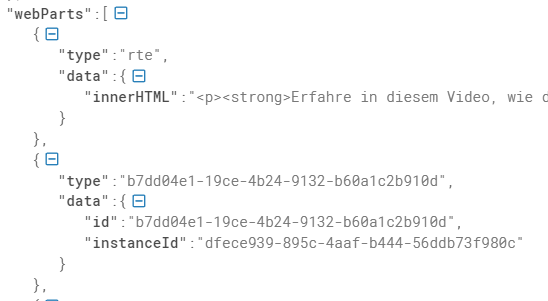
Is there more information to this that im not seeing or is this not implemented yet?
Is there any other way to get the images that im looking for?
' cx='32' cy='32' r='32' /%3E%3Ctext x='50%25' y='55%25' dominant-baseline='middle' text-anchor='middle' fill='%23FFF' %3ESM%3C/text%3E%3C/svg%3E)
Hi @Roman ,
I am able to reproduce this scenario and it seems to be by design. As per this documentation, we can see for image type web part we can only get text data in data property. Moreover in this documentation its mentioned that the sitePageData resource represents the properties of a webPart and as these properties vary by web part, this is an OpenType with no fixed properties.
Also, Please note that this API is under the /beta version in Microsoft Graph which is subject to change. Use of these APIs in production applications is not supported.
Hope this helps.
If the answer is helpful, please click Accept Answer and kindly upvote it. If you have any further questions about this answer, please click Comment.
So there is currently no way (even in /beta) to retrieve images from a sharepoint site?
Or is this a configuration issue from our sharepoint?
Unfortunately no. /beta is in development stage hopefully, it will be added eventually.
' cx='32' cy='32' r='32' /%3E%3Ctext x='50%25' y='55%25' dominant-baseline='middle' text-anchor='middle' fill='%23FFF' %3ELL%3C/text%3E%3C/svg%3E)
I have the same requirement to retrieve images from a sharepoint site. I cannot seems to find a solution in v1.0 version. Would this functionality in the plan of the upcoming graphapi version?