Azure Data Factory
An Azure service for ingesting, preparing, and transforming data at scale.
This browser is no longer supported.
Upgrade to Microsoft Edge to take advantage of the latest features, security updates, and technical support.
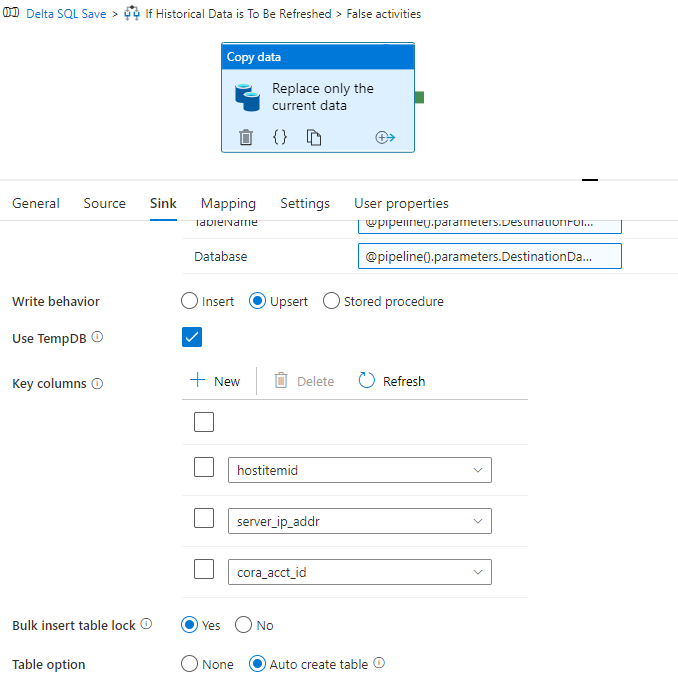
I have a Copy Data task with "Upsert" enabled.
Something very strange is happening where when a row that is found in the destination data set is also in the DELTA file which is to be loaded. ADF is not UPDATING the row, and is adding a second row

This however is only happening with a delta parquet source file which is coming from a different server. I believe the columns I declared (cora_acct_id,hostitemid,server_ip_addr) would create a composite key to find the data within the destination - and update if it is there... well that is not happening, but strangely only for my US data and not my Canadian data.
Why in the world is it writing a second row for this and other examples. (377 examples I can find)

Hi @Dan Barbary ,
Just checking in to see if the below answer helped. Please do consider clicking Accept Answer as accepted answers help community as well.
Hi @Dan Barbary ,
Thankyou for using Microsoft Q&A platform and thanks for posting your question.
As I understand your query, you are trying to perform upsert inside Copy data activity in ADF, however it's not working as expected as it is creating a duplicate. Please let me know if my understanding is incorrect.
What is happening in your case is certainly not expected. As upsert merges the data if the keyColumns matches and then perform update or insert accordingly. There shouldn't be duplicates coming in.
Kindly check if there is any trailing space in any of the column values - cora_acct_id, hostitemid, server_ip_addr which is leading it to treat the two rows as separate entries.
Also, kindly make sure that the source data doesn't have duplicate entries.
Please let us know if any of these is the case . Looking forward to your response. Thanks !
Hello, I did check that there was no trailing spaces or strange hidden characters in the key fields. They are all correct.
Hi @Dan Barbary ,
This is not an expected behavior . This might have been caused due to following reasons:
To check the exact cause of the error, Would it be possible to add a new column during the runtime with value as utcdate() which would depict when that particular record got inserted or modified so that for duplicate record ,we would be able to identify in what frequency it inserts the record and deep dive into the cause of it.
Please let us know if it helps! Thanks
Hi @Dan Barbary ,
Just checking in to see if you got a chance to see previous response. If the suggested response helped you, please click Accept Answer and kindly upvote the same.
Sorry no time yet to check on this, adding the column is a good idea however just need time to try it out.
Hi @Dan Barbary ,
Just checking in to see if you got a chance to try the above approach. If the suggested response helped you, please click Accept Answer as the accepted answer helps community as well.
I was away for a week, today I aim to look into the solutions.
It seems the duplicate records only appear when a scheduled trigger is run. Running the pipeline manually in debug does not cause the error as well as running the pipeline trigger manually "Trigger now" also does not produce duplicate records. I have another pipeline now that is producing errors in the same manner. I have also checked to see if the other settings such as "Write Batch Size", "Max concurrent Connections" and in the settings tab "Degree of Copy Parallelism" have any affect. No matter how I seem to try and debug the process, I end up with no duplicate records. YET when the process is allowed to run on its overnight scheduled trigger, This is where I get the duplicate records showing up.
Very confusing behavior. I'm stumped
Hi @Dan Barbary ,
Would recommend you to please file a support ticket for deeper investigation and in case if you don't have a support plan, do let us know here so that we can check on other options to unblock you.
' cx='32' cy='32' r='32' /%3E%3Ctext x='50%25' y='55%25' dominant-baseline='middle' text-anchor='middle' fill='%23FFF' %3ESG%3C/text%3E%3C/svg%3E)
Hello @AnnuKumari-MSFT ,
I am facing the same issue. In my source, the duplicates are removed, as seen in first query result. However, in my destination, there are two entries, second query result. Also, there are 3 such records out of ~1100 records.
In my case, the date and time is also the same. I am wondering on why all activities are happening at exactly the same timestamp.
Please advise on what is going wrong and how to remove the duplicates
As far as the ADF Upsert is concerned. I believe it does work as designed. In the data that was causing the issues for us was coming from a source that in fact did have duplicate rows of data for what ever reason. I believe because those rows live in different rows ( and potentially different uploaded batches ) ADF sees them as net new when updating.
I'd suggest to try :
Hopefully some words here would trigger you to find your solution. best of luck.