Azure Data Factory
An Azure service for ingesting, preparing, and transforming data at scale.
This browser is no longer supported.
Upgrade to Microsoft Edge to take advantage of the latest features, security updates, and technical support.
' cx='32' cy='32' r='32' /%3E%3Ctext x='50%25' y='55%25' dominant-baseline='middle' text-anchor='middle' fill='%23FFF' %3EMI%3C/text%3E%3C/svg%3E)
I have export a pipeline template (not export arm template) and try to import another adf and had a conneciton string fail.
I copied the connection string from this format ;
Server=tcp:XXX.database.windows.net,1433;Initial Catalog=<databasename>;Persist Security Info=False;User ID=<user>;Password={your_password};MultipleActiveResultSets=False;Encrypt=True;TrustServerCertificate=False;Connection Timeout=30;
And i also try this format copied from linked services and append password
"connectionString": "integrated security=False;encrypt=True;connection timeout=30;data source=XXX.database.windows.net;initial catalog=dbname;user id=username"
Both of these solution does not work.
"message": "The document creation or update failed because the entity name 'Server=tcp:XXX.database.windows.net,1433;Initial Catalog=XXX;Persist Security Info=False;User ID=XXX;Password=XXX;MultipleActiveResultSets=False;Encrypt=True;TrustServerCertificate=False;Connection Timeout=30;' has invalid characters."
' cx='32' cy='32' r='32' /%3E%3Ctext x='50%25' y='55%25' dominant-baseline='middle' text-anchor='middle' fill='%23FFF' %3EBM%3C/text%3E%3C/svg%3E)
Hello @mustafa.ispir ,
Thanks for the question and using MS Q&A platform.
By looking at the error message, it seems like you are having issues with the linked services on the new datafactory.
Could you please try recreating the linked services when you import the template from another adf? when you try to import the template, you will see "use the existing linked services" or "create new linked services". Please click on '+New' linked services and add new linked services to the pipeline.
Please let us know if you still have any issues with this.
Below is the screenshot to create new linked services when importing the pipeline template.

Hi,
Thank you for the answer.But i am not trying 'import from pipeline template'.
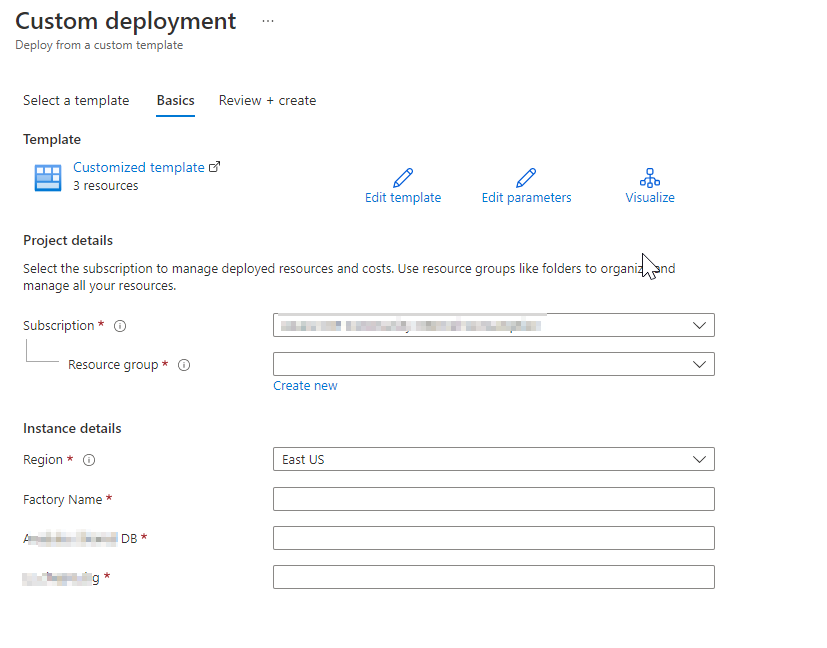
I export template from pipeline and trying to 'import ARM template'.
At this point when i click to create i got this message.

Is it not possible to import like this?
Thank you.
Btw there will be no problem about 'import from pipeline template' solution.
I just wonder what is wrong about 'import ARM template'
Hi @mustafa.ispir ,
When you are trying to import ARM template, did you hard code the parameters or passing the dataset parameters on the fly.
and can you please make sure the datasets are available on the new data factory. I am trying to understand where exactly you are seeing this error.
I have tested from my end and I am able to deploy using "import ARM template"
Hi @mustafa.ispir ,
I am just checking in to see if you have any updates on my above comment. I am looking forward to hearing from you.
Hi @mustafa.ispir ,
I am just checking in to see if you have any updates here.