Developer technologies | VB
An object-oriented programming language developed by Microsoft that can be used in .NET.
This browser is no longer supported.
Upgrade to Microsoft Edge to take advantage of the latest features, security updates, and technical support.
' cx='32' cy='32' r='32' /%3E%3Ctext x='50%25' y='55%25' dominant-baseline='middle' text-anchor='middle' fill='%23FFF' %3ENT%3C/text%3E%3C/svg%3E)
I am adding to columns to a datagridview and I want to write down a text value based on a calculation so the code is like this
Try
            For i As Integer = DataGridView1.RowCount - 1 To 0 Step -1

 If CInt(Replace(DataGridView1.Rows(i).Cells(5).Value, ",", "")) > 2 Then
                    Me.DataGridView1.Rows(i).Cells(8).Value = "High"
 End If


            Next
        Catch
        End Try
But I get an error that says High is not a valid value for int32
So my question is how can I do that to parse it as a text and avoid any errors?

Maybe some of DataGridView1.Rows(i).Cells(5).Value contain "High", which is not a number. Which line generates the error and how did you add the new column? (It must be a text column).

Hi
One thing. You may be better off to use a datatable and do any calculations on its contents rather than on the DataGridView contents, and just use the DataGridView to display the data. Of course, there are arguments to just use the DataGridView directly.
Anyway, based on the limits of your question, and on my previous answer to your earlier question, her is some example code.
This example adds 2 more columns to the DataTable and is also dynamic in that when the textbox value is changed then the results are auto generated. You did not specify what the column should be when NOT "High" so I just used "Low".
Disclaimer: if this example is of no use to you then just crumple it up and throw in the trash!
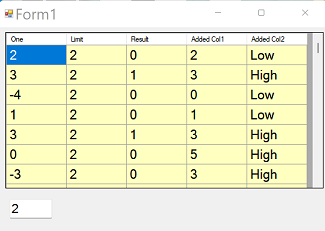
' Form1 with
' DataGridView1
' TextBox1
Option Strict On
Option Explicit On
Public Class Form1
	Dim dt As New DataTable("freddy")
	Private Sub Form1_Load(sender As Object, e As EventArgs) Handles MyBase.Load
		With dt
			.Columns.Add("One", GetType(Integer))
			.Columns.Add("Limit", GetType(Integer))
			.Columns.Add("Result", GetType(Integer), "One > Limit")

			' --------
			dt.Columns.Add("Added Col1", GetType(Integer))
			dt.Columns.Add("Added Col2", GetType(String))
			' --------

			Dim r As New Random
			For i As Integer = 0 To 99
				.Rows.Add(r.Next(-5, 5), Nothing, Nothing, r.Next(0, 6))
			Next
		End With
		DataGridView1.DataSource = dt
		TextBox1.Text = "2"

		' this line will hide the Limit
		' column (uncomment to see)
		'	DataGridView1.Columns("Limit").Visible = False

	End Sub
	Function GetInteger(s As String) As Integer
		Dim v As Integer = 0
		If Integer.TryParse(s, v) Then Return v
		Return 0
	End Function

	Private Sub TextBox1_TextChanged(sender As Object, e As EventArgs) Handles TextBox1.TextChanged
		Dim v As Integer = GetInteger(TextBox1.Text)
		For i As Integer = 0 To dt.Rows.Count - 1
			dt(i)("Limit") = v
			dt(i)("Added Col2") = IIf(GetInteger(dt(i)("Added Col1").ToString) > 2, "High", "Low")
		Next
	End Sub
End Class
I need to mention that I add the columns to hold the value with code.
Sorry for late response, I tried your code and it's working just fine. I am trying to implement that to my code but I can't make it happen. I tried a few different stuff but I get some strange results. There are approximately 23.000 rows but only the last 2.000 rows are calculated and all the other ones are empty (I have the code inside a try...catch...end try.)
So let's recap.
What do you suggest me to do for the next scenario...
I have a mysql online database with the data and I want to download the data to my vb.net app and then do the calculations as I mentioned before. The way I do it is by loading all the data to datagridview and then trying to do the calculations.
But what will be a better approach for a scenario like this. You mentioned that is better to load the data to a datatable and then display the data to datagridview. Is it possible to connect a datatable to mysql database? I am asking because I couldn't find anything. Can I use a listview instead of a datagridview?
What do you think is the best way for a scenario like this?
Hi
Do you download the entire database to your computer before connecting to it etc?
If so, how do you access it? DataTables are integral to handling the data.
I am not knowledgable in database code - others may help with that, but after accessing the data and filling a datatable(s), then ask further questions.
Start a new question for help with accessing the data in your database if needed. Initially, step one is to connect to the database and fill datatable(s) with your data. Then, further questions regarding the use of the data within your code.
Thank you for your answer. You are right I should open a new question about this topic.