Azure Data Lake Storage
An Azure service that provides an enterprise-wide hyper-scale repository for big data analytic workloads and is integrated with Azure Blob Storage.
This browser is no longer supported.
Upgrade to Microsoft Edge to take advantage of the latest features, security updates, and technical support.
' cx='32' cy='32' r='32' /%3E%3Ctext x='50%25' y='55%25' dominant-baseline='middle' text-anchor='middle' fill='%23FFF' %3ER4%3C/text%3E%3C/svg%3E)
Hi
I have a pipeline using Data Flow activity which reads csv files from data lake(common data model from D365 CE)
I am reading and loading files into SQL DB in a loop. So, I have chosen Schema Drift.
Data Flow is parameterized. All are working well except date fields.
Every data field is inserted into the sql table as NULL even though there is value in csv file.
If I create pipeline without loop and selected Import schema in Data Flow source (ADLS) and still clicked schema drift. Sink(SQL) still uses Auto Mapping.
But the date fields are coming well and populated in sql table.
What is the issue with dynamic and parameterized data flow?
Thanks in advance

Hi @rajanisqldev-42 ,
Thank you for posting query in Microsoft Q&A Platform.
Usually nulls will get insert into SQL DB when you source file column data cannot be converted as SQL type datatype for that column automatically.
In your case your source is csv file, that means all columns in file by default will come as string type. So, date column also will come as string into dataflow. Making sure to use a derived column transformation on top of date column to convert its type to date and then load into SQL table will help here.
Check this video to know about derived column transformation.
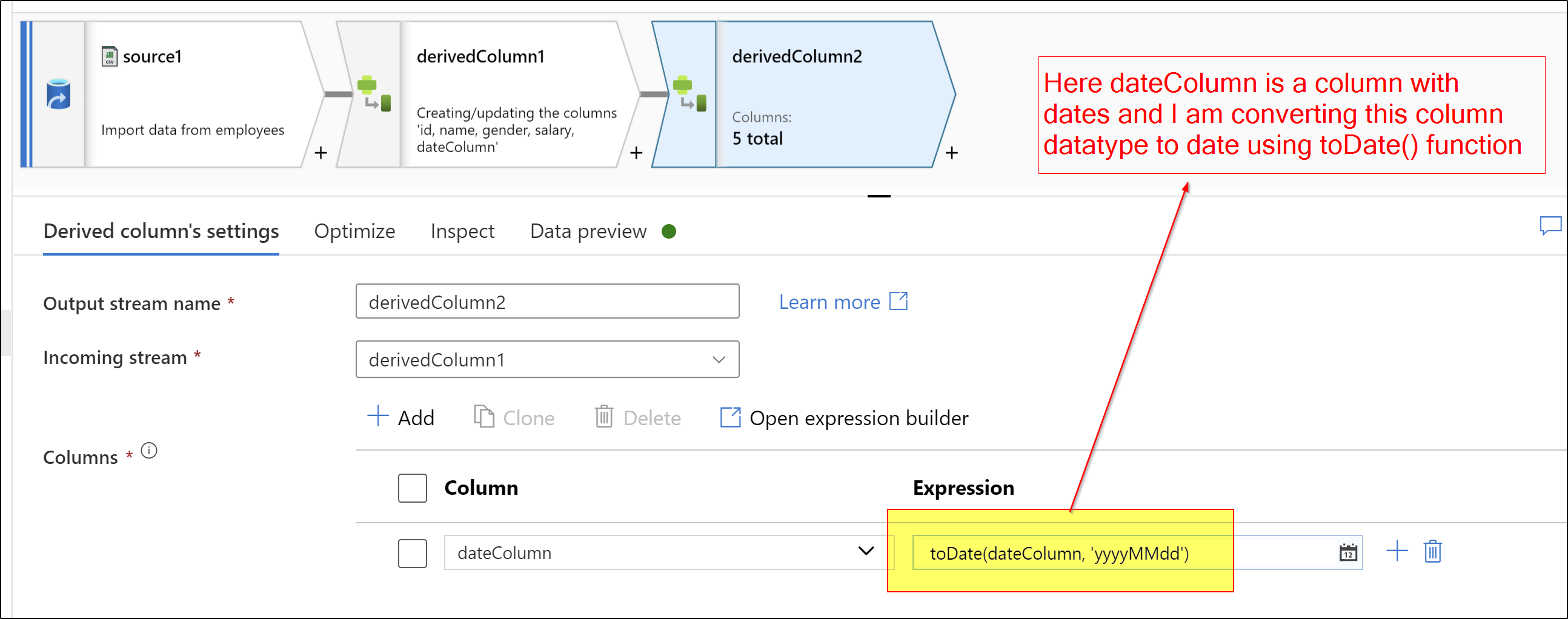
Hope this helps. Please let us know if any queries.
-----------
Please consider hitting Accept Answer and Up-vote. Accepted answers help community as well.
Hi @rajanisqldev-42 ,
Just checking in to see if the above answer helped. If this answers your query, do click  and upvote
  for the same. And, if you have any further query do let us know.