Azure Monitor
An Azure service that is used to collect, analyze, and act on telemetry data from Azure and on-premises environments.
This browser is no longer supported.
Upgrade to Microsoft Edge to take advantage of the latest features, security updates, and technical support.
' cx='32' cy='32' r='32' /%3E%3Ctext x='50%25' y='55%25' dominant-baseline='middle' text-anchor='middle' fill='%23FFF' %3EBT%3C/text%3E%3C/svg%3E)
Good morning
I hope that all is well.
I have seen a report indicating that the user machine is "compliant" however, not sure on what contributed to the machine to be compliant. Is there a way one can check the "back-end" on what contributed to the machine to be compliant?
An Azure service that is used to collect, analyze, and act on telemetry data from Azure and on-premises environments.
Setting up and managing device configurations using Intune

Other Intune-related topics, including unsupported scenarios and platform-specific behaviors

Hi @Bilwane, Thapelo ,
Can you please clarify if this question is related to Azure Automation Update management or Azure Active Directory or Intune or something else?
it is related to Intune. The organization is using micorsoft azure to monitor and patch devices
Hi @Bilwane, Thapelo ,
Okay. I have added intune related tags to this question so tag related SME's might be able to provide insights.
' cx='32' cy='32' r='32' /%3E%3Ctext x='50%25' y='55%25' dominant-baseline='middle' text-anchor='middle' fill='%23FFF' %3ECM%3C/text%3E%3C/svg%3E)
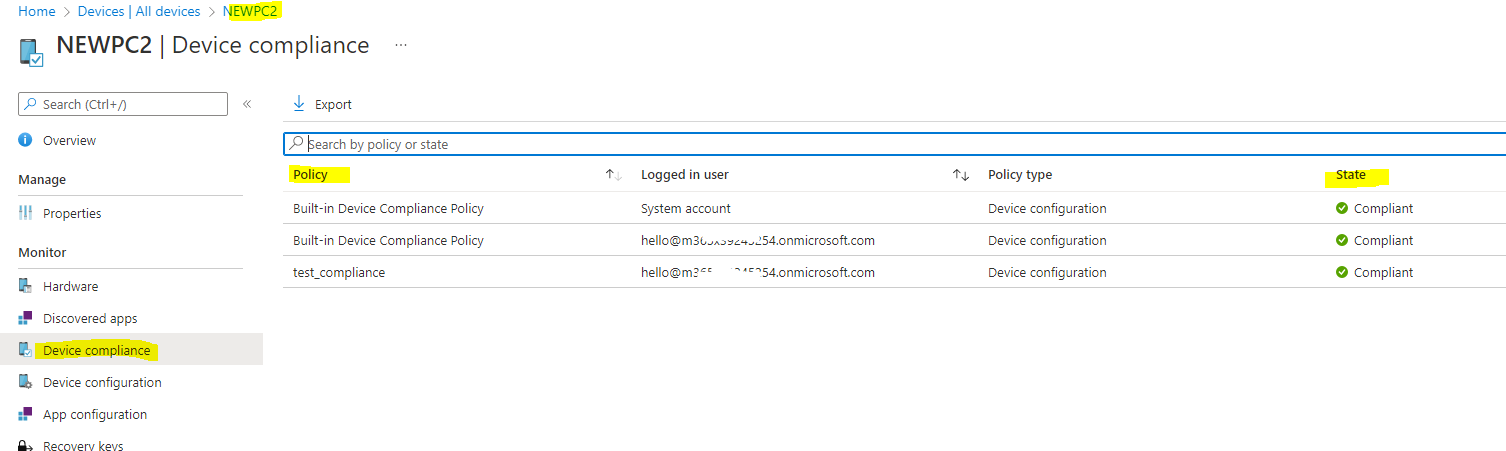
@Bilwane, Thapelo , To see what are the compliance policies applied to this device which state is compliant, we can go to Intune portal, Devices->All devices, find the device, click Device compliance, then we can see the compliance policies applied and its state.
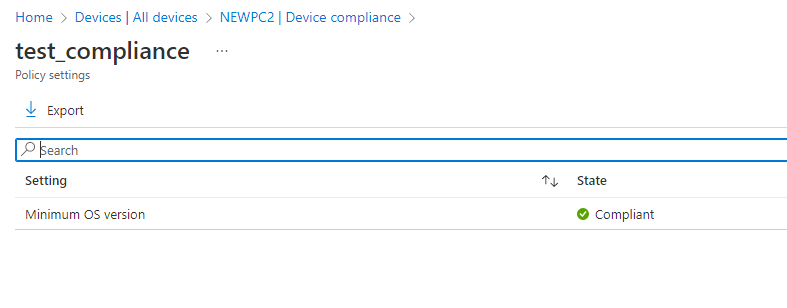
Meanwhile, we can also click the compliance policy to see the compliance state of each setting in compliance policy.
Hope it can help.
If the answer is helpful, please click "Accept Answer" and kindly upvote it. If you have extra questions about this answer, please click "Comment".
Note: Please follow the steps in our documentation to enable e-mail notifications if you want to receive the related email notification for this thread. 2: /api/attachments/225879-image.png?platform=QnA
@Bilwane, Thapelo , How's everything going? I am writing to see if the above information can help. If there's anything else we can help, feel free to let us know.