Developer technologies | VB
An object-oriented programming language developed by Microsoft that can be used in .NET.
This browser is no longer supported.
Upgrade to Microsoft Edge to take advantage of the latest features, security updates, and technical support.
' cx='32' cy='32' r='32' /%3E%3Ctext x='50%25' y='55%25' dominant-baseline='middle' text-anchor='middle' fill='%23FFF' %3ENT%3C/text%3E%3C/svg%3E)
I have an online mysql database and I want to connect to retrieve the data from one table. I know how to do that for a datagridview but don't know or found anything on how to do that on a listview or a datatable. When I download the data I want to do some calculations and add some additional columns to hold data. Now here are some of my questions:
How to connect a listview to a mysql server?
How to connect a datatable to a mysql server and then display the data to listview or datagridview?
What is the best approach to download the data, which is better option for my scenario.
Now the reason I want to do the calculations on the app and not in the data it self is because my data contains around 23.000 to 30.000 rows of data and 10 columns. The columns I want to calculate are around 70 more , and when I do that on an excel it takes for ever for the sheet to do the calculations, so i thought it will be faster if i do that on the app.
What will be your approach if you wanted to do something like that?
Here is my code that I am currently using:
Imports MySql.Data.MySqlClient

Public Class Form1

    Dim MysqlConn As MySqlConnection

    Dim COMMAND As MySqlCommand


    Public sconnection As New MySqlConnection

    Private Sub Form1_Load(sender As Object, e As EventArgs) Handles MyBase.Load
        'open the connection to mysql

        If sconnection.State = ConnectionState.Closed Then
            sconnection.ConnectionString = "My connection string"
            sconnection.Open()

        End If

    End Sub


    Private Sub Button1_Click(sender As Object, e As EventArgs) Handles Button1.Click

        'Connect to mysql to get data
        MysqlConn = New MySqlConnection
        MysqlConn.ConnectionString = "My connection string"

        Dim SDA As New MySqlDataAdapter
        Dim dbdataset As New DataTable
        Dim bsource As New BindingSource

        'Clear datagridview before re-apply data
        dbdataset.Clear()
        DataGridView1.Columns.Clear()
        DataGridView1.Refresh()

        Try
            MysqlConn.Open()
            Dim query As String
            query = ("select * from Test1.Complete ")
            COMMAND = New MySqlCommand(query, MysqlConn)
            SDA.SelectCommand = COMMAND

            SDA.Fill(dbdataset)
            bsource.DataSource = dbdataset
            DataGridView1.DataSource = bsource
            SDA.Update(dbdataset)

            MysqlConn.Close()

        Catch ex As Exception
            MessageBox.Show(ex.Message)
        Finally
            MysqlConn.Dispose()

        End Try

        'Add additional columns to datagridview
        DataGridView1.Columns.Add("NameOfColumn", "First Calc Test")
        DataGridView1.Columns.Add("NameOfColumn", "Second Calc Test")


        'Do some test calculations
        Try
            For i As Integer = DataGridView1.RowCount - 1 - 1 To 0 Step -1
                If CInt(Replace(DataGridView1.Rows(i).Cells(5).Value, ",", "")) > 2 Then
                    Me.DataGridView1.Rows(i).Cells(8).Value = "High"
                ElseIf CInt(Replace(DataGridView1.Rows(i).Cells(5).Value, ",", "")) > 1 Then
                    Me.DataGridView1.Rows(i).Cells(8).Value = "Medium"
                ElseIf CInt(Replace(DataGridView1.Rows(i).Cells(5).Value, ",", "")) > 0 Then
                    Me.DataGridView1.Rows(i).Cells(8).Value = "Low"
                ElseIf CInt(Replace(DataGridView1.Rows(i).Cells(5).Value, ",", "")) < 1 Then
                    Me.DataGridView1.Rows(i).Cells(8).Value = "Very Low"
                End If

                If CInt(Replace(DataGridView1.Rows(i).Cells(7).Value, ",", "")) - CInt(Replace(DataGridView1.Rows(i).Cells(5).Value, ",", "")) > 2 Then
                    Me.DataGridView1.Rows(i).Cells(9).Value = "High"
                ElseIf CInt(Replace(DataGridView1.Rows(i).Cells(7).Value, ",", "")) - CInt(Replace(DataGridView1.Rows(i).Cells(5).Value, ",", "")) > 1 Then
                    Me.DataGridView1.Rows(i).Cells(9).Value = "Medium"
                ElseIf CInt(Replace(DataGridView1.Rows(i).Cells(7).Value, ",", "")) - CInt(Replace(DataGridView1.Rows(i).Cells(5).Value, ",", "")) > 0 Then
                    Me.DataGridView1.Rows(i).Cells(9).Value = "Low"
                ElseIf CInt(Replace(DataGridView1.Rows(i).Cells(7).Value, ",", "")) - CInt(Replace(DataGridView1.Rows(i).Cells(5).Value, ",", "")) < 1 Then
                    Me.DataGridView1.Rows(i).Cells(9).Value = "Very Low"
                End If


            Next
        Catch
        End Try

    End Sub


End Class
This is the error i get when i do the calculations
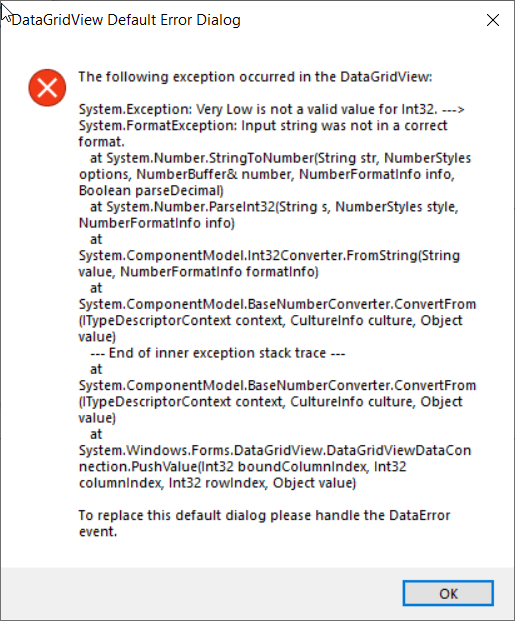

Hi
Does everything work as expected up to line 61 of the code you posted?
Also, please post a couple of lines of the dbdataset with example data.
I am confused, I created a sample table with 3.000 rows so you can test it for your self. But the problem is that now the code is working as supposed to do. So I deleted some data to see if my empty lines are causing this issue. But it's working again. Now I need to try to add more than 3.000 lines to check again. In the meantime this is the complete code (there is no other code).
I have some issues with the software I am using to upload the data (DBeaver) so I did it from my browser (phpmyadmin) and I can't upload more data (more rows) at the moment.
Imports MySql.Data.MySqlClient

Public Class Form1

    Dim MysqlConn As MySqlConnection

    Dim COMMAND As MySqlCommand


    Public sconnection As New MySqlConnection

    Private Sub Form1_Load(sender As Object, e As EventArgs) Handles MyBase.Load
        'open the connection to mysql

         If sconnection.State = ConnectionState.Closed Then
            sconnection.ConnectionString = "server=sql11.freesqldatabase.com;userid=sql11508072;password=s2PWmyaDkE"
            sconnection.Open()

        End If

    End Sub


    Private Sub Button1_Click(sender As Object, e As EventArgs) Handles Button1.Click

        'Connect to mysql to get data
        MysqlConn = New MySqlConnection
        MysqlConn.ConnectionString = "server=sql11.freesqldatabase.com;userid=sql11508072;password=s2PWmyaDkE"

        Dim SDA As New MySqlDataAdapter
        Dim dbdataset As New DataTable
        Dim bsource As New BindingSource

        'Clear datagridview before re-apply data
        dbdataset.Clear()
        DataGridView1.Columns.Clear()
        DataGridView1.Refresh()

        Try
            MysqlConn.Open()
            Dim query As String
            query = ("select * from sql11508072.Complete ")
            COMMAND = New MySqlCommand(query, MysqlConn)
            SDA.SelectCommand = COMMAND

            SDA.Fill(dbdataset)
            bsource.DataSource = dbdataset
            DataGridView1.DataSource = bsource
            SDA.Update(dbdataset)

            MysqlConn.Close()

        Catch ex As Exception
            MessageBox.Show(ex.Message)
        Finally
            MysqlConn.Dispose()

        End Try

        'Add additional columns to datagridview
        DataGridView1.Columns.Add("NameOfColumn", "First Calc Test")
        DataGridView1.Columns.Add("NameOfColumn", "Second Calc Test")


        'Do some test calculations
        Try
            For i As Integer = DataGridView1.RowCount - 1 - 1 To 0 Step -1
                If CInt(Replace(DataGridView1.Rows(i).Cells(5).Value, ",", "")) > 2 Then
                    Me.DataGridView1.Rows(i).Cells(8).Value = "High"
                ElseIf CInt(Replace(DataGridView1.Rows(i).Cells(5).Value, ",", "")) > 1 Then
                    Me.DataGridView1.Rows(i).Cells(8).Value = "Medium"
                ElseIf CInt(Replace(DataGridView1.Rows(i).Cells(5).Value, ",", "")) > 0 Then
                    Me.DataGridView1.Rows(i).Cells(8).Value = "Low"
                ElseIf CInt(Replace(DataGridView1.Rows(i).Cells(5).Value, ",", "")) < 1 Then
                    Me.DataGridView1.Rows(i).Cells(8).Value = "Very Low"
                End If

                If CInt(Replace(DataGridView1.Rows(i).Cells(7).Value, ",", "")) - CInt(Replace(DataGridView1.Rows(i).Cells(5).Value, ",", "")) > 2 Then
                    Me.DataGridView1.Rows(i).Cells(9).Value = "High"
                ElseIf CInt(Replace(DataGridView1.Rows(i).Cells(7).Value, ",", "")) - CInt(Replace(DataGridView1.Rows(i).Cells(5).Value, ",", "")) > 1 Then
                    Me.DataGridView1.Rows(i).Cells(9).Value = "Medium"
                ElseIf CInt(Replace(DataGridView1.Rows(i).Cells(7).Value, ",", "")) - CInt(Replace(DataGridView1.Rows(i).Cells(5).Value, ",", "")) > 0 Then
                    Me.DataGridView1.Rows(i).Cells(9).Value = "Low"
                ElseIf CInt(Replace(DataGridView1.Rows(i).Cells(7).Value, ",", "")) - CInt(Replace(DataGridView1.Rows(i).Cells(5).Value, ",", "")) < 1 Then
                    Me.DataGridView1.Rows(i).Cells(9).Value = "Very Low"
                End If


            Next
        Catch
        End Try

    End Sub


End Class
Hi
Don't worry about posting all the data, just 2 or 3 lines would do. I just need to see the dormats and number of columns the data needs.
Also, you didn't answer my main question: is everything working as expected up to line 61?
Although, you seem to say the code is in fact working OK at times, so up to line 61 must be OK.
Yes everything working just fine up to line 61. I am trying to figure out why I was getting the error message before so hopefully you can see what I don't see, and help me with that.
Hi
I can't progress this as I have no idea what your datta looks like.

A novice mistake is doing what you are, calculating using cell values while the DataGridView has a DataSource. And assuming the calculated value is read-only I recommend performing the calculation when loading the data using a case statement where here I do one column, simply do the same for the second column. I may not have all conditions but you should get the point, adjust as needed
SELECT Id, SomeInt, [First Calc Test] =
CASE
	WHEN SomeInt < 0 THEN 'Very Low'
	WHEN SomeInt = 0 THEN 'Low'
	WHEN SomeInt > 1 THEN 'Medium'
	WHEN SomeInt >= 2 THEN 'High'
ELSE
	'(unknown)'
END
FROM dbo.WorkingCaseStatements;
Karen I tried to implement your sample code in my code but I had no luck with that (I am not that good in programing). But I tried a lot of things in those days and what I did is this and seems to working just fine. But any advice will be welcomed.
So what I did:
I change this code:
 For i As Integer = DataGridView1.RowCount - 1 - 1 To 0 Step -1
                     If CInt(Replace(DataGridView1.Rows(i).Cells(5).Value, ",", "")) > 2 Then
Me.DataGridView1.Rows(i).Cells(8).Value = "High"
To this:
For i As Integer = DataGridView1.RowCount - 1 - 1 To 0 Step -1
            If CInt(Replace(DataGridView1.Rows(i).Cells(5).Value.ToString, ",", "")) > 2 Then
                Me.DataGridView1.Rows(i).Cells(9).Value = "High"
Now in the next code I had an issue, when the values I was calculating where empty (no values) or if the result of..
If CInt(Replace(DataGridView1.Rows(i).Cells(7).Value.ToString, ",", "")) - CInt(Replace(DataGridView1.Rows(i).Cells(5).Value.ToString, ",", "")) > 2 Then
                Me.DataGridView1.Rows(i).Cells(10).Value = "High"
...was 0 then it throws an error so I added this
ElseIf CInt(Replace(DataGridView1.Rows(i).Cells(7).Value.ToString, ",", "")) - CInt(Replace(DataGridView1.Rows(i).Cells(5).Value.ToString, ",", "")) = Nothing Then
                Me.DataGridView1.Rows(i).Cells(10).Value = "No values"
Now it's working but any advice will be appreciated.