Microsoft Security | Microsoft Authenticator
A Microsoft app for iOS and Android devices that enables authentication with two-factor verification, phone sign-in, and code generation

This browser is no longer supported.
Upgrade to Microsoft Edge to take advantage of the latest features, security updates, and technical support.
' cx='32' cy='32' r='32' /%3E%3Ctext x='50%25' y='55%25' dominant-baseline='middle' text-anchor='middle' fill='%23FFF' %3EM%3C/text%3E%3C/svg%3E)
When I try to add my work account ******@mycompany.com.au) to the Microsoft Authenticator app the app asks me to enter my email address which is fine.
It then comes up with a screen saying "Approve sign-in request" and the text below says "We've sent a notification to your mobile device. Please open Microsoft Authenticator app to respond".
But I am in the app trying to set this account up so I can't re-open it and if I do I just get back to the "Add account" home(?) screen.
The only other way of verifying my account that is available to me is send a code to the app which is also unhelpful. There is no option to send a text message.
It seems that the only way to verify my account is using the app. When I log on to the website and try and look at any security settings I am again asked to verify my identity with the app which does not work and there is no alternative.
Note that I have my own company (it is a one man company), I have my own email and that is about it. I do not have an IT department.
If I try to set up MFA with the below link I get the same problem.
What can I do?
' cx='32' cy='32' r='32' /%3E%3Ctext x='50%25' y='55%25' dominant-baseline='middle' text-anchor='middle' fill='%23FFF' %3EA%3C/text%3E%3C/svg%3E)
I try to add my work account
You can follow along here.
https://support.microsoft.com/en-us/account-billing/add-your-work-or-school-account-to-the-microsoft-authenticator-app-43a73ab5-b4e8-446d-9e54-2a4cb8e4e93c
--please don't forget to upvote and Accept as answer if the reply is helpful--
Just checking if there's any progress or updates?
--please don't forget to upvote and Accept as answer if the reply is helpful--
DSPatrick - i tried to answer you in this section, but after clicking submit a couple of times and nothing happened, i decided to post my reply to you in a separate post. Miguel.
Please don't forget to close up the thread by 
Thanks DSPatrick.
The issue is that a bought a Office 365 (business plan) - I register my account in Microsoft site, paid and now I have the apps working in my computer. Next time, when I tried to access my Microsoft account using my email and password, the Microsoft site asks for the verification code using Authenticator. As I did not have that email account in the authenticator, i decided to add it. I followed the steps in the Authenticator apps (press "add account", enter email and password). Then the authenticator app, where I am adding the account, asks me for the verification code which is provided by the ..., authenticator (where at the same time I am adding the account - this step does not make sense). I thought the Authenticator, after I added the password for my email and it was confirmed, would send an email to my account with some code. Then I introduce the code into the Authenticator to verify that I am the owner of the account, and I can the email with the Authenticator. This does not happen.
I checked the link you sent me.
1- I do not have a Temporary Access Pass.
2- when I registered with Microsoft, they did not request to have a strong authentication methods.
3- it does not help. the Microsoft site asks me for the verification code...which i am unable to obtain because when I add my email to authenticator (see above), authenticator requires the verification code from the Authenticator...
Thanks DSPatrick.
The issue is that a bought a Office 365 (business plan) - I register my account in Microsoft site, paid and now I have Office365 working in my computer. Next time, when I tried to access my Microsoft account using my email and password, the Microsoft site asks for the verification code using Authenticator. As I did not have that email account in the authenticator, i decided to add it. I followed the steps in the Authenticator apps (press "add account", enter email and password). Then the authenticator app, where I am adding the account, asks me for the verification code which is provided by the ..., authenticator (where at the same time I am adding the account - this step does not make sense). I thought the Authenticator, after I added the password for my email and the access was confirmed, would send an email to my account with some code. Then I introduce the code into the Authenticator to verify that I am the owner of the account, and I can the email with the Authenticator. This does not happen.
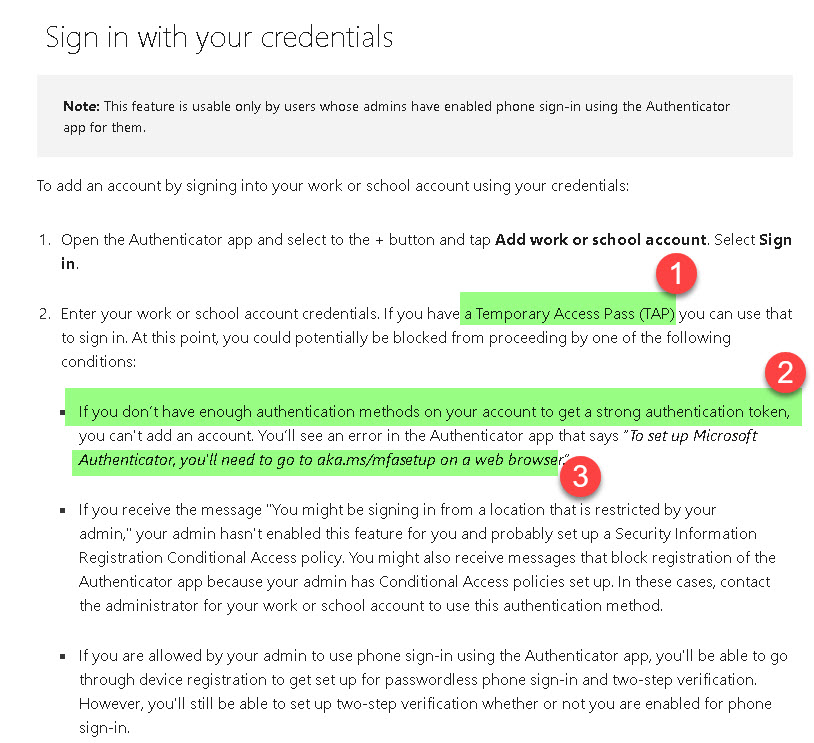
I checked the link you sent me. See picture with some notes.
1- I do not have a Temporary Access Pass.
2- when I registered with Microsoft, they did not request to have a strong authentication methods.
3- it does not help. the Microsoft site asks me for the verification code...which i am unable to obtain because when I add my email to authenticator (see above), authenticator requires the verification code from the Authenticator...it is going in circles.
when I tried to access my Microsoft account
Try to sign in to your account but select the Sign in another way link on the Two-factor verification page (assumes another way was setup)https://support.microsoft.com/en-us/account-billing/common-problems-with-two-step-verification-for-a-work-or-school-account-63acbb9b-16a1-47b9-8619-6a865e8071a5
--please don't forget to upvote and Accept as answer if the reply is helpful--