Microsoft 365 and Office | Development | Other
Building custom solutions that extend, automate, and integrate Microsoft 365 apps.

This browser is no longer supported.
Upgrade to Microsoft Edge to take advantage of the latest features, security updates, and technical support.
' cx='32' cy='32' r='32' /%3E%3Ctext x='50%25' y='55%25' dominant-baseline='middle' text-anchor='middle' fill='%23FFF' %3EAA%3C/text%3E%3C/svg%3E)
Hi Forum!
I wish to create custom icons for MS Project 2016 to add to my custom tabs.
In MS Project 2016, I created XML in a VBA that automatically creates custom tabs via the "Auto_Open" named macro. That works perfectly. However, I can only use standard imageMso icons. I wish to create new, custom icon images.
In the past, I have used the CustomUIEditor.exe to insert icons for Excel, yet this does not work for MS Project. From what I see, that tool is good for Excel, Word and PowerPoint only.
From my internet search, I have not identified a method/way to create, store and add custom icon images to an MS Project custom tab. Thus far, I am OK at writing VBA macros, creating custom tabs, and using standard imageMso icons. Yet, I am not a "trained" MS Developer in VBA or XML and could use an assist in this area.
Many thanks in advance!
Allen
' cx='32' cy='32' r='32' /%3E%3Ctext x='50%25' y='55%25' dominant-baseline='middle' text-anchor='middle' fill='%23FFF' %3EMD%3C/text%3E%3C/svg%3E)
Hi Allen,
hope this link can help you.
check
It is an Italian video but I suppose it will help you
Marco
Hi Marco!
Thank you for the video suggestion. I saw use of the "Custom RibbonX" editor and will pursue that. I previously found the RibbonX editor in my research and have not yet checked it out. Yet, I will have to see IF it acknowledges MS Project .mpp files. The Previous "Custom UI Editor" did not--hence my question here. I will provide an update as I have it.
Thanks again!
Allen
Hi Marco!
An update: I installed current versions of the SDK and the .net Framework. I also installed the Custom RibbonX Editor as show in the video. However, I still cannot find a way to add custom icons to MSP. Nor could I get the RibbonX Editor to acknowledge the .mpp file type. RibbonX works for Excel, Word, PPT and Visio, but not MSP.
Oh well, I will use the stock iso images for now.
Thanks for the assist!
Allen

CustomUIEditor.exe is a good program for beginners, anyway put files in right places where using office files.
I create ions based on my own creation, then i realize that not every extensions can work with that.
You should check place like *customUI\images*
and ext png (can included transparency) be sure of small size and 32b color
Buton should have: image="filename without ext"
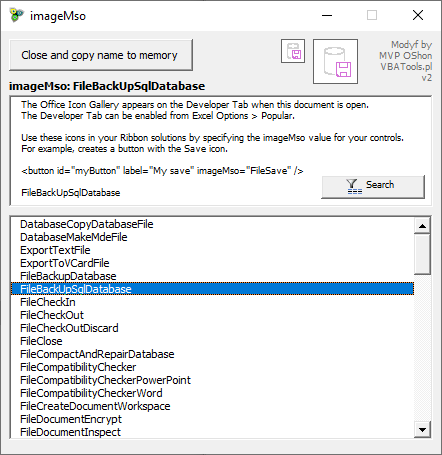
Anyway if you can back for icons immageMSO then I create tool for looking and searching proper image: galeria-ikon-imagemso
Regards