Microsoft 365 and Office | Excel | For business | Windows
A family of Microsoft spreadsheet software with tools for analyzing, charting, and communicating data

This browser is no longer supported.
Upgrade to Microsoft Edge to take advantage of the latest features, security updates, and technical support.
' cx='32' cy='32' r='32' /%3E%3Ctext x='50%25' y='55%25' dominant-baseline='middle' text-anchor='middle' fill='%23FFF' %3ECJ%3C/text%3E%3C/svg%3E)
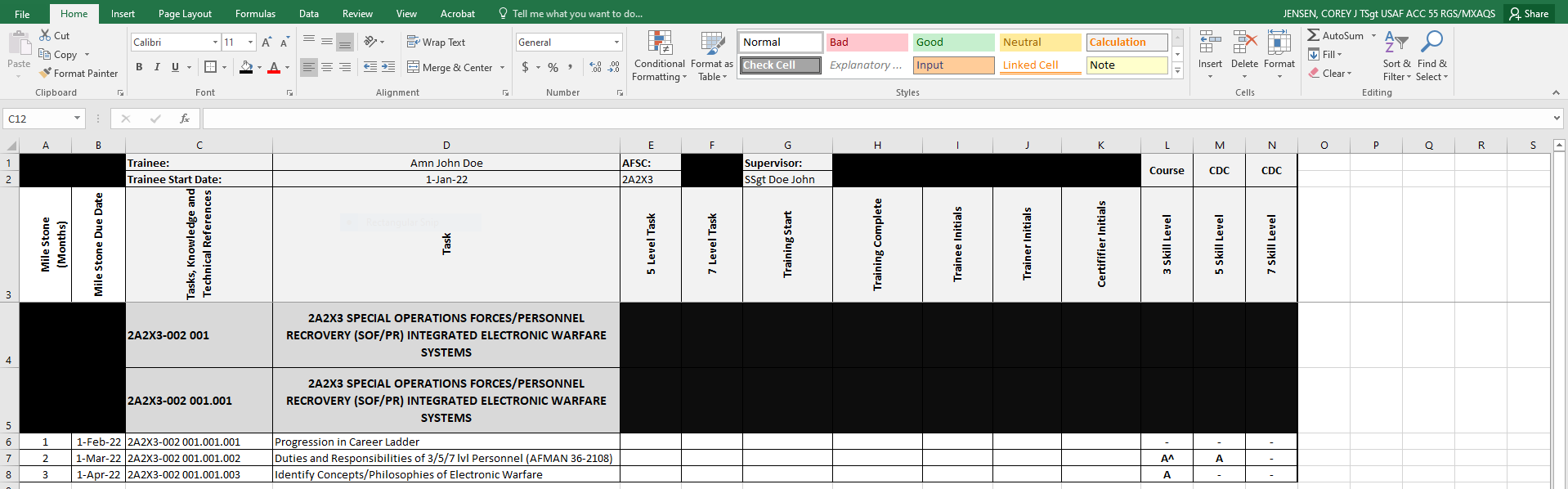
Hopefully the image loaded correctly this time. I'm trying to set up an excel sheet to track training progress. We use milestones to indicate when the training should be done based off the date of when a new member arrives. Column A is the number of months, column B is the due date. D2 is the date of when they arrived and is what the dates in column B are calculated from. In order for someone to be fully qualified in a task, the trainee (column I) and trainer (column J) must initial in their blocks. So, here's what I'm trying to do...
I've set up column B to project due dates based off the date they arrived and the number in column A =EDATE($D$2,A6) Easy enough, now how do I set it up to turn green when the trainee and trainer initial their blocks? I can't use character specific due to initials always being different. Any help would be appreciated.
A family of Microsoft spreadsheet software with tools for analyzing, charting, and communicating data

Hi,
Which column do you want to create the conditional formatting?
Column B if it can incorporate the EDATE, if not then column D (Task Column).