Community Center | Not monitored
Tag not monitored by Microsoft.

This browser is no longer supported.
Upgrade to Microsoft Edge to take advantage of the latest features, security updates, and technical support.
' cx='32' cy='32' r='32' /%3E%3Ctext x='50%25' y='55%25' dominant-baseline='middle' text-anchor='middle' fill='%23FFF' %3ENC%3C/text%3E%3C/svg%3E)
I have a calculated column in a SharePoint List that I would like to utilize in the integrated PowerBI module but it does not appear to be treated as a number in PowerBI. Below is the column configuration:
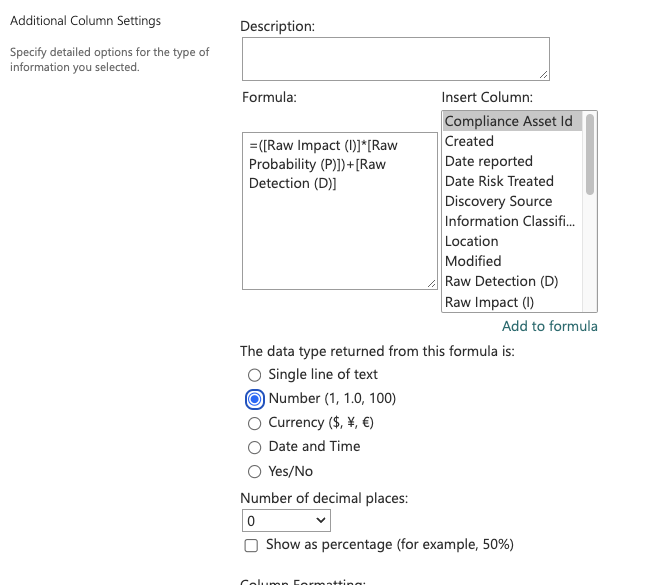
When I utilize the PowerBI integration on this SharePoint list, the only options I have for this column is Count. I do not have the options to sum, average or any of the other number options. I would like to have a dynamic dashboard built that does not require an import into PowerBI.
' cx='32' cy='32' r='32' /%3E%3Ctext x='50%25' y='55%25' dominant-baseline='middle' text-anchor='middle' fill='%23FFF' %3EA%3C/text%3E%3C/svg%3E)
Power Bi is not currently supported here on Q&A. The product group for Power Bi actively monitors questions over at
https://community.powerbi.com/
--please don't forget to upvote and  if the reply is helpful--