Azure Virtual Network
An Azure networking service that is used to provision private networks and optionally to connect to on-premises datacenters.
This browser is no longer supported.
Upgrade to Microsoft Edge to take advantage of the latest features, security updates, and technical support.
' cx='32' cy='32' r='32' /%3E%3Ctext x='50%25' y='55%25' dominant-baseline='middle' text-anchor='middle' fill='%23FFF' %3ECP%3C/text%3E%3C/svg%3E)
I have a server within a subnet that I want to be the VPN gateway for my Azure services. On the on-premises side of the network, I set a static route in DHCP that routes remote subnets to the gateway which deals with getting the traffic to the destination. I would prefer to keep using this setup since it's easier to manage than manually setting up expressroutes going everywhere.
I tried setting up a route table and associating it with the subnet but for some reason, it isn't working. When trying to connect to the remote subnet, the gateway responds, saying that the next hop is the default gateway.
Not sure if I configured my route table wrong or if there's a completely different way I should be doing this.
An Azure networking service that is used to provision private networks and optionally to connect to on-premises datacenters.

Hi @Charles Pickering ,
Welcome to the Microsoft Q&A Platform. Thank you for reaching out & I hope you are doing well.
I understand that you are trying to set up routing between your on-premises and Azure via a custom VPN server/gateway.
Can you please provide more details on your setup?
Thanks,
Kapil
Hey! Thanks for helping me out.
The gateway I am referring to the server in azure. I was a little fluid going between the OS itself and the software that is handling routing. I'm using Tailscale on Ubuntu 22.04. That server is within a subnet with all the other VMs (for now).
When pinging from a server in azure to a private ip on prem, the following message appears:
From 10.1.1.4 icmp_seq=6 Redirect Host(New nexthop: 10.1.1.1)
I configured it in a route table attached to the vnet as you described.
I did not think to put it on a separate subnet. Doing so makes pings just drop it seems.
Hi @Charles Pickering ,
Thanks for the update.
Before Troubleshooting for other VMs, can you confirm if your VPN VM is able to ping the OnPrem machines?
If not,
We should focus on this before proceeding further.
If yes,
P.S :
Thanks,
Kapil.
Yes, the vpn server is able to ping on prem machines.
I've just verified the route table has a route to all other sites pointing to the vpn server. that route table is attached to the subnet (there is only one right now besides the vpn one) which is separate from the vpn server. the vpn server has it's own subnet inside the same vnet.
IP forwarding is on on the nic for the vpn server.
In effective routes, there are some overlapping default routes listed above my routes. Will those interfere?
I enabled ip forwarding in ubuntu the same way I do on prem. if the azure image is different than ubuntu server 22.04 than you would download from online i'm all ears but I've never heard as much.
the tool does support this and I'm using it in my digitalocean vpc as well as 2 physical sites. both sites, the digitalocean vpc, and remote clients are all able to talk to each other and it works very nicely.
Just so I understand correctly, when the vm has a packet that isn't local to it's subnet, it sends it to the gateway in the subnet it's in, that gateway is run by azure, the azure gateway uses the effective routes for that nic to determine where it should go and forwards it directly to the other nic? If that's the case than I'm thinking maybe there's a firewall somewhere? I have the route configured, attatched to the subnet, with another subnet for the vpn server and the devices in the first can't connect to remote devices. Let me know what you think.
Hi @Charles Pickering ,
To address your queries,
In effective routes, there are some overlapping default routes listed above my routes. Will those interfere?
Just so I understand correctly, when the vm has a packet that isn't local to it's subnet, it sends it to the gateway in the subnet it's in, that gateway is run by azure, the azure gateway uses the effective routes for that nic to determine where it should go and forwards it directly to the other nic?
If that's the case than I'm thinking maybe there's a firewall somewhere?
As next steps, you can try to collect simultaneous captures on the source VM and VPN server to double check if the packets are reaching the VPNServer or not.
That should give us some clarity if the platform is forwarding the packet to VPNServer or not.
Kindly let me know if you can see the packets reaching the VPNServer.
Thanks,
Kapil
I looked over the routing information and it appears as if there should be no issues because my private subnet mask is a /24. Either way, I am getting the same problem when the route is applied at the OS level, where traffic should go straight to the VPN server.
I allowed all traffic through the NSGs on both involved nics for testing and filtered tcpdump by ICMP and saw pings received and sent on the VPN server when pinging the server internally but saw nothing when trying to ping an ip in the remote subnet. The outgoing pings were captured on the first side as
15:15:56.232416 IP tailscaletest2.internal.cloudapp.net > 100.125.56.69: ICMP echo request, id 5, seq 8, length 64
I also tried using an Azure NSG Flow Log to see what was happening but as far as I could tell, my intended traffic was not logged anywhere.
If there's a more specific test that will help please share.
Thanks for your time,
Charles
anonymous user-MSFT Is this expected???
The VPN gateway has the mac address of:
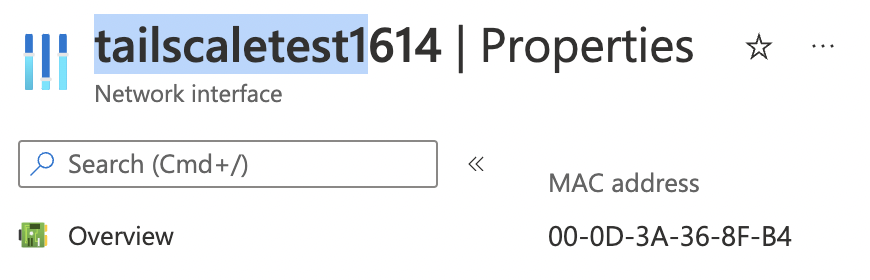
But somehow the second vm is getting an arp response from the default gateway for it's mac address, and is sending the packets that should be routed to the vpn gateway to the default gateway

This is when I'm not using an azure route table but just an ip route in the OS.
I downloaded the captured tcpdump and looked inside it with wireshark and found nothing about the next hop's ip or address. it looked the same as without the os level route.
Hi @Charles Pickering ,
Traffic between VMs in two different subnets will always pass through the default gateway of the source VM when you configure routing via the platform (Azure route table).
However, I believe this would require a deeper investigation, so if you have a support plan, I request you file a support ticket, else please do let us know, and we will try and help you get a one-time free technical support.
Cheers,
Kapil.
Hey,
I was surprised that traffic between two VMs even in the same subnet are routed that way. Regardless, I think I have it working thanks to your points about longer mask routing, NSGs, and ip forwarding. There's alot of moving peices and I must have missed one because recreating it Saturday night got it working fine.
Thanks for your help,
Charles
Hi @Charles Pickering ,
I am glad you were able to resolve this.
I shall summarize our discussion and post it as an Answer.
Kindly "Accept the answer" and Up-Vote for the same, which might be beneficial to other community members reading this thread.
Cheers,
Kapil
Answer accepted by question author
Hi @Charles Pickering ,
Welcome to the Microsoft Q&A Platform. Thank you for reaching out & I hope you are doing well.
I understand that you are trying to set up routing between your on-premises and Azure via a custom VPN server/gateway.
I suggested we,
You informed you are able to resolve the issue, post recreating the environment.
Cheers,
Kapil.
----------------------------------------------------------------------------------------------------------------
Please don’t forget to close the thread by clicking "Accept the answer" wherever the information provided helps you, as this can be beneficial to other community members.