Developer technologies | Transact-SQL
A Microsoft extension to the ANSI SQL language that includes procedural programming, local variables, and various support functions.
This browser is no longer supported.
Upgrade to Microsoft Edge to take advantage of the latest features, security updates, and technical support.

Hello!
I'm trying to parse an xml column as described here:
select
Category,
sqlXML.value('@category','varchar(60)') as [Subcategory_from_XML],
sqlXML.value('.', 'varchar(150)') as [Book_Name],
BooksXML
from Books
cross apply BooksXML.nodes('/root/book') XMLDATA(sqlXML)
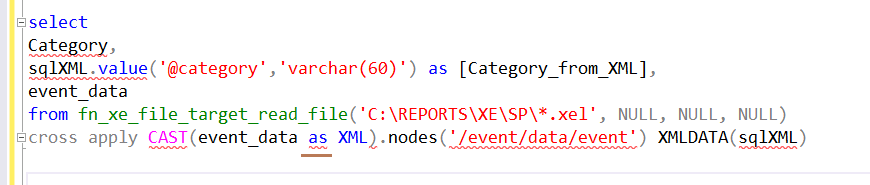
...but when I run my own example SQL Server keeps saying there's an error either with AS or with "." (the only difference here is that I must first cast the event_data column to XML):
select
Category,
sqlXML.value('@category','varchar(60)') as [Category_from_XML],
event_data
from fn_xe_file_target_read_file('C:\REPORTS\XE\SP*.xel', NULL, NULL, NULL)
cross apply CAST(event_data as XML).nodes('/event/data/event') XMLDATA(sqlXML)
If I use the "extra" Select in the CAST the error moves to "." after ...XML)
select
Category,
sqlXML.value('@category','varchar(60)') as [Category_from_XML],
event_data
from fn_xe_file_target_read_file('C:\REPORTS\XE\SP*.xel', NULL, NULL, NULL)
cross apply (Select CAST(event_data as XML)).nodes('/event/data/event') XMLDATA(sqlXML)
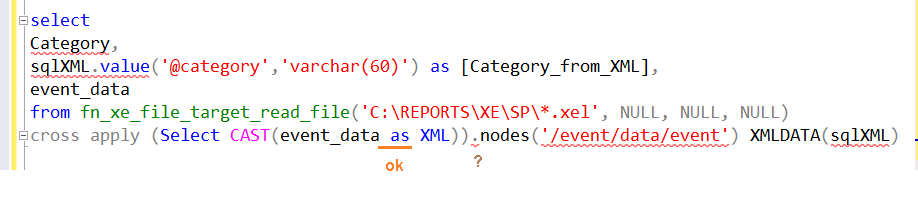
Would you please tell me why casting the event_data column to XML raises the syntax error here?
Thank you in advance,
Michael

T-SQL is not exactly C#, but there are a lot of limitations when you can use expressions and when you can not. For instance, you cannot say:
EXEC MySP @x + 1
If we look at the syntax graph for FROM clause, we find:
   <joined_table> ::=
   {
       <table_source> <join_type> <table_source> ON <search_condition>
       | <table_source> CROSS JOIN <table_source>
       | left_table_source { CROSS | OUTER } APPLY right_table_source
       | [ ( ] <joined_table> [ ) ]
   }
Thus, APPLY is followed by a table source, and above we see:
   <table_source> ::=
   {
       table_or_view_name [ FOR SYSTEM_TIME <system_time> ] [ AS ] table_alias ]
           [ <tablesample_clause> ]
           [ WITH ( < table_hint > [ [ , ]...n ] ) ]
       | rowset_function [ [ AS ] table_alias ]
           [ ( bulk_column_alias [ ,...n ] ) ]
       | user_defined_function [ [ AS ] table_alias ]
       | OPENXML <openxml_clause>
       | derived_table [ [ AS ] table_alias ] [ ( column_alias [ ,...n ] ) ]
       | <joined_table>
       | <pivoted_table>
       | <unpivoted_table>
       | [@](/users/na/?userId=92dd3473-4001-0003-0000-000000000000) [ [ AS ] table_alias ]
       | [@](/users/na/?userId=92dd3473-4001-0003-0000-000000000000).function_call ( expression [ ,...n ] )
           [ [ AS ] table_alias ] [ (column_alias [ ,...n ] ) ]
   }
So there is a whole slew of options, but none of them opens for a built-in function.
While these limitations are irritating and also inconsistent - in other places, we might be able to do exactly this, there is a generic workaround: define things in a derived table, or a CTE:
   ; WITH CTE AS (
       SELECT cast(event_data AS XML) AS event_data
      FROM   sys.fn_xe_file_target_read_file('file*', DEFAULT, DEFAULT, DEFAULT)
   )
   select sqlXML.value('@category','varchar(60)') as [Category_from_XML],
   event_data
   FROM   CTE
   CROSS APPLY event_data.nodes('/event/data/value') AS XMLDATA(sqlXML)
ErlandSommarskog, thank you so much for the explanation!!!
Regards,
Michael