Microsoft 365 and Office | SharePoint | For business | Windows
A group of Microsoft Products and technologies used for sharing and managing content, knowledge, and applications.

This browser is no longer supported.
Upgrade to Microsoft Edge to take advantage of the latest features, security updates, and technical support.
' cx='32' cy='32' r='32' /%3E%3Ctext x='50%25' y='55%25' dominant-baseline='middle' text-anchor='middle' fill='%23FFF' %3EO%3C/text%3E%3C/svg%3E)
I have a question about adding and overwriting an existing list (with data) on sharepoint. I want to import Excel data into an existing list. Is it possible to add or overwrite it? If not, what are the options?

Hi @ooumi77
I am checking to see if the problem has been resolved. If you have any questions or progress, you can contact me in time.
Yours sincerely,
Renjie Sun
Dear @ooumi77 ,
Do you have any further questions about this thread? If you have any questions or progress, you can contact me in time.
Yours faithfully,
Renjie Sun
Hi @ooumi77 ,
Per my test, you could import data using quick edit.
1.Make sure columns in a view have the same order as columns in an excel file. Otherwise, when you do copy or paste, you will get a mismatch.
2.Copy rows you want to copy from excel file.
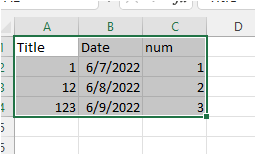
3.Click Edit in grid view on the ribbon -> Add new item.
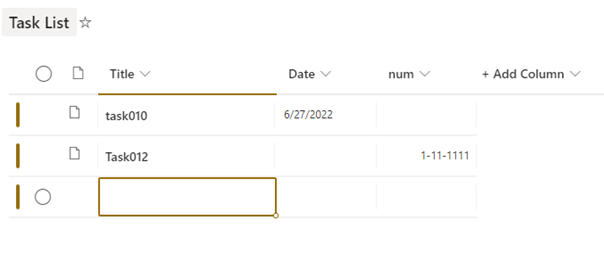
4.Press ‘Ctrl + v’ to copy contents into the list. Values that violate the column type will be marked red or be warned.
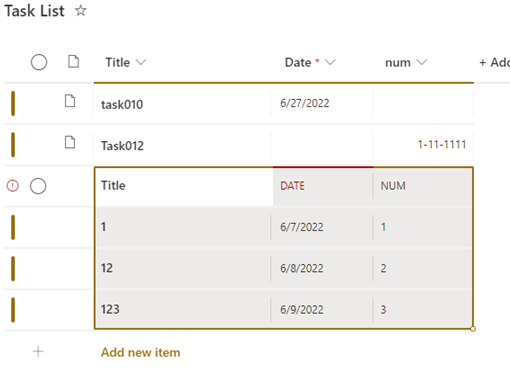
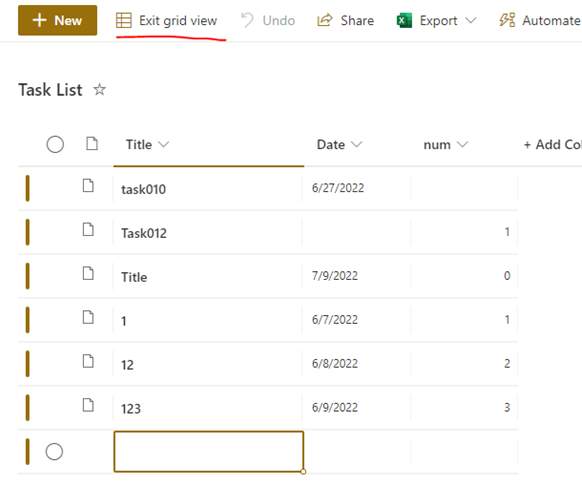
5. After correcting the incorrect values, click Exit grid view on the ribbon.
If the answer is helpful, please click "Accept Answer" and kindly upvote it. If you have extra questions about this answer, please click "Comment".
Note: Please follow the steps in our documentation to enable e-mail notifications if you want to receive the related email notification for this thread.