Developer technologies | .NET | Other
Microsoft Technologies based on the .NET software framework. Miscellaneous topics that do not fit into specific categories.
This browser is no longer supported.
Upgrade to Microsoft Edge to take advantage of the latest features, security updates, and technical support.
' cx='32' cy='32' r='32' /%3E%3Ctext x='50%25' y='55%25' dominant-baseline='middle' text-anchor='middle' fill='%23FFF' %3EIZ%3C/text%3E%3C/svg%3E)
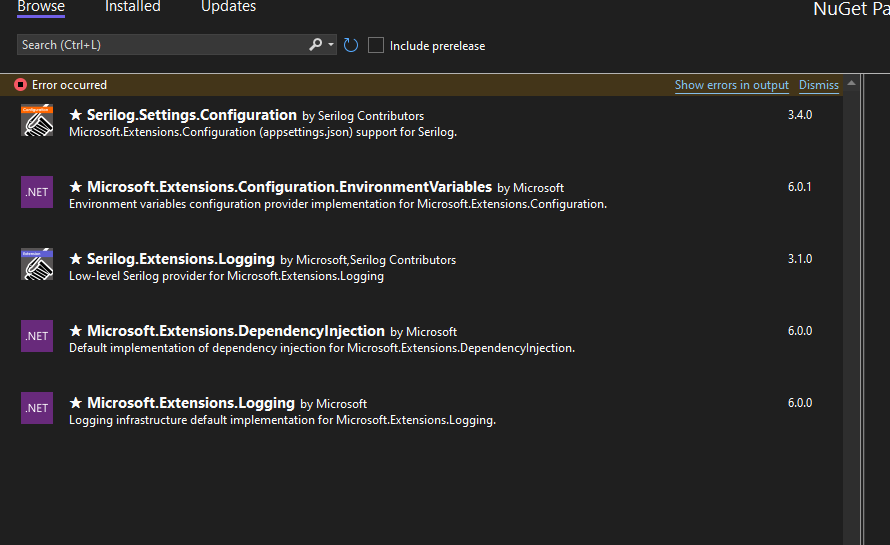
I am having trouble using NuGet in Visual Studio. I selected "Managed NuGet packages for solution..." and tried using NuGet browser by entering a string in the Search field. I get the following error:
[nuget.org] Failed to retrieve metadata from source 'https://azuresearch-ussc.nuget.org/query?q=&skip=0&take=26&prerelease=false&supportedFramework=.NETFramework,Version=v4.7.2&semVerLevel=2.0.0'.
  An error occurred while sending the request.
  The request was aborted: Could not create SSL/TLS secure channel.
----------
Some additional details:
My operating systems is Windows 10 Enterprise, Version 21H2
My NuGet source is set to nuget.org https://api.nuget.org/v3/index.json
This error initially appeared in VisualStudio 2019. NuGet manager used to work on my machine a few months ago and only recently I noticed this error.
I uninstalled VS 2019 and installed Visual Studio 2022. Still got the same error. Also tried changing .NET framework from 4.7.2 to 4.8 - this did not help either.
I pasted the source https address from the error message in my Edge browser and had no problem connecting. The browser displayed a very long string starting with the following:
{"@Георгий Георгиевский ":{"@vocab":"http://schema.nuget.org/schema#","@BASE ":"https://api.nuget.org/v3/registration5-gz-semver2/"},"totalHits":274432,"data":[{"@id":"https://api.nuget.org/v3/registration5-gz-semver2/newtonsoft.json/index.json","@type ":"Package","registration":"https://api.nuget.org/v3/registration5-gz-
My colleague in my office is running Visual Studio 2019 and has no problem using NuGet manager.
From Internet search I suspect that some registry settings in my computer registry are not configured properly to work with the Visual Studio internal browser. I did not personally make any changes to my computer settings except for accepting updates and new software pushed to my computer by our IT department (mostly Microsoft products). I recently installed Microsoft Project Professional.
I would appreciate some help on how to troubleshoot this issue.
' cx='32' cy='32' r='32' /%3E%3Ctext x='50%25' y='55%25' dominant-baseline='middle' text-anchor='middle' fill='%23FFF' %3EV%3C/text%3E%3C/svg%3E)
We are having the same issue since a week and our development is halted due to this issue. did you find out a fix for this. thank you
No, I have tried all suggestions but nothing worked so far.
' cx='32' cy='32' r='32' /%3E%3Ctext x='50%25' y='55%25' dominant-baseline='middle' text-anchor='middle' fill='%23FFF' %3ESS%3C/text%3E%3C/svg%3E)
Got the same problem now. Using visual studio 2022 version 17.4.0 Preview 2.1.
When I copy the URL into a browser, I get a result. and certificate is valid.
EDIT: When I use the nuget executable I am able to search packages. Used VS 2019 and I'm able to search packages.
in VS2022 only a part loads and I then get the error.
' cx='32' cy='32' r='32' /%3E%3Ctext x='50%25' y='55%25' dominant-baseline='middle' text-anchor='middle' fill='%23FFF' %3ED%3C/text%3E%3C/svg%3E)
I had the "[nuget.org] Failed to retrieve metadata from source" issue after updating to 17.8.3. Usually, when I get an error installing nuget packages, I close Visual Studio, delete the hidden .vs folder and try again. I did that and it did solved this issue.
' cx='32' cy='32' r='32' /%3E%3Ctext x='50%25' y='55%25' dominant-baseline='middle' text-anchor='middle' fill='%23FFF' %3ED%3C/text%3E%3C/svg%3E)
This solved the issue for me. Thanks!

Hi @satya karki
Thanks for your suggestion. The links refer to older versions of Visual Studio so some of the recommended remedies do not apply. I tried some recommendations that still work for VStudio 2022 but none of them solved my problem.
' cx='32' cy='32' r='32' /%3E%3Ctext x='50%25' y='55%25' dominant-baseline='middle' text-anchor='middle' fill='%23FFF' %3ETS%3C/text%3E%3C/svg%3E)
Hi @Irek Zawadzki ,
Welcome to Microsoft Q&A forum.
Please check this blog: Ensuring your system uses TLS 1.2.
You may need to confirm and enable the TLS 1.2 support for your Windows OS.
Best Regards,
Tianyu
Hi @Tianyu Sun-MSFT
I verified that TLS 1.2 is enabled on my computer. In fact that is the only TLS version that is enabled.
I tried using NuGet Package Manager console in my Visual Studio and get the same error:
PM> Find-Package Helix3D
Find-Package : The following source failed to search for packages: 'nuget.org'
Failed to retrieve metadata from source 'https://azuresearch-ussc.nuget.org/query?q=Helix3D&skip=0&take=26&prerelease=false&semVerLevel=2.0.0'.
An error occurred while sending the request.
The request was aborted: Could not create SSL/TLS secure channel.
At line:1 char:1
Hi @Irek Zawadzki , please try this: navigate to HKEY_LOCAL_MACHINE\SOFTWARE\Wow6432Node\Microsoft\.NetFramework\v4.0.30319 > add a new registry entry called SchUseStrongCrypto, and set its type to DWord and its value to 1(back up the Registry if necessary). Reboot your machine and test again.
@Tianyu Sun-MSFT , I checked the registry. The registry entry you mention was already set as you described on my computer.
Upgrading Visual Studio Professional 2022 to Version 17.3.1 solved my problem. I no longer get an error when I try to browse NuGet packages.
Unfortunately the upgrade "fix" did not last. I am having the same problem just one day later. My machine update history shows the following updates were done yesterday:
Microsoft Teams 1.5.0.21463 x64
Google Chrome 104.0.5112.101 x65
Does anyone have a suggestion as to why/if these installs could cause NuGet browser to fail in my Visual Studio?
Hi @Irek Zawadzki ,
This issue may be caused by NuGet server side. Could you raise a ticket on our Developer Community for further investigate?
Regards,
Tianyu