Azure Backup
An Azure backup service that provides built-in management at scale.
This browser is no longer supported.
Upgrade to Microsoft Edge to take advantage of the latest features, security updates, and technical support.
' cx='32' cy='32' r='32' /%3E%3Ctext x='50%25' y='55%25' dominant-baseline='middle' text-anchor='middle' fill='%23FFF' %3EL%3C/text%3E%3C/svg%3E)
Hi everyone. :)
We have deployed Microsoft Azure Backup Server in our environment and added 2 Hyper-V VMs to backup (installed protection agent on Hyper-V host). After first successful online backup, we decided to check restore from Recovery Services Vault in Azure. But every time we face an issue that "Online recovery" passes fine, but next phase-"Restore from staging area"-always fails. We receive errors like these:
StagingArea and folder, where VMs should be restored, have enough space. Additionally the following registry values have been added both for MABS server and protected Hyper-V host:
Also, just for test, fully disabled antivirus protection (though exclusions for MABS processes and folders have been added, but anyway) for the time of restore, but it still keeps failing during
"Restore from staging area".
Very often recovery point creation also fails with nearly the same errors.
Could you you advise what should we change to solve the issue? Or what can be wrong and should be checked?
Thanks.

@LuckyPhantom Sorry for the inconvenience this must have caused!
I understand that your Hyper-V VM restore is failing using MABS. Could you please ensure the staging location has sufficient space? If possible change staging location and then try restore.
Thanks for the feedback. As I mentioned before, "StagingArea and folder, where VMs should be restored, have enough space." If I understand correctly, first, VM is restored to StagingArea, and then, should be copied from StagingArea to location, which was chosen during the restore configuration process. Something happens at the point after "Online recovery" phase is finished. Also recovery points fail very often with the errors above.
@LuckyPhantom Seems the failure it's on Hyper-V side, meaning data to be restored was downloaded to staging area but wasn't on Hyper-V. So, can you share DPMRA Log for verification please. On DPMRA Log you should have "Hyper-VErrorCode = InvalidArgument" and "Message" to something which is the cause of the failure.
Example:
5C74 5018 02/21 13:08:12.926 31 hyper-Vhelpers.h(25) E2DDB7A7-C99D-42BC-92DA-B4E7589E7A64 WARNING Hyper-VErrorCode = InvalidArgument, Message = A specified parameter was not correct: configSpec.bootOptions.bootOrder
Just one question-as described here, in "Recover backed up virtual machines" section, - https://learn.microsoft.com/en-us/azure/backup/back-up-hyper-v-virtual-machines-mabs - 3 recovery types can be used. I use "Copy to a network folder". Shouldn't it just restore VM files to a share or volume on MABS protected machine, has it something to do with Hyper-V VM registration? I'm not choosing a host, only a folder.
Copy to a network folder should restore the .vhdx files to a volume or share you set on restore wizard then you can create a new machine based on those restored .vhdx files.
Yes, so my point is that it has nothing to do with errors on Hyper-V side (because I restore to a folder only, not to a host) like you assumed before? I have seen that one disk has been restored, Data one, but then it has failed to restore OS one. Also I have noticed that "Program Files" folder has been created and there have been VM configuration files as well. So what can be the issue with it? Why it fails during this phase, "Restore from staging area"?
The online restore process is the following
The first steps is to download the restorable objects data to the staging location. This is done by MARS. If you set the staging for example on path "C:\onlinerestore" you will see a set of folders being created there. You should not touch on those folders and files. You will only be able to go through this set of folders or files using SYSTEM Account context. At the end of the restore this is cleaned. For this step you can search verb[6b8b3657-a21b-468c-a4dc-8bb9c049e322] in msdpm.errlog
<<1A-DPM-Recovery-7B4D592F-FCA2-4CAD-921A-A1A88E3CACD6.txt>>
You can use this technique for example in case of a restore failure while copying the data from staging to the destination path you set on the restore wizard.
Note the folders and files which will be on staging location will be deleted on a restore in order to keep the files on staging you can use the registry key below.
HKLM\Software\Microsoft\Microsoft Data Protection Manager\Configuration\Prm\StagingAreaOptions\SkipDataDeletion
Value : 1
Type : DWORD
Once above step is completes DPM will perform the catalog job. You can verify the same by looking into the verb[c225c292-4997-478e-b223-dde19f47e62c].
<<2A-catalog-task-AE9BCDCA-29CD-4B36-8AB9-6E5D03298F15.txt>>
When catalogs completes DPM will copy the restorable objects data from staging to the destination path you set on the restore wizard.
You can search by verb[26e363fd-ada2-4b1f-b8a5-ef7f34ef5f5d] for this step. The DPMRA copies the data from the staging area to final destination.
<<2B-copy-to-PS-task-E7E25E7E-66D7-484D-A29D-0A6FCD5F89B1.txt>>
Once all steps above complete the folders or files on staging location will be deleted.
When catalogs completes DPM will copy the restorable objects data from staging to the destination path you set on the restore wizard
This is where the restore failed, data was downloaded but while trying to copy to destination it failed
why? not sure have to look into the logs and would be good to know which option you selected during the restore.
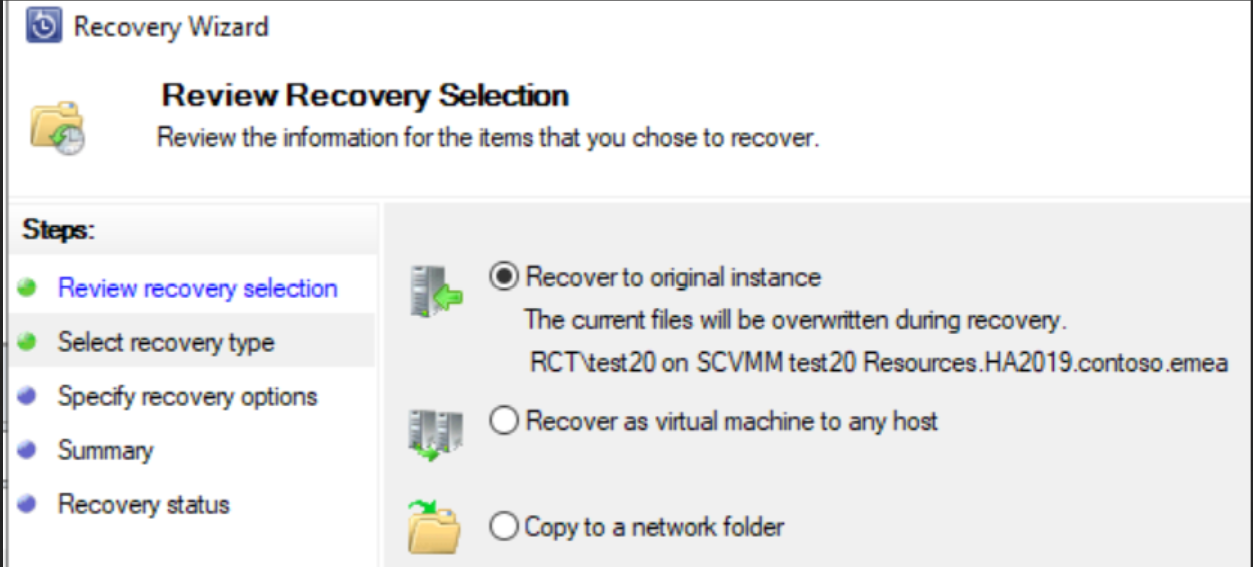
also if used different restore selections including different recovery points, important also to know if from disk recovery points the data is restorable, since DPM will shadow copy the latest healthy available replica.
To add also would be good to know if restoring to a folder on dpm works but not to a "remote"?
----------------------------------------------------------------------------------------------------------------------
If the response helped, do "Accept Answer" and up-vote it